Twitter Watch History: Where It Is, What X Keeps (2026)
X (Twitter) shows a watch history in its iPhone app's History tab, for long videos. What X logs, what your archive holds, and 3 tested ways to find a clip.
Weir Team
Published · Updated · 7 min read
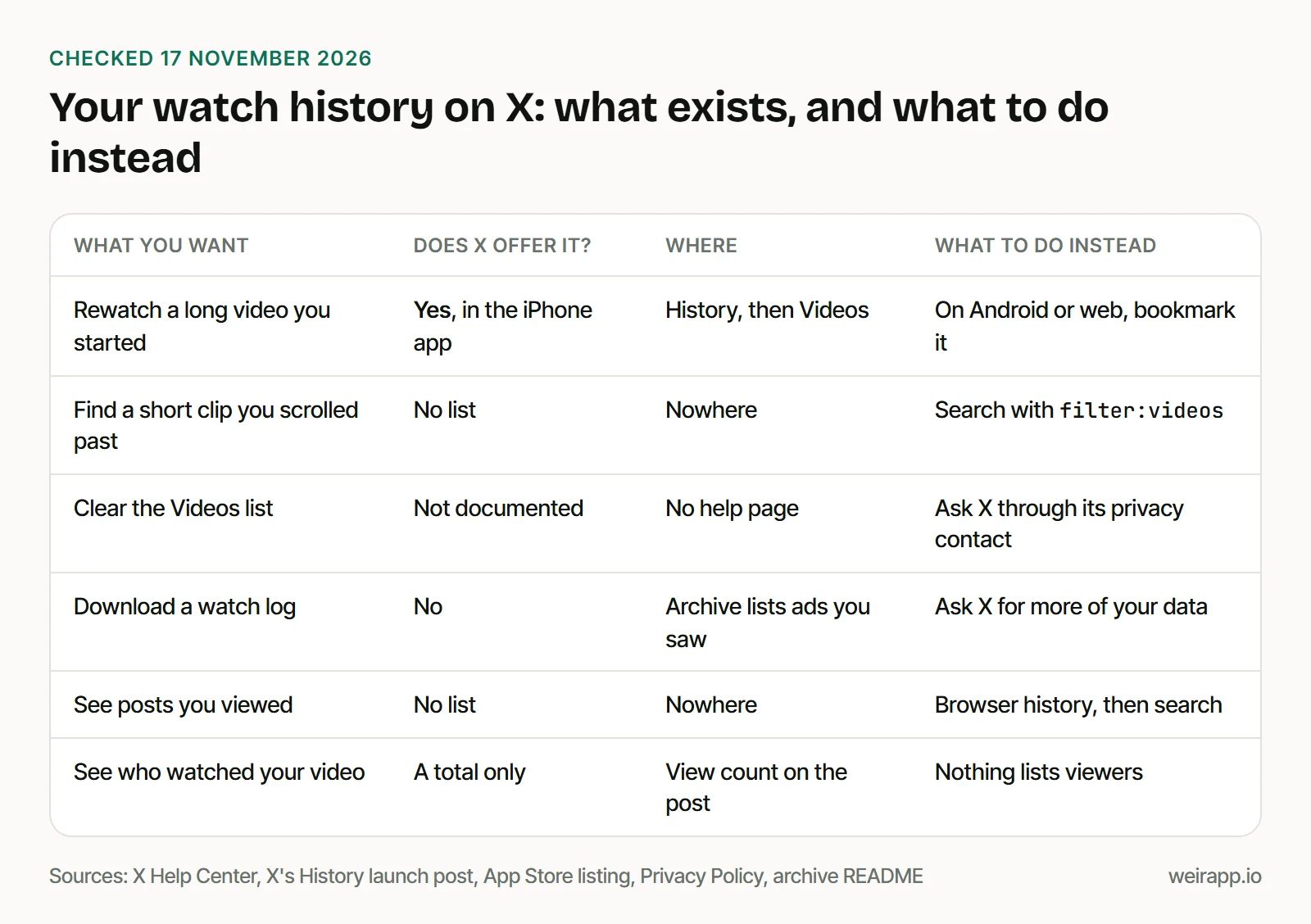
X (Twitter) has a partial watch history: on iPhone, the History tab lists long videos you watched, but X documents no way to delete it.
The tab began rolling out on 12 May 2026. Short clips and posts you scroll past appear in no list X documents. Here's where to look, what X records anyway, and three tested searches.
Lost a clip? Paste this into X with the account and days you remember:
from:SpaceX filter:videos -filter:replies since:2026-11-01 until:2026-11-16How to check your Twitter watch history on iPhone
Open the menu and tap History:
- Update the X appHistory reached iPhone in May 2026.
- Tap your profile pictureIt sits in the top menu.
- Tap HistoryTechCrunch says it replaced the Bookmarks button.
- Tap VideosLong videos you watched, grouped by day.
- Tap a videoIt picks up where its progress bar stops.
We checked X's post and TechCrunch, not a phone, so your menus may differ.
On Android or the web, bookmark what you want back. X's help page says bookmarks "are private and are only viewable to you."
What the History tab shows, and what it leaves out
X's head of product announced History for iOS on 12 May 2026. The post says Bookmarks, Long Videos, Articles and Likes live there, "so you can always come back and continue watching or reading."
On the App Store, checked on 17 November 2026, X's listing calls it "one unified place for your bookmarks, likes, videos, and articles."
What we can confirm, and what we can't:
- Long videos. The post says Long Videos, and every example in its launch image runs 24 minutes or more.
- Sorted by day. The image groups videos under Today and Yesterday, each with a bar showing how far you got.
- Private to you. The image calls History "a private place for your favorite content."
- No short clips. We found no list of them anywhere X documents.
- Android and the web: not announced. X named iOS only, and its Google Play listing doesn't mention History.
How to delete your watch history on X
X documents no way to clear your video history, the History tab's Videos list, as of 17 November 2026.
We checked X's Help Center, App Store listing and launch thread. Some guides name a "Clear all watch history" setting, but X's Help Center doesn't.
What X does document:
- Bookmarks: tap the Bookmark icon again, or remove them all from the more icon at the top of Bookmarks.
- Likes: tap the liked icon to undo a like.
- Your data: X's Privacy Policy lists a contact for "access, modification, or deletion" requests. Deactivating your account queues your data for deletion.
What X records about the videos you watch
X's Privacy Policy, effective 15 January 2026, says X logs what you view:
- Views. X "may receive information when you view content", such as pages visited and ads shown to you.
- Broadcasts. For live broadcasts you join, it collects "your viewing history."
- Video ads. It may record "watching a video ad or preroll."
Three controls help:
- See your interests in Settings and privacy, then Account, then Your X data. X says they shape "recommended posts in your Home timeline and Explore."
- Turn off Personalized ads in Ads preferences. X says ads can still use what you post, who you follow and "the links you click on X."
- Stop autoplay: Settings and privacy, then Accessibility, display, and languages, then Data usage, then Video autoplay. Pick Never.
Does the Twitter archive include watch history?
No. You can't download a Twitter watch history: neither X's archive help page nor its README lists a file of videos you watched.
X's help page, in a 3 November 2026 copy, names "information about ads that you've seen or engaged with." The README, in a published copy from December 2022, describes these viewing files:
| File | What X's README says it holds |
|---|---|
| ad-impressions.js | Promoted posts you viewed, with times |
| ad-engagements.js | Promoted posts you engaged with |
| user-link-clicks.js | Links you clicked in the apps, 30 days |
| personalization.js | Interests, which "may be inferred" |
None covers ordinary posts or videos you viewed. X hasn't said whether newer archives add History, so check your data folder.
Request it under Settings and privacy, Account, Your X data. Our guide to opening your Twitter archive explains the files; our free Twitter archive viewer reads only your posts.
How to find a video you watched on X
Search is the way back: add filter:videos to what you remember.
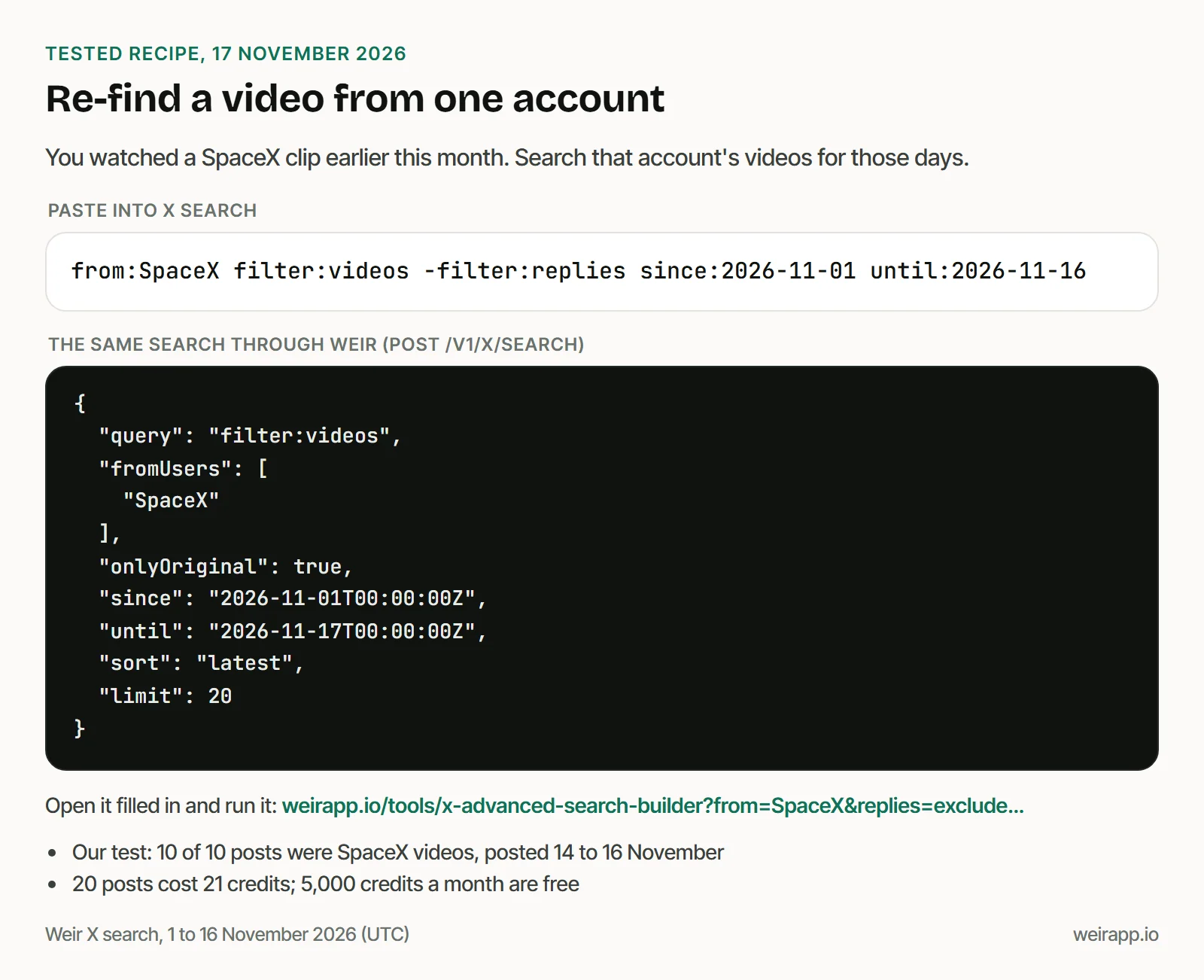
You know the account. Search its videos for the days you saw it:
from:SpaceX filter:videos -filter:replies since:2026-11-01 until:2026-11-16We ran it through Weir, the API we run, on 17 November 2026. Our first 10 results were all SpaceX videos, posted around Starship Flight 15.
You remember what it showed. Add a likes floor and use Top:
trailer min_faves:5000 filter:videos since:2026-11-01 until:2026-11-16Every result was a trailer with 5,000 likes or more, mostly from film news accounts. Top isn't a likes sort: the most-liked one came eighth. Swap "trailer" for any word you remember.
All you recall is that it went viral. List the most-liked videos of those days:
-filter:nativeretweets min_faves:50000 filter:videos since:2026-11-15 until:2026-11-16This one surprised us: all 10 clips came from small personal accounts. By their media IDs, four were uploaded months or years before the post, so widen your dates.
With Weir connected to Claude or ChatGPT, ask in plain words:
Use Weir to find SpaceX's video posts from 1 to 16 November 2026, no replies. Show the three most-liked with date, likes and link.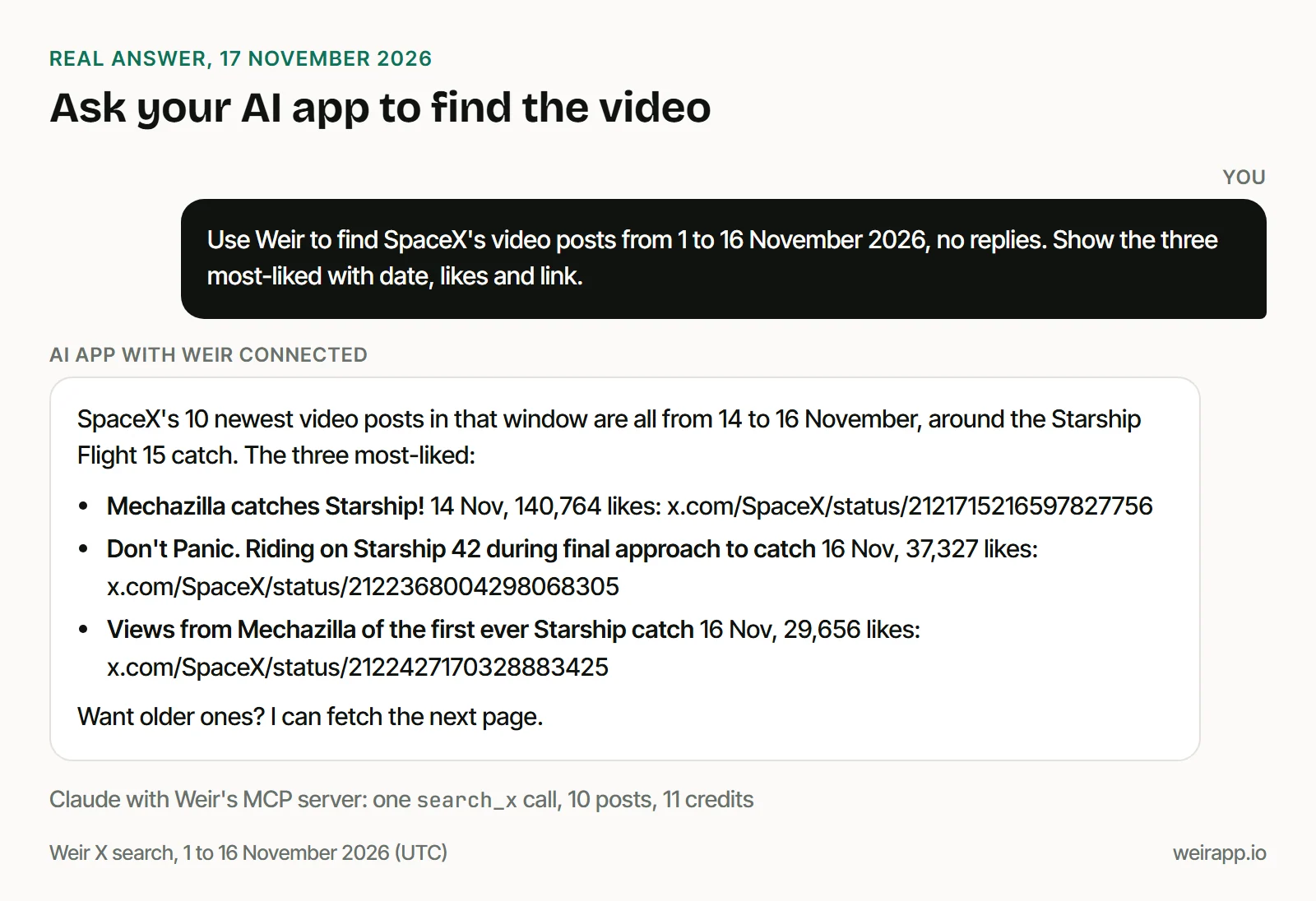
More filters, GIFs included, are in our Twitter video search guide. To rerun searches you made before, see your Twitter search history.
If you still can't find the video
- You opened it on x.com. Its address sits in your browser history.
- Search skipped it. X's search help says it "may not show every post in search results."
- The account is protected. Then only its approved followers see it in search.
When not to use Weir
We run Weir, a read-only API for public X posts.
- You want your own History list. Weir never sees your X account, so it can't read History, likes or bookmarks.
- It was a long video on iPhone. Check History first. It's free and private.
- You remember the post clearly. X's search box costs nothing.
Weir isn't licensed by X, so access can change.
FAQ
Does Twitter have a watch or view history?
Partly. Since May 2026, the X app for iPhone has a History tab that lists long videos you watched. X documents no view history of short clips or posts, and hasn't announced History for Android or the web.
How do I delete my watch history on X?
X documents no way to clear the Videos list, as of 17 November 2026. You can remove bookmarks and likes one at a time, or send X a deletion request through the contact in its Privacy Policy.
Does the Twitter archive include watch history?
No. X's archive help page lists ads you've seen, not videos you watched. Its README describes files for promoted posts you viewed, link clicks and interests, but none for ordinary posts or videos.
Can people see what videos I watch on X?
Not as far as X documents. It calls History "a private place for your favorite content." Your view adds to a post's public view count, but X's help page describes no list of who viewed it.
Sources
Checked 17 November 2026. X's help pages are Wayback copies, dated in brackets:
- X's head of product, History launch post and image (12 May 2026), read through Weir: https://x.com/nikitabier/status/2054349560114454862
- TechCrunch on the History tab (13 May 2026): https://techcrunch.com/2026/05/13/x-launches-a-history-tab-for-bookmarks-likes-videos-and-articles/
- X on the App Store and on Google Play: https://apps.apple.com/us/app/x/id333903271, https://play.google.com/store/apps/details?id=com.twitter.android
- X Help Center, videos (11 November), bookmarks (20 October), likes (15 November), view counts (3 November): https://help.x.com/en/using-x/x-videos, https://help.x.com/en/using-x/bookmarks, https://help.x.com/en/using-x/liking-posts-and-moments, https://help.x.com/en/using-x/view-counts
- X Help Center, help with search (10 September 2025, the latest copy): https://help.x.com/en/using-x/x-search-not-working
- X Help Center, your archive (3 November), your X data (13 October), personalized ads (16 November): https://help.x.com/en/managing-your-account/how-to-download-your-x-archive, https://help.x.com/en/managing-your-account/accessing-your-x-data, https://help.x.com/en/safety-and-security/privacy-controls-for-tailored-ads
- X Privacy Policy, effective 15 January 2026, read directly: https://x.com/en/privacy
- X's archive README.txt, in BitFolk's archive of 25 December 2022: https://bitfolk.com/twitter-archive/data/README.txt
- Our six Weir calls, 40 credits, 17 November 2026