Download Twitter Images in HD and Original Size (2026)
To download Twitter images at full size, set name=orig in the link. We measured every size option on a NASA photo and saved 10 originals with Python.
To download a Twitter image in full quality, open the image, change name= in its link to orig, and save it.
It works for any public photo on X (Twitter), on a computer or a phone. We measured every size option on a NASA photo on 17 November 2026, then saved a whole account's images with Weir, the API we run.
Open this link to see NASA's galaxy photo at its full size, 4220 by 4220 pixels:
https://pbs.twimg.com/media/HWzDV4DW0AA__wJ?format=jpg&name=orig- Open the photoClick it so it fills your screen.
- Open the image itselfRight-click, Open image in new tab.
- Set name=origEdit the link's end, press Enter.
- Save the fileRight-click, Save image as.
- Go bulkRun the 15-line script.
Step 1: Download a Twitter image in HD on a computer
Every photo on X lives on pbs.twimg.com, and its link ends with a size name.
Open the image in its own tab and look at your address bar. The link ends with a size such as name=small or name=large. Swap that word for orig:
before: https://pbs.twimg.com/media/HWzDV4DW0AA__wJ?format=jpg&name=small
after:  https://pbs.twimg.com/media/HWzDV4DW0AA__wJ?format=jpg&name=orig
Press Enter, then right-click the image and save it.
X's media docs still say a post carries up to 4 photos, but we read a @netflix post with 7 on 17 November 2026, so edit each one.
If your link ends in .jpg with nothing after it, add ?name=orig. Both forms gave us the same full-size file.
Which Twitter image size is the biggest? We tested every option
orig gets you the largest copy X keeps, and it beat every other size in our test.
We fetched one NASA photo in every size with Python's urllib, measured each file, then deleted them:
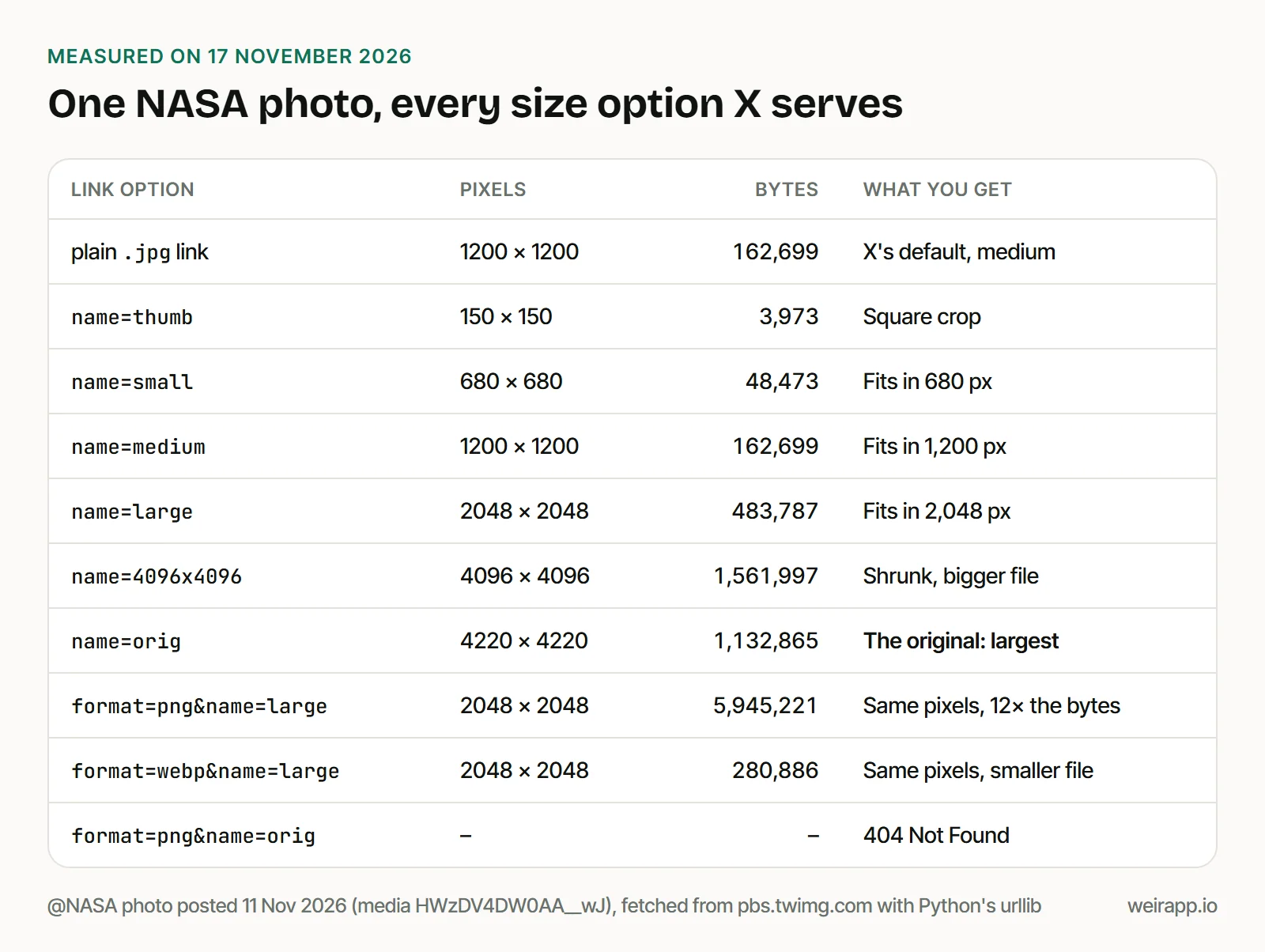
X's developer docs name four sizes: thumb, small, medium and large. They say a link with no size loads medium, as we found. orig and 4096x4096 aren't in the docs, but both worked for us.
The sizes that matter for saving:
| Link option | Pixels | Bytes |
|---|---|---|
name=medium (default) |
1200x1200 | 162,699 |
name=large |
2048x2048 | 483,787 |
name=4096x4096 |
4096x4096 | 1,561,997 |
name=orig |
4220x4220 | 1,132,865 |
Four things surprised us:
origbeat "4K".4096x4096shrank our photo and still made a bigger file thanorig.- PNG adds bytes, not detail. At
large, the PNG had the same pixels and 12 times the bytes. origstays in its own format. PNG and WebP versions oforigreturned 404, as did a made-up size,xlarge.- The old
:origending still works. X's docs call that form deprecated, so use?name=orig.
No link can give you pixels the uploader didn't send. Our Saturn photo from 12 November was 971 by 855 at every size from medium up.
Step 2: Save a Twitter photo on your phone
X's Help Center pages for its iPhone and Android apps don't explain how to save a photo. iDownloadBlog's guide, updated 28 October 2026, gives these iPhone steps:
- Tap the photo so it fills the screen.
- Touch and hold it, or tap the three dots, and pick Load in 4K.
- Touch and hold again, then tap Save Photo.
We couldn't test the app, so we can't say which size it saves.
For a link you know is the original, ask an AI app. With Weir connected to Claude or ChatGPT, paste:
Use Weir's get_x_post on https://x.com/NASA/status/2119846862286930036 and give me each photo's full-size link. Add ?name=orig to each one.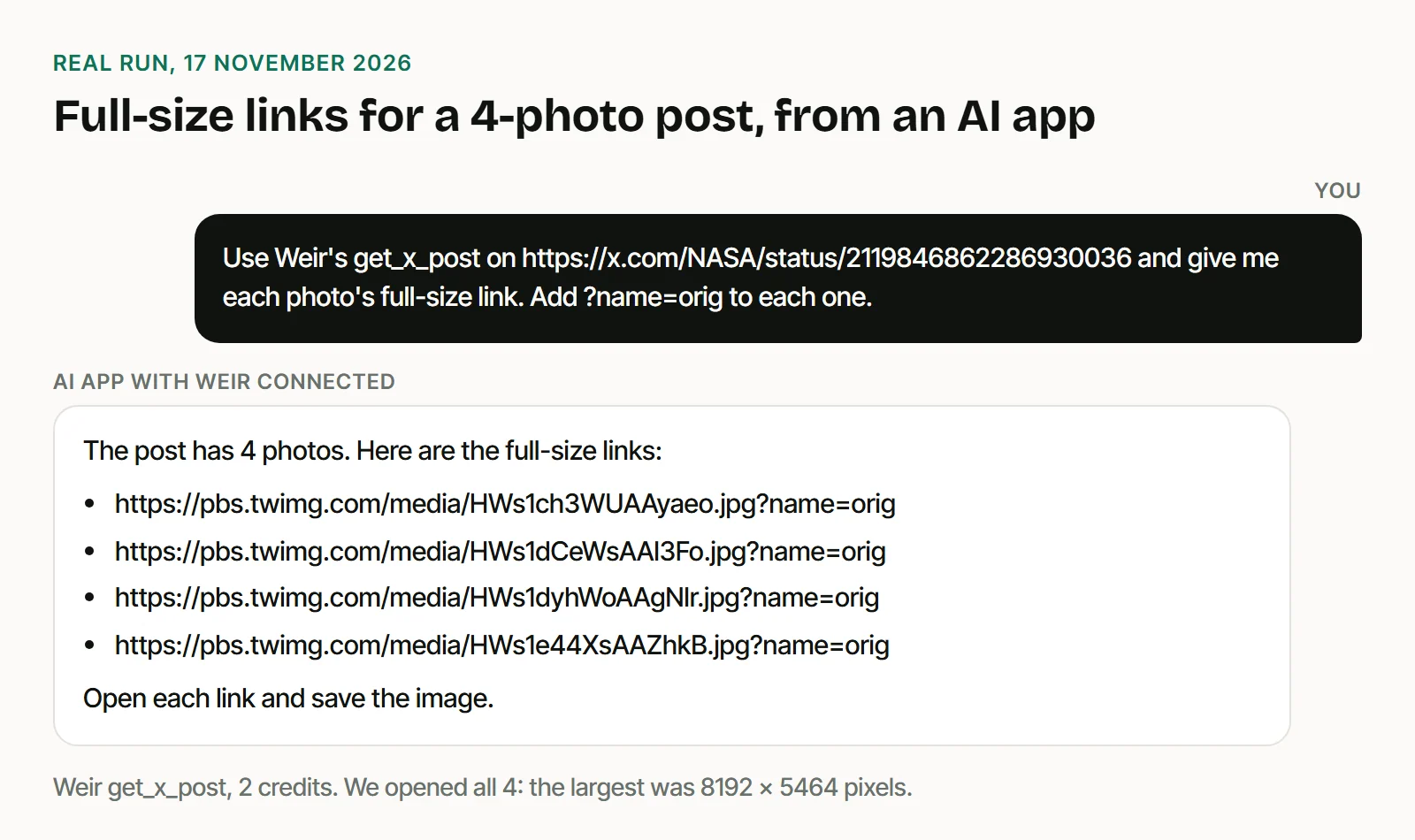
It cost 2 credits and returned 4 links. Tap each one and save it to your phone.
Step 3: Download all images from a Twitter account
For your own images, X has a bulk route: your X archive holds the "images, videos, and GIFs" you attached to posts, per X's Help Center.
For another public account, list its photo posts first. This x.com search drops reposts, and its Latest tab puts the newest first:
-filter:nativeretweets from:NASA filter:imagesOpen it filled in. We ran it through Weir and got 10 posts holding 16 photos. It skipped the video post that NASA's Media tab showed first.
To reach older photos, add dates and a likes floor:
-filter:nativeretweets from:NASA min_faves:5000 filter:images since:2025-01-01 until:2025-12-31Open it filled in. It returned 10 photo posts from December 2025. Three had under 5,000 likes, so treat X's floor as rough.
This script is a small Twitter image downloader. It runs that first search through Weir's API and saves up to 10 photos with name=orig. You need only Python's standard library and a free key in WEIR_API_KEY:
import json, os, sys, urllib.request

user = sys.argv[1]  # an account whose images you may save
body = {"fromUsers": [user], "query": "filter:images -filter:nativeretweets", "limit": 10}
req = urllib.request.Request("https://api.weirapp.io/v1/x/search", data=json.dumps(body).encode(),
                             headers={"Authorization": "Bearer " + os.environ["WEIR_API_KEY"],
                                      "Content-Type": "application/json"})
posts = json.load(urllib.request.urlopen(req, timeout=60))["data"]
photos = [(p["createdAt"][:10], m["url"]) for p in posts for m in p["media"] if m["type"] == "photo"]
os.makedirs(user, exist_ok=True)
for day, url in photos[:10]:
    base, ext = url.rsplit(".", 1)  # https://pbs.twimg.com/media/<id> and jpg
    path = f"{user}/{base.rsplit('/', 1)[1]}.{ext}"
    urllib.request.urlretrieve(f"{base}?format={ext}&name=orig", path)  # full size
    print(day, path, f"{os.path.getsize(path):,} bytes")
We ran it as python save_images.py NASA on 17 November 2026:
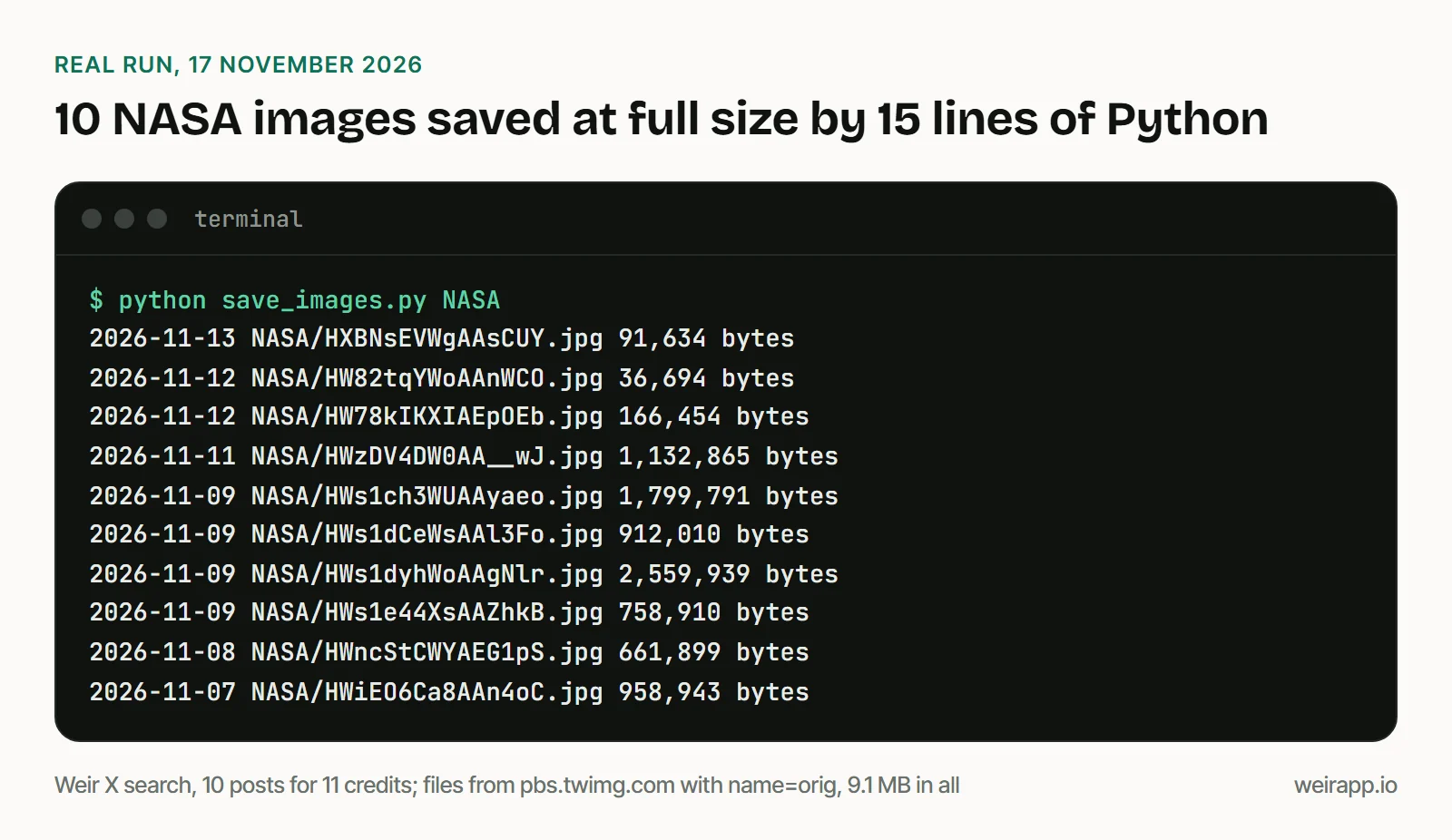
Cost: the search cost 11 credits for 10 posts and 16 photos, because Weir bills per post, not per photo. 5,000 credits a month are free, and $5 buys 25,000.
For more than 10 posts, send meta.nextCursor back as cursor until it is null, and cap the pages. Our Twitter image search guide has that loop, built on Weir's Media tab endpoint.
If a Twitter image is blurry or the link fails
- You get a 404. Keep the photo's own format, such as
format=jpg, and a real size name. origis still small. The uploader posted a small file, and no link can add detail.- Photos look soft in your X app. With data saver on, "images will load in lower quality," per X's Help Center. Turn it off under Settings and privacy, then Accessibility, display, and languages, then Data usage.
- You want a video or GIF. Those are MP4 files with their own links. Our Twitter video download API guide covers them.
Is it legal to download images from X?
Saving a public photo is easy. Reusing it is where rights matter.
X's Terms of Service, effective 9 October 2026, say users own what they post, and "your incorporated audio, photos, and videos are considered part of the Content." To reproduce or publicly display it, the terms say you "must use the interfaces and instructions we provide," except as they permit.
So save only photos you may use: your own, ones the owner allowed, or what your law permits. Credit the author and ask before you republish. This isn't legal advice, and Weir isn't licensed by X, so access can change.
When not to use Weir
- You want one image. No media downloader needed: the
name=origedit is free. - They're your own images. Your X archive has them all, at no cost.
- You need a contract with X. X's API lists $0.005 per post read. An open change to X's docs plans $0.005 per photo from 22 November 2026.
- Price per post is all that matters. As of November 2026, TwitterAPI.io lists $0.15 per 1,000 tweets, below our $0.20 at the $5 pack.
FAQ
How do I download a Twitter image in HD?
Open the image in its own tab, change name= at the end of its link to orig, and save it. You get the largest copy X keeps: 4,220 pixels wide in our test, against 1,200 for the plain link.
Can you download Twitter images in 4K?
Yes, if the uploader posted one that big. Half of the 10 NASA images we saved with name=orig were 4K or larger, up to 8192 by 5464 pixels. No link adds pixels to a small upload.
How do I download all images from a Twitter account?
Search from:username filter:images -filter:nativeretweets to list the photo posts, then save each photo with name=orig. Our Step 3 script does both through Weir's API, at 11 credits for 10 posts. For your own account, request your X archive.
Why are Twitter images blurry?
Data saver in your X app loads lower-quality images, per X's Help Center, and a link with no size loads the medium copy. Open your image with name=orig. If that is blurry too, the uploader posted a small file.
Sources
Checked 17 November 2026; X's Help Center pages are Wayback copies, dated in brackets.
- X docs: https://docs.x.com/x-api/enterprise-gnip-2.0/fundamentals/data-dictionary (Photo Media URL Formatting), https://docs.x.com/x-api/media/quickstart/best-practices and https://docs.x.com/x-api/getting-started/pricing
- X docs pull request 520, still open: https://github.com/xdevplatform/docs/pull/520
- X Terms of Service, effective 9 October 2026: https://x.com/en/tos
- X Help Center: https://help.x.com/en/using-x/x-ios-app (19 May 2026), https://help.x.com/en/using-x/x-for-android (14 February 2026) and https://help.x.com/en/managing-your-account/how-to-download-your-x-archive (3 November 2026)
- iDownloadBlog, updated 28 October 2026: https://www.idownloadblog.com/2023/01/11/how-to-upload-download-full-resolution-images-twitter/
- TwitterAPI.io pricing: https://twitterapi.io/pricing
- Weir docs: https://docs.weirapp.io/reference/x/searchX, https://docs.weirapp.io/reference/x/getXPost and https://docs.weirapp.io/billing
- Our tests: 53 image requests to pbs.twimg.com and six data calls to Weir