How to Download Twitter GIFs as Real GIFs (2026)
Twitter GIFs download as MP4 video because X stores them that way. We turned a brand's GIF into a real GIF with one ffmpeg line, and tested GIF search.
Weir Team
Published · Updated · 7 min read
To download a Twitter GIF as a real GIF, save its MP4 file, then convert it with one free ffmpeg command.
X (Twitter) stores every GIF as a short MP4 video, so saving one hands you a video, not a .gif. We checked it on a Chrome for Developers post on 17 November 2026.
Run this on the MP4 you saved, and you get a GIF that loops:
ffmpeg -i input.mp4 -vf "split[a][b];[a]palettegen[p];[b][p]paletteuse" output.gif- Get the MP4 linkAsk your AI app with Weir connected.
- Make it a GIFRun the ffmpeg line on a computer.
- Check the sizeUse the small version if it's over 5 MB.
- Find more GIFsSearch with the subtraction recipe.
Why does a Twitter GIF download as an MP4?
X takes GIF files in, but it serves each one back as an MP4 video.
X's Help Center says you can post GIF files. Yet the sample "Post with an animated GIF" in X's developer data dictionary lists one variant: a video/mp4 file.
On 17 November 2026 we looked up @ChromiumDev's GIF post of 17 September through Weir's get_x_post, for 2 credits. Its media, trimmed:
{
  "media": [
    {
      "id": "2100617822237806593",
      "type": "animated_gif",
      "url": "https://video.twimg.com/tweet_video/HSbkx59W0AENuVq.mp4",
      "previewImageUrl": null
    }
  ]
}
That's one URL, one MP4 and no poster frame. ffprobe showed what's inside:
All 32 GIFs we pulled through Weir that day were tweet_video MP4s. With one MP4 per GIF, there's no HD copy to hunt for.
Photos are real image files, covered in our guide to download Twitter images at full size.
Step 1: Download a Twitter GIF on iPhone or Android
Your route to a real GIF depends on where you are:
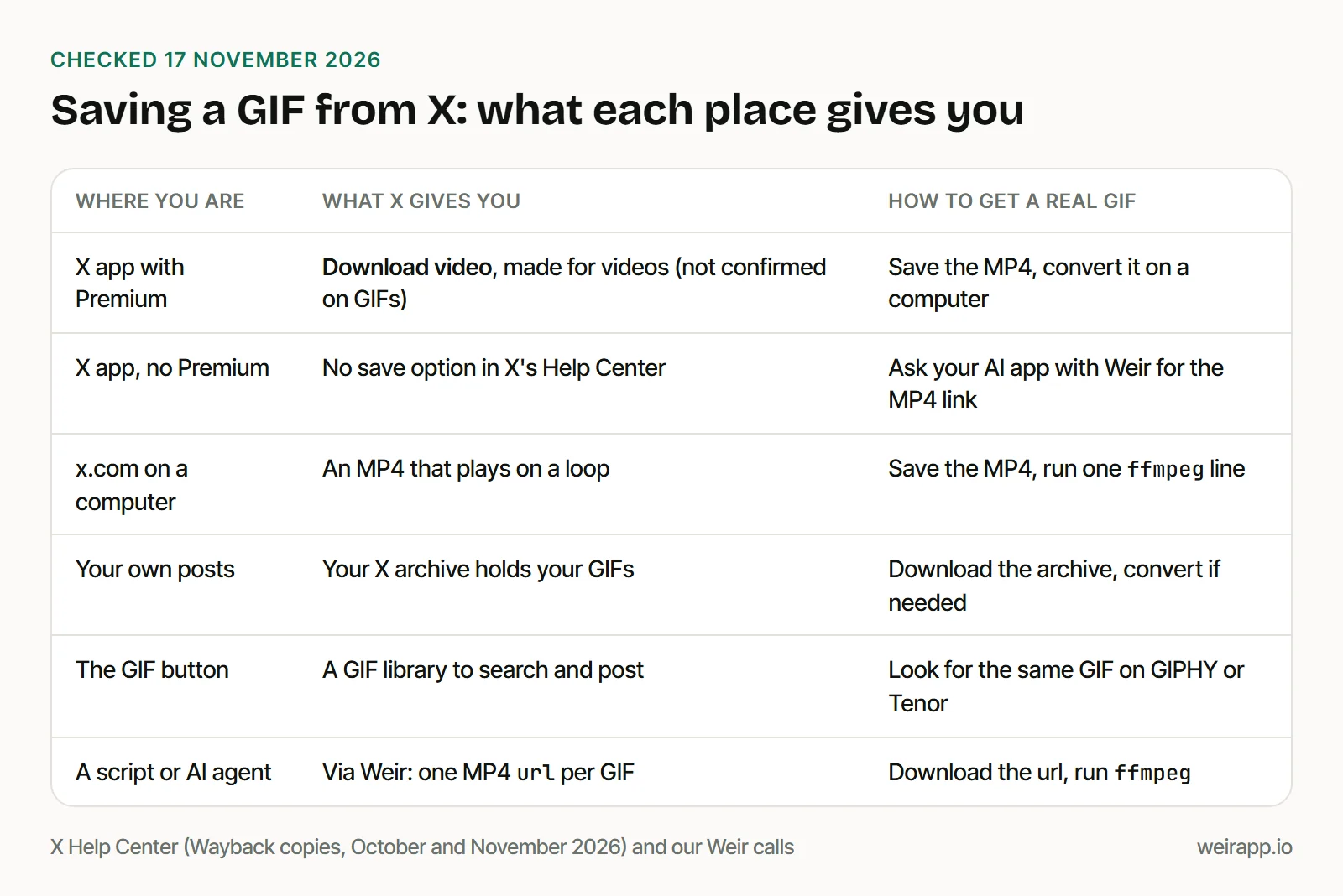
Per X's Help Center, paying subscribers get a Download video option under the three-dot icon: X Premium, plus the Plus, Premium, Super and Ultra plans. It covers videos posted since 25 July 2023. Its download steps never mention GIFs, and we couldn't test the app.
Without Premium, ask your AI app. With Weir connected to Claude or ChatGPT, paste:
Use Weir's get_x_post on https://x.com/ChromiumDev/status/2100630863679529243 and give me the GIF's MP4 link.We ran it on 17 November 2026: 2 credits, one MP4 link.
Open the link and save the clip with your browser's download option; we didn't test phone menus. Your phone keeps a video, so make the .gif in Step 2.
Step 2: How to download Twitter GIFs on a PC or Mac
To export a GIF from Twitter on a computer, save the MP4, then convert it with ffmpeg, a free, open-source tool.
Get the link as in Step 1, or by API as in our Twitter video download API guide. Our real run:
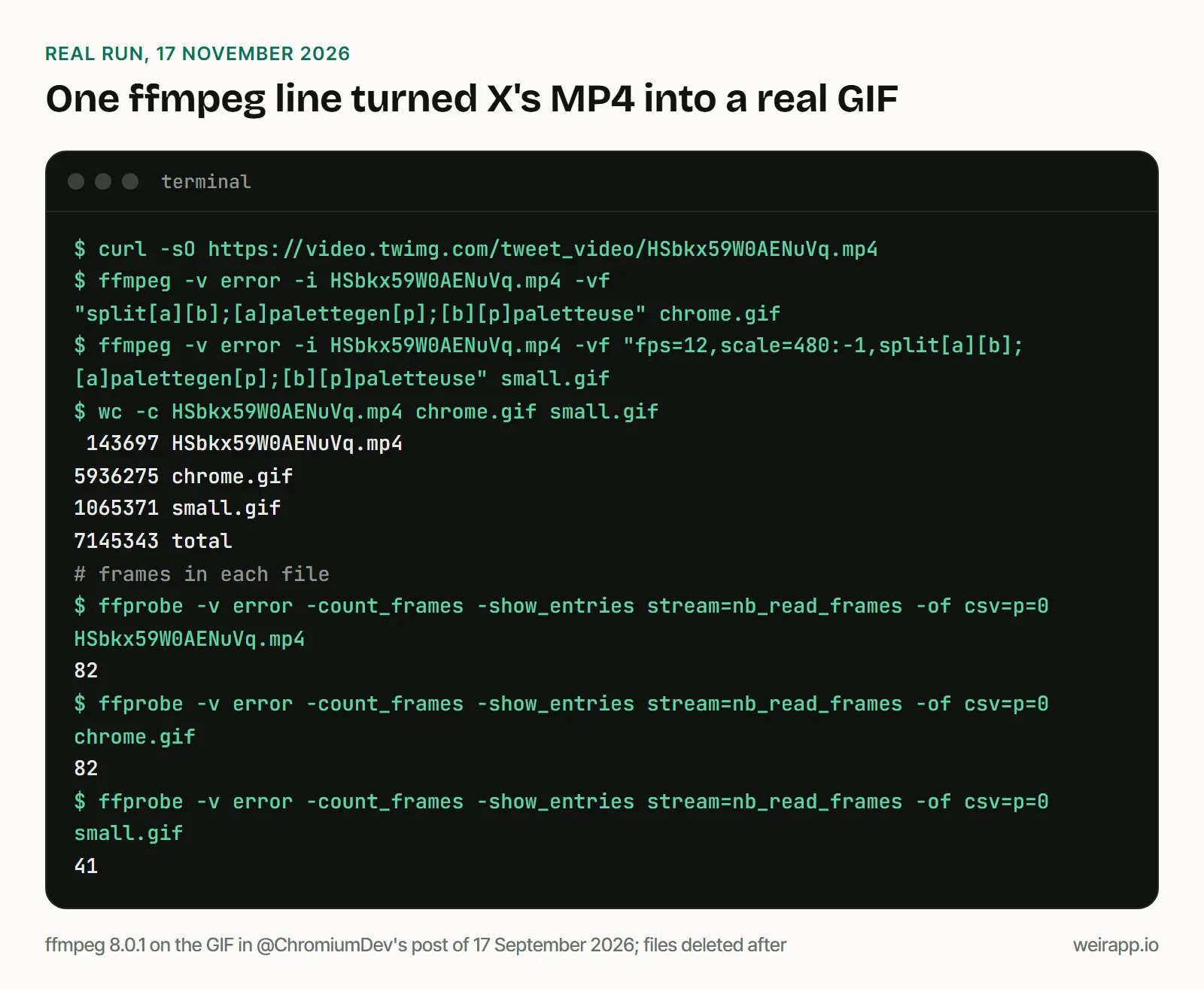
Per ffmpeg's docs, palettegen builds one 256-color palette for the clip, and paletteuse draws each frame with it. The GIF loops forever by default, which X needs: its Help Center says a GIF that plays once shows as a still image.
The catch is size. Same 82 frames, 41 times the bytes:
At 5.9 MB, the full-size GIF is over X's 5MB limit for GIFs posted from a phone. Halve the frame rate and the width:
ffmpeg -i input.mp4 -vf "fps=12,scale=480:-1,split[a][b];[a]palettegen[p];[b][p]paletteuse" small.gifThat kept the whole clip in 41 frames.
The same line turns a video tweet into a GIF, without the sound. Add -t 5 before -i to keep five seconds: a NASA video gave us 60 frames.
Cost: a post lookup costs 2 credits, and a search costs 1 plus 1 per post. 5,000 credits a month are free, and $5 buys 25,000.
How to search Twitter GIFs in 2026
X's search has no GIF tab, per its Help Center, and its advanced search form has no GIF or media field.
So on 17 November 2026 we tested GIF-only operators on 10 brand accounts, such as @Google and @github:
Neither GIF operator worked in our searches. card_name:animated_gif comes from Igor Brigadir's operator list, last checked in 2022. Both came back empty on accounts where subtraction found 9 GIF posts.
Subtraction keeps media posts, then drops photos and videos. Stay on Latest: on Top, four videos from 2016 to 2019 slipped through.
GIFs from one account, newest first. Swap duolingo for any account:
-filter:images -filter:videos -filter:nativeretweets from:duolingo filter:media -filter:repliesOpen it filled in. We got 6 posts back to June 2025: 5 had a GIF, and the sixth only linked a photo.
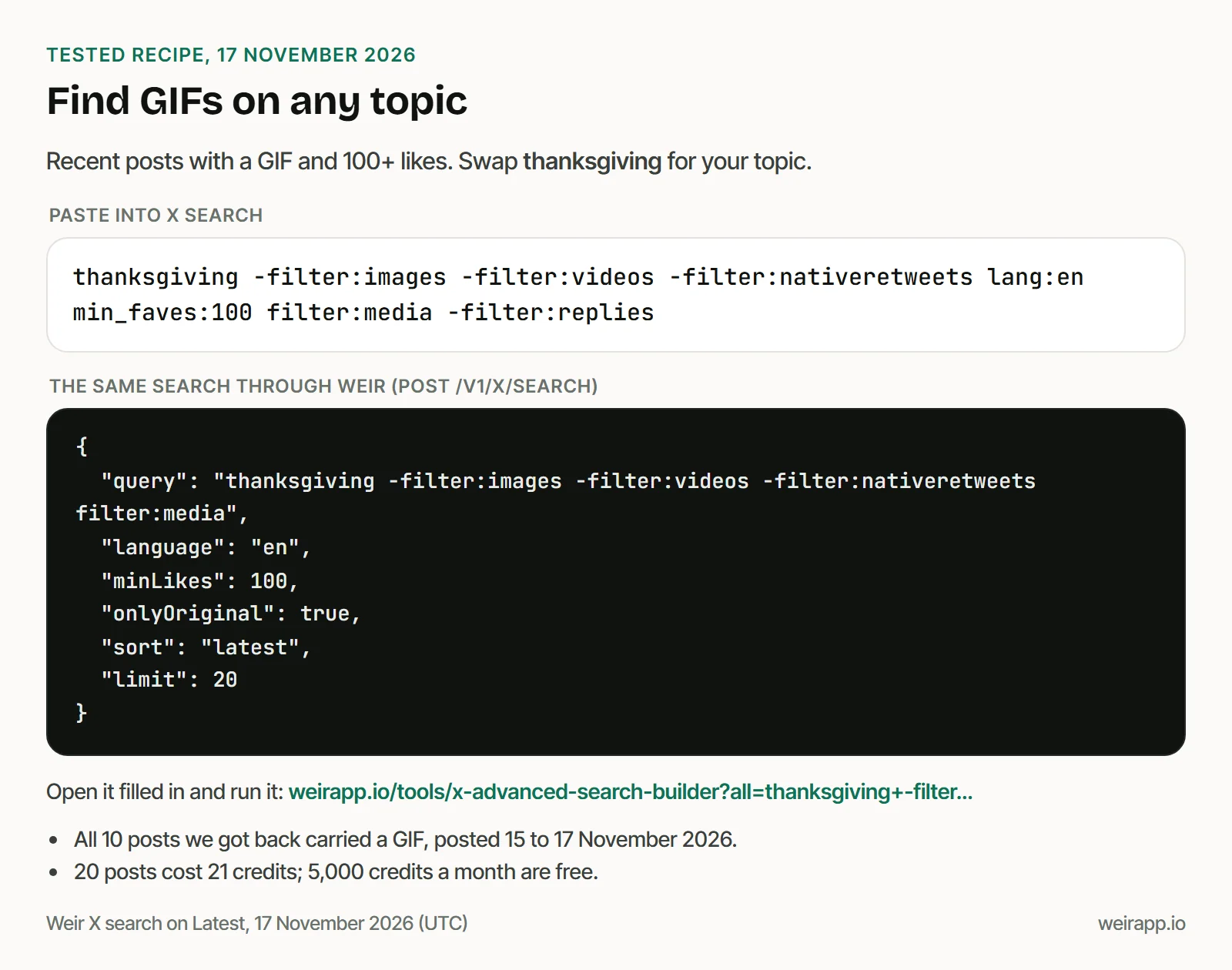
GIFs on a topic, with 100+ likes. Swap thanksgiving for your topic:
thanksgiving -filter:images -filter:videos -filter:nativeretweets lang:en min_faves:100 filter:media -filter:repliesOpen it filled in. All 10 posts carried a GIF, on themes from movies and family dinners to football. One held six GIFs, though X's Help Center says a post takes only one.
More ready searches by goal live in our X search recipes.
Where do X's GIFs come from, and how do you find a GIF's source?
X's Help Center describes three ways to post one: the GIF button in the composer, an uploaded GIF file, or an iPhone Live Photo shared as a GIF.
When X launched GIF search in February 2016, its blog said the library came "courtesy of our partners at GIPHY and Riffsy." Riffsy became Tenor that August, per TechCrunch. X's Help Center names no partner today.
Neither X's Help Center nor Weir's post data shows a GIF's name or source. To trace one:
- Search GIPHY or Tenor with a few words that describe the clip.
- Reverse-search a frame, as our Twitter video search guide shows.
- Date the file. A GIF's
media[].idholds its upload time. Duolingo's GIF post of 29 September 2026 used a file uploaded 18 days earlier.
Are Twitter GIF downloader sites safe?
We recommend none: the free route above does the same job on your computer.
- They see what you save. Every link you paste reaches someone else's server, with your IP address.
- You can't check them, so never give one your X password.
- They can break when X changes its pages.
- You get the same MP4, or a GIF made from it, which you can make yourself.
Can you reuse a GIF from X?
A GIF someone posted still belongs to its owner. X's Terms of Service, effective 9 October 2026, say "You retain your rights to any Content" you post. To reuse it, you "must use the interfaces and instructions we provide," except where the terms permit.
Save GIFs for yourself, and ask before you repost one elsewhere. This isn't legal advice, and Weir isn't licensed by X, so access can change.
When not to use Weir
- It's your own GIF. Your X archive includes it, per X's Help Center, for free.
- X's Download video shows up for you. Use it, then run ffmpeg.
- You need a contract with X. X's API lists $0.005 per post read, as of November 2026.
FAQ
How do I download Twitter GIFs on mobile?
Ask your AI app with Weir connected for the GIF's MP4 link, then save it in your browser. X Premium's Download video is for videos; we couldn't confirm it on GIFs. Either way, your phone keeps a video.
How do I get Twitter GIFs on Discord?
Make a .gif with the Step 2 command and attach it to your Discord message. Try the 480 px version first: ours was about 1 MB, not 5.9.
Can I bookmark a GIF on Twitter?
You bookmark the post, not the GIF. X's Help Center says bookmarks are private, so only you see them. To keep the file itself, save its MP4.
Sources
Checked 17 November 2026; X's Help Center pages are Wayback copies, dated in brackets.
- X Help Center: GIFs (6 November), videos (11 November), search (20 October), advanced search (15 November), bookmarks (20 October), archive (3 November): https://help.x.com/en/using-x/posting-gifs-and-pictures, https://help.x.com/en/using-x/x-videos, https://help.x.com/en/using-x/x-search, https://help.x.com/en/using-x/x-advanced-search, https://help.x.com/en/using-x/bookmarks, https://help.x.com/en/managing-your-account/how-to-download-your-x-archive
- X blog, 17 February 2016 (2 October 2026): https://blog.x.com/official/en_us/a/2016/introducing-gif-search-on-twitter.html
- TechCrunch, 9 August 2016: https://techcrunch.com/2016/08/09/gif-keyboard-maker-riffsy-gets-a-new-name-tenor-and-opens-up-an-sdk/
- X developer docs: https://docs.x.com/x-api/enterprise-gnip-2.0/fundamentals/data-dictionary, https://docs.x.com/x-api/getting-started/pricing
- X Terms of Service: https://x.com/en/tos
- ffmpeg: https://ffmpeg.org/ffmpeg-filters.html, https://ffmpeg.org/ffmpeg-formats.html, https://ffmpeg.org/legal.html
- Igor Brigadir, twitter-advanced-search: https://github.com/igorbrigadir/twitter-advanced-search
- Weir docs: https://docs.weirapp.io/reference/x/getXPost, https://docs.weirapp.io/reference/x/searchX, https://docs.weirapp.io/billing
- Our tests: seven Weir calls, and ffmpeg 8.0.1 on two public MP4s, deleted after