X Article to PDF, Markdown or Kindle: Free Ways (2026)
Turn an X Article into a PDF, Markdown or plain text: what X offers, why printing x.com falls short, a free reader tool, and the Kindle formats that work.
Weir Team
Published · Updated · 7 min read
To save an X Article to PDF, open it in a clean reader view and print it: X itself has no download button.
This guide is for you if you want to keep, print or hand a long X (Twitter) Article to an AI app. We checked X's help pages, tested x.com logged out, and read a real GitHub Article through Weir. We run Weir.
Have Weir connected to Claude or ChatGPT? Paste this:
Use get_x_article on https://x.com/github/status/2118830274431873379 and give me the whole Article as Markdown, with its headings and image links.- Copy the Article's linkThe post's link, or the x.com/i/article/ link.
- Paste it into our readerPress Run. A free Weir sign-in, 2 credits.
- Save it your waySave as PDF, or download Markdown or text.
How to save an X Article as a PDF in 4 steps
Our free X Article to PDF tool shows any public Article as a clean reader page. You don't need an X account.
- Copy the link. The post that shares the Article works best. An
x.com/i/article/link works too. - Paste it into the tool and press Run. The first time, you sign in to Weir, which is free.
- Check the reader view. It shows the title, author, date, word count and images, without X's menus.
- Press Save as PDF. A print window opens with the Article alone. Pick Save as PDF as the printer.
For an editable copy, the same page has Download Markdown, Download text and Copy Markdown.
One Article costs 2 credits; 5,000 credits a month are free; $5 buys 25,000. An x.com/i/article/ link costs about 8, because the tool first searches for the post that shares it.
We read GitHub's "Inside GitHub's new Git storage architecture" through Weir on 17 November 2026:
Can you save an X Article on X itself?
X lets you read, bookmark and share an Article, but its help pages describe no way to download, print or export one.
We don't log in to X, so we checked X's own pages, not its menus:
- Reading. X's help page says anyone can read a published Article, "according to the audience controls" its author picked.
- The Articles tab. A new Article goes "live on your profile on the Articles tab," so each author's Articles sit together.
- Bookmarks. They keep a post "for easy, quick access," and X says only you can see them.
- History on iPhone. X's App Store listing calls it "one unified place for your bookmarks, likes, videos, and articles."
None of these gives you a file you can keep outside X.
Why printing x.com to PDF falls short
Press Ctrl+P, or ⌘+P on a Mac, and pick Save as PDF, as Chrome's help shows. You print whatever x.com shows you, so the link you open matters.
We requested a public GitHub Article on 17 November 2026 with plain curl, logged out:
- The Article link,
x.com/i/article/..., sent us to X's log-in page. - The post link,
x.com/github/status/..., opened with the whole Article in the page. - That page also held X's log-in box and its "Relevant people" and "What's happening" panels.
So if you print from x.com, use the post link. Those panels can end up in your PDF too.
Two more catches:
- Videos can't play in a PDF. GitHub's Article had 4 of them.
- Scroll before you save. Tweeks, which makes an export add-on, warns that its exporter "can only see what the page has."
Download an X Article as a PDF free: which way fits you?
Each route keeps the Article, and each has a catch:
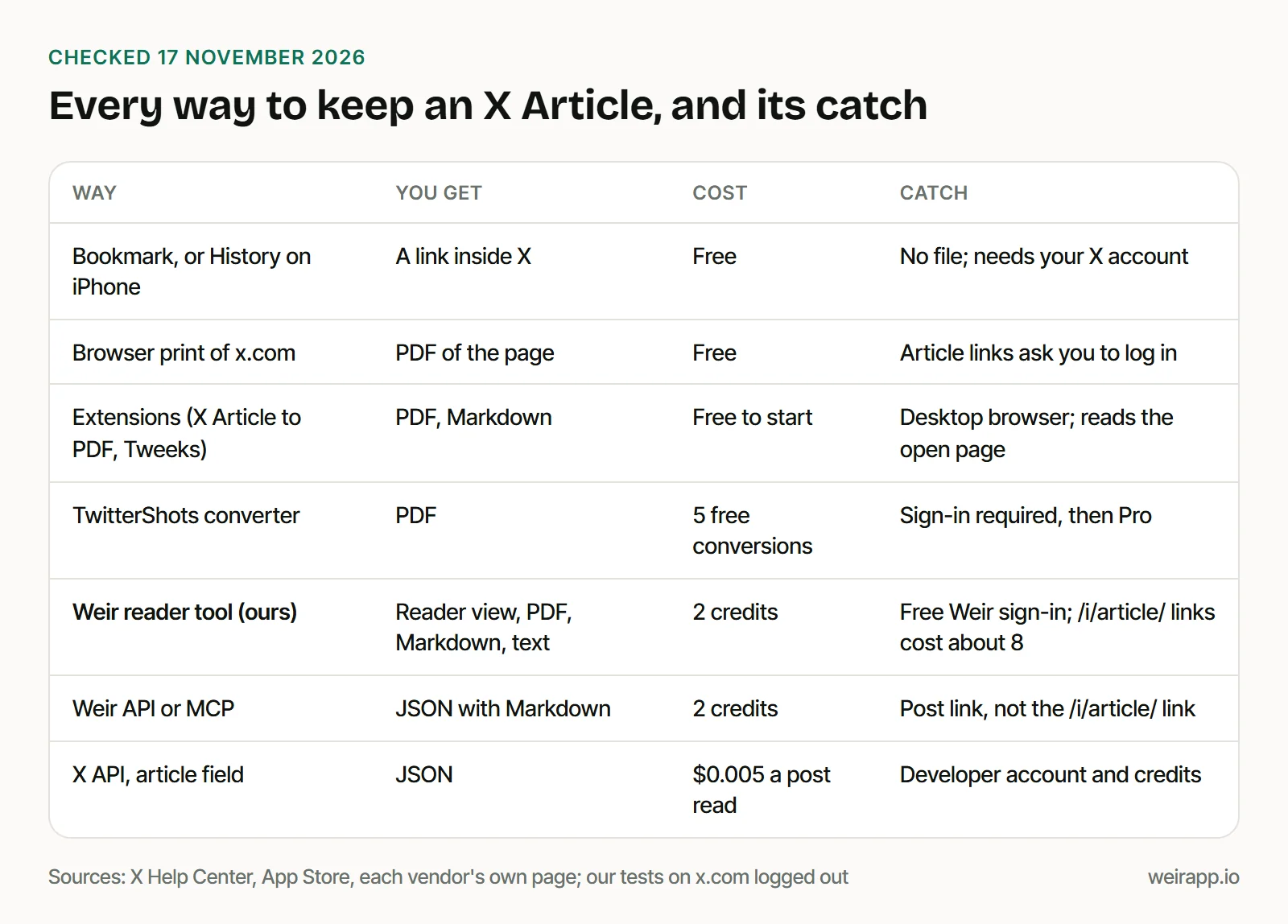
Which one to pick:
- For a one-off save on a computer, print the post link from x.com.
- If you save Articles daily, try an extension. X Article to PDF's site promises "no export limits," but not on mobile.
- For Markdown, or with no X account, use our reader tool.
- If you need X's own terms, the X API's
articlefield costs $0.005 per post read.
Turn an X Article into Markdown for ChatGPT or Claude
AI apps mostly can't open x.com links, as our test of AI assistants found. With Weir connected, your AI app fetches the full Article with the get_x_article tool.
Connect Weir to Claude or ChatGPT, then paste the prompt from the top of this page. We ran a shorter one:
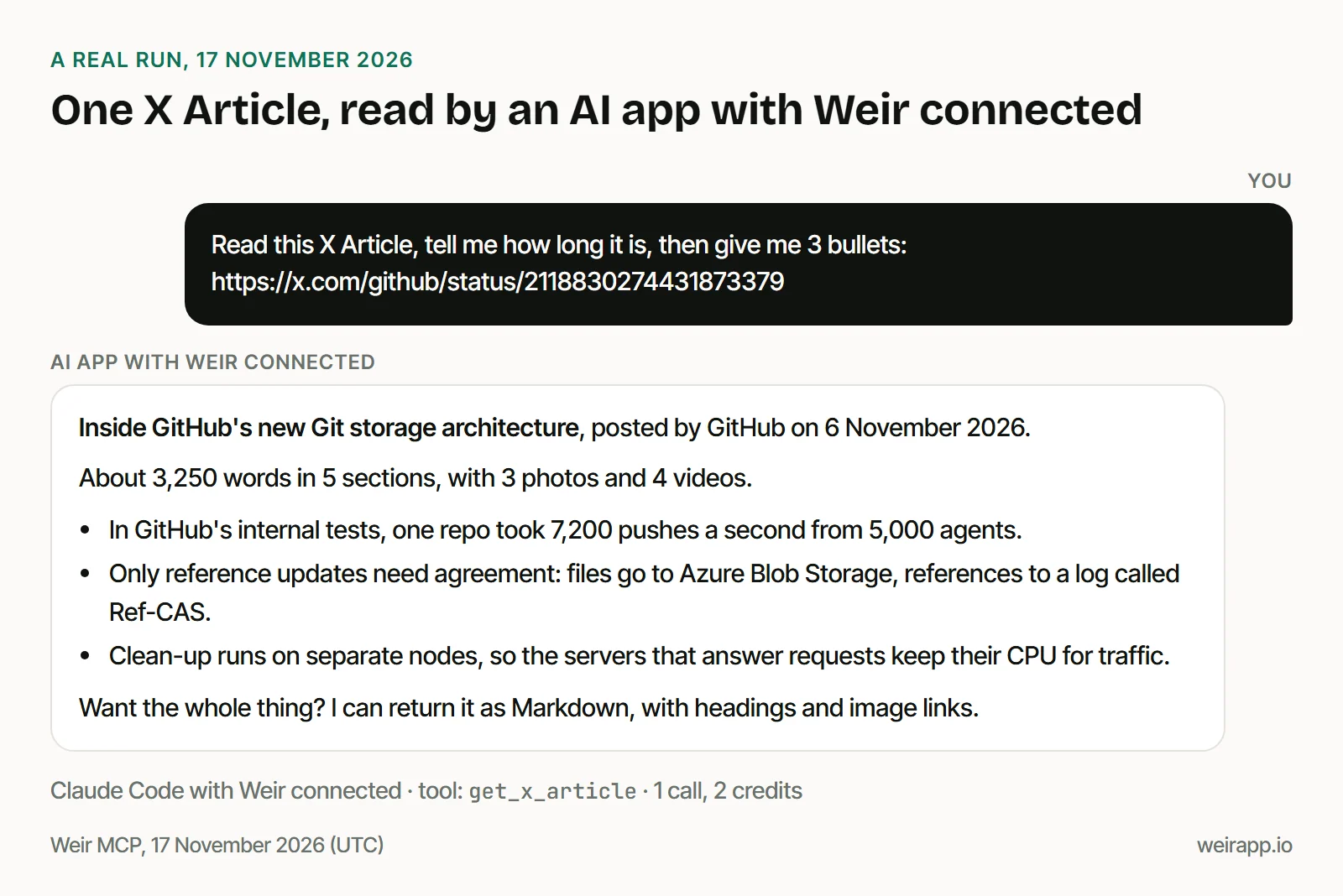
Behind that answer was the whole Article as Markdown, with 5 headings, 3 photo links and 4 video links.
For developers: one curl call returns the Markdown
Weir's Article endpoint takes the post id, the digits after /status/:
curl --url https://api.weirapp.io/v1/x/posts/2118830274431873379/article \
  --header "Authorization: Bearer $WEIR_API_KEY"
We ran it on 17 November 2026, and the x-credits-charged header said 2. The reply, trimmed:
{
  "data": {
    "title": "Inside GitHub’s new Git storage architecture",
    "markdown": "... Last week at GitHub Universe, we announced our new Git storage architecture ...",
    "media": [
      { "type": "photo", "url": "https://pbs.twimg.com/media/HWeWvjaaEAA2CNZ.jpg" },
      "... 6 more"
    ],
    "postUrl": "https://x.com/github/status/2118830274431873379"
  }
}
An x.com/i/article/ link fails here: its number is the Article's own id. Our MCP call with one got a validation error, at no charge.
For Python that saves .md files, and a search that finds Articles, see reading X Articles through the API.
How to send an X Article to Kindle
Kindle takes a PDF or plain text, but not Markdown.
Amazon's help page lists what Send to Kindle accepts: HTML, RTF, TXT, JPEG, GIF, PNG, BMP, PDF and EPUB. We read its 29 September 2026 copy, because the live page refused our request.
Three routes work:
- Send the PDF from our tool's Save as PDF button.
- Send the .txt file from Download text. Text drops the images.
- Convert the Markdown to EPUB. Pandoc's ebook guide does it in one command:
pandoc mybook.txt -o mybook.epub.
Send it from the Send to Kindle website, by email or from the Kindle app.
If saving an X Article doesn't work
- The print window doesn't open. Your browser blocked it: allow pop-ups for the page and try again.
- You get a 404. The post was deleted, or it isn't an Article. Failed calls cost nothing.
- It's for subscribers only. Weir reads public data, so a paywalled Article won't come back.
- It's a thread, not an Article. Our Twitter thread reader handles those, and how to unroll a Twitter thread shows the other ways.
When not to use Weir
- You read on x.com with an account. A bookmark is free and one tap away.
- You want a button right on x.com. An extension adds one. Our tool is a separate page.
- You plan to republish the Article. The author owns it, so link to it and quote briefly. This isn't legal advice.
Weir is not affiliated with X and reads public posts only, so access can change.
FAQ
Can you download an X Article as a PDF?
Not from X itself: its Articles help page lists no download, print or export option, as of 17 November 2026. Open it in a reader view, like our free tool, and save it as a PDF, or use an extension.
How do I convert an X Article to Markdown?
Paste its link into our free X Article to PDF tool, press Run, then Download Markdown. In an AI app with Weir connected, ask it to use get_x_article. Developers call GET /v1/x/posts/{id}/article, which returns the body as Markdown for 2 credits.
Is there a free X Article to PDF converter?
Yes. Printing from your browser is free, and so is the X Article to PDF extension for Chrome. TwitterShots gives 5 free conversions after you sign in. Our tool runs on Weir's free monthly credits, at 2 credits per Article.
How do I read X Articles without an account?
Open the post's link, not the x.com/i/article/ link. Logged out, the post link opened with the full Article in our test, while the Article link sent us to X's log-in page. Our reader tool needs a free Weir sign-in, not an X account.
Sources
Checked 17 November 2026. help.x.com answered us with a 403, so X's help pages are Wayback copies, dated:
- X Help Center, Articles (15 November 2026) and Bookmarks (20 October 2026): https://help.x.com/en/using-x/articles and https://help.x.com/en/using-x/bookmarks
- X on the App Store, History tab: https://apps.apple.com/us/app/x/id333903271
- Our logged-out curl requests to x.com
- Google Chrome Help, Print from Chrome: https://support.google.com/chrome/answer/1069693
- Amazon, Send to Kindle file types (29 September 2026): https://www.amazon.com/gp/help/customer/display.html?nodeId=G5WYD9SAF7PGXRNA
- Pandoc, creating an ebook: https://pandoc.org/epub.html
- X Article to PDF extension: https://xexport.goodexts.com/
- Tweeks guide (8 July 2026) and FAQ: https://www.tweeks.io/blog/save-x-twitter-articles-as-pdf-or-markdown and https://www.tweeks.io/
- TwitterShots, Twitter Article to PDF: https://twittershots.com/twitter-article-to-pdf
- X API pricing and data dictionary,
articlefield: https://docs.x.com/x-api/getting-started/pricing and https://docs.x.com/x-api/fundamentals/data-dictionary - Weir getXArticle reference: https://docs.weirapp.io/reference/x/getXArticle
- GitHub's Article, read through Weir for 2 credits: https://x.com/github/status/2118830274431873379