Twitter Media Tab in 2026: Where It Went and How to See It
The Twitter Media tab needs an X log-in, and some 2026 apps split it into Videos and Photos. We tested it logged out and reached old media by date.
The Media tab on an X (Twitter) profile shows that account's own photos, videos and GIFs, newest first, at x.com/username/media.
You need an X log-in, and since May 2026 some phone apps show Videos and Photos in its place. Below: what X's help pages say, our logged-out tests from 17 November 2026, and searches for old media. We run Weir, the API in the later steps.
Paste this into X's search box, then swap in any username and dates:
-filter:nativeretweets from:NASA filter:media since:2015-07-14 until:2015-07-15- Open the Media tabProfile, then Media.
- Tab missing?Look for Videos and Photos instead.
- Go back in timeSearch with filter:media and dates.
- No X accountRun it on weirapp.io or in your AI app.
Where is the Media tab on Twitter, and what does it show?
You'll find the Media tab in the row of tabs under a profile's bio. X's Help Center says to click Media "at the top of the post timeline" on x.com, or tap Media in the app.
It shows "the photos, videos, and GIFs you've uploaded with your posts," in X's words. We read the page's latest archived copy, from 14 October 2025, because help.x.com blocks our reader.
The same page explains what you may find missing:
- Reposts don't count. A photo you repost with the button stays off your tab, but a pasted photo link shows up.
- Very old photos are hidden. Photos in posts sent before 1 January 2010 are not displayed.
- Outside media can be missing. X may not show photos or videos hosted by third-party services.
On 17 November 2026, a logged-out x.com/NASA page listed four tabs: Posts, Replies, Reposts and Media. X's help pages add a Likes tab, where you see the posts you liked.
Did X remove the Media tab? What changed in 2026
Not everywhere. Some phone apps changed it in 2026, and we found no explanation from X:
- Dec 2023Social Media Today: the tab becomes a grid.
- May 2026PiunikaWeb: iPhones show Videos and Photos tabs.
- Aug 2026hashout.jp: users still want the photo grid back.
- Nov 2026Our check: x.com lists Media, and its code opens it on videos.
PiunikaWeb's 25 May test still found Media on Android. Two days later, Roboin saw X Lite show Videos with Photos in a menu. x.com's page code, read on 17 November, does the same: Media opens on videos, and ?filter=photo switches to photos.
X's own posts say nothing about it. On 17 November 2026 we searched ten of X's accounts, including @X and @Support, for "media tab," "photos tab," "videos tab" and "media grid," and got zero posts.
Can you view Twitter media in a grid?
Sometimes. Social Media Today reported in December 2023 that X was swapping the tab's list of posts for a grid of uploads. A Japanese guide updated in August 2026 says that mixed grid gave way to a video-first tab.
On a phone, tap Media, or Photos where your app has one. X's help page on media timelines describes no setting that switches layouts.
We couldn't check today's logged-in layout, because we don't log in to X for these tests.
Can you see Twitter media without an account?
No. On 17 November 2026, X answered our logged-out request with a redirect to its log-in page. We used plain curl, with no browser disguise:
$ curl -sI https://x.com/NASA/media
HTTP/1.1 307 Temporary Redirect
location: /i/jf/onboarding/web?redirect_after_login=%2FNASA%2Fmedia&mode=login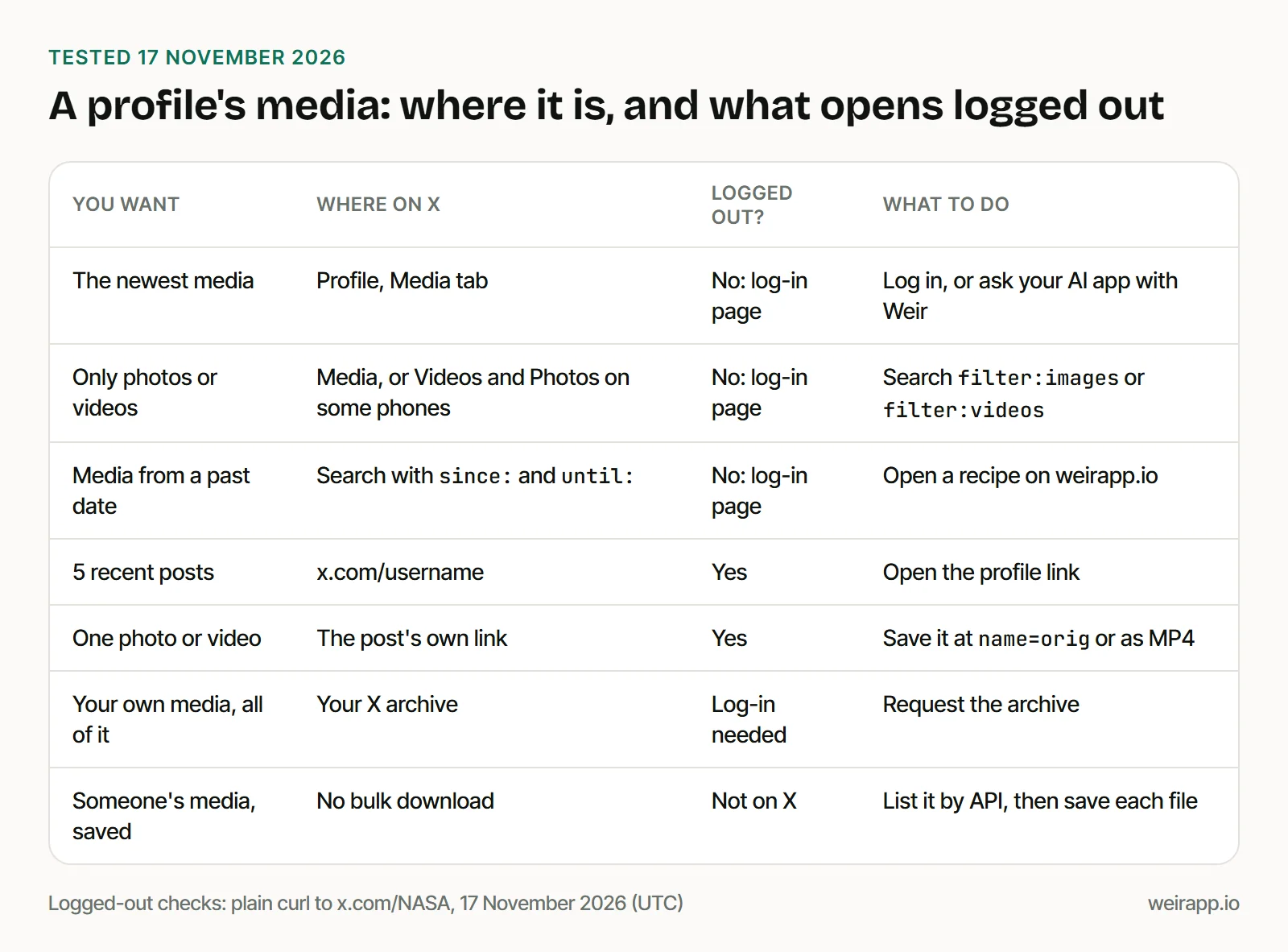
Two things still opened:
- The profile page. x.com/NASA returned 5 recent NASA posts, with their photos and a video.
- A single post. Its link returned the text and the photo link, and the photo loaded.
Replies, Reposts and search all sent us to log in. Our guide to searching Twitter without an account covers Google, embeds and archives.
How to see old Twitter media: search by date
Search is your way back. X's Help Center says media timelines show "the most recent photos, videos, and GIFs," and gives no number. For the Posts tab, it says profiles show the newest 800 posts.
Our first page of NASA's Media tab covered just 11 days. At that pace, a year of NASA media fills about 30 pages.
We built these recipes with our search builder and tested each through Weir on 17 November 2026. until: includes its own day.
Photos from one day. Webb's first full-color images, July 2022:
-filter:nativeretweets from:NASAWebb filter:images since:2022-07-12 until:2022-07-13All 10 posts we got had a photo, all from 12 July 2022. Open it filled in
Videos only. SpaceX's first booster catch, October 2024:
-filter:nativeretweets from:SpaceX filter:videos since:2024-10-13 until:2024-10-14All 10 had an MP4 file. The newest came first, so you page on to reach the catch day. Open it filled in
Everything from an old week. NASA's Pluto flyby, July 2015:
-filter:nativeretweets from:NASA filter:media since:2015-07-14 until:2015-07-15Nine of 10 came with photos. One linked a photo but came back without its file. Open it filled in
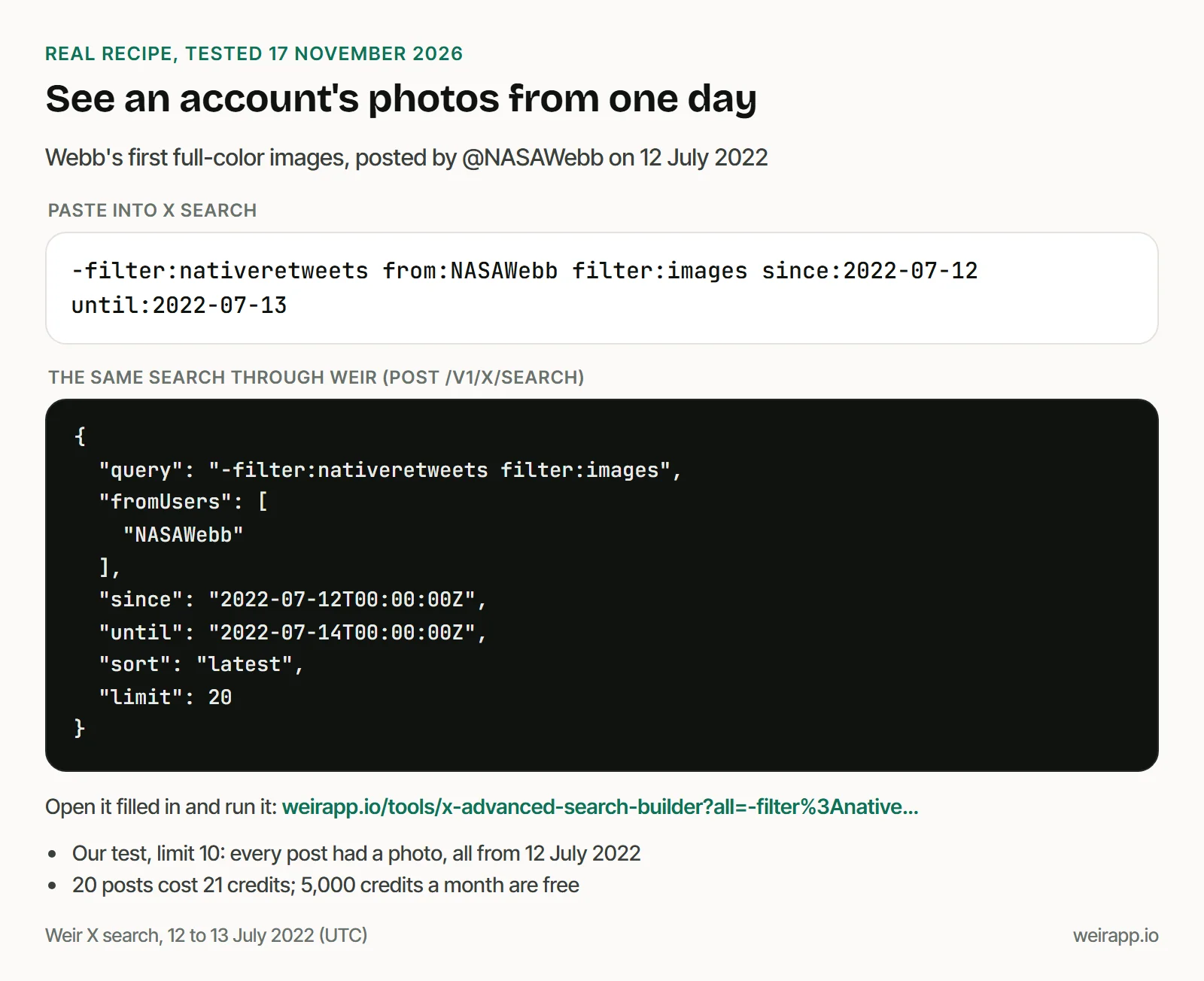
Each link opens our builder, where "Run it here" shows you the first 20 posts after a free Weir sign-in. Our Twitter video search guide compares the video filters on real posts.
Get any account's Media tab as a list, with no X account
Weir's get_x_user_media returns the Media tab as data: each post with its photo, video or GIF links. You need a free Weir account, not an X one.
With Weir connected to Claude or ChatGPT, paste:
Use Weir's get_x_user_media on NASA with limit 20. Count the posts, photos, videos and GIFs, give the date range, and list the 3 newest file links.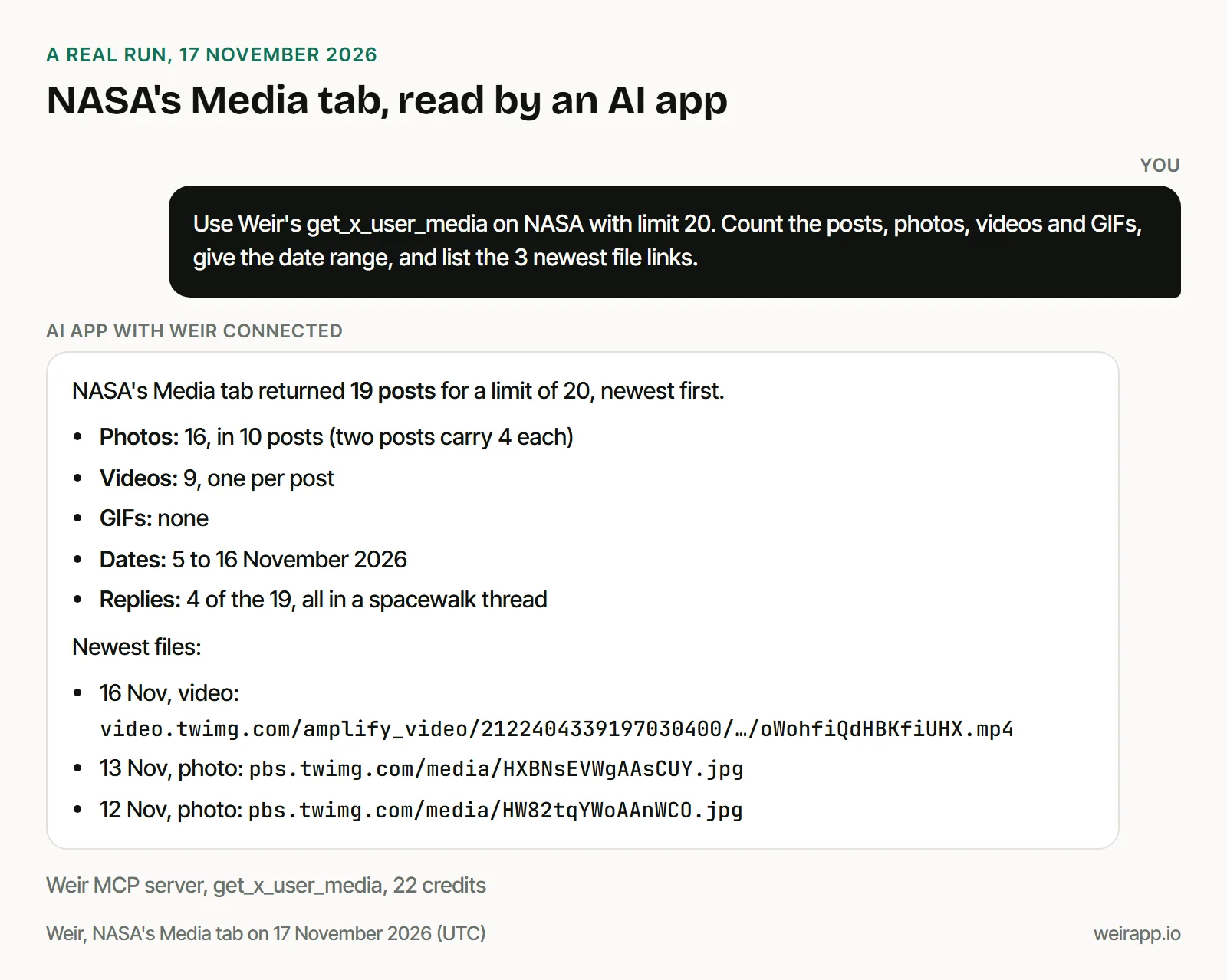
Four of the 19 were NASA replies, so the tab counts replies with media. Every post had a file.
X can return fewer than you ask. This REST call asked for 5 and got 4, and @YouTube's tab gave 5 for a limit of 10:
curl -G https://api.weirapp.io/v1/x/users/NASA/media -d limit=5 \
  -H "Authorization: Bearer $WEIR_API_KEY"
Send meta.nextCursor back as cursor until it is null, and cap the pages. A protected account returns a 404.
Cost: a page of 20 media posts costs 23 credits: 1 for the call, 2 for the profile, 1 per post. 5,000 credits a month are free, and $5 buys 25,000.
To save the files, see how to download Twitter images at full size and how to turn Twitter GIFs back into GIFs.
Are Twitter media viewer sites safe?
We recommend none of them:
- They can vanish. X Corp. sent cease-and-desist letters to Nitter, an open-source X viewer, on 24 August 2026, its README says.
- They see what you look up. Every account you open passes through someone else's server.
- X's terms limit them. X's Terms of Service say you can't scrape X without permission or "work around any technical limitations we impose." This isn't legal advice.
When not to use Weir
- You browse one account by hand. The Media tab and X search are free once you log in.
- It's your own media. Your X archive holds the "images, videos, and GIFs" you attached to posts.
- You want a photo grid. Weir returns lists and links, not a gallery.
- You need a contract with X. X's own API charges $0.005 per post read, as of November 2026.
Weir reads public data only and isn't licensed by X, so access can change.
FAQ
Did Twitter remove the media tab?
Not everywhere. Since May 2026, reports say some phone apps show Videos and Photos tabs instead, while x.com still lists Media. We found no post about it from X's own accounts.
How do I see old media on Twitter?
Search from:username filter:media with since: and until: dates. Use filter:images or filter:videos for one type. It reaches years back, where the Media tab only shows the most recent media.
How can I see Twitter media without logging in?
Not on the Media tab, which sent us to X's sign-in page. A profile link shows 5 recent posts, and post links open. For more, run a search on weirapp.io with a free Weir account.
How do I download all media from a Twitter user?
List the posts with a dated search or Weir's media endpoint. Then save photos at name=orig and videos from their MP4 links. For your own media, request your X archive.
Sources
Checked 17 November 2026; X Help Center pages are Wayback copies, dated in brackets.
- X Help Center: media timelines (14 October 2025, the latest copy), https://help.x.com/en/using-x/view-all-x-pictures; missing posts (6 October 2026), https://help.x.com/en/using-x/missing-posts; likes (15 November 2026), https://help.x.com/en/using-x/liking-posts-and-moments; your X archive (3 November 2026), https://help.x.com/en/managing-your-account/how-to-download-your-x-archive
- X Terms of Service, effective 9 October 2026: https://x.com/en/tos
- X API pricing: https://docs.x.com/x-api/getting-started/pricing
- Social Media Today, 19 December 2023: https://www.socialmediatoday.com/news/x-continues-to-roll-out-updates-for-the-profile-media-tab/703037/
- PiunikaWeb, 25 May 2026: https://piunikaweb.com/2026/05/25/x-replaces-media-tab-with-videos/
- Roboin, 27 May 2026: https://roboin.io/article/en/2026/05/27/how-to-fix-missing-media-tab-on-x/
- hashout.jp, updated 23 August 2026: https://hashout.jp/?p=8469
- Nitter README: https://github.com/zedeus/nitter
- Weir docs: https://docs.weirapp.io/reference/x/getXUserMedia
- Our logged-out curl requests to x.com and seven Weir calls, 17 November 2026