How to See Comments on X (Twitter) in 2026: App and Web
See comments on X in the app or on x.com, why some never show, and what you get logged out: X showed us 3 of a post's 139 replies, then a log-in box.
To see comments on X, tap or click the post itself, not the reply icon, and its replies appear below it.
X (Twitter) calls comments replies. This guide covers the app, x.com on a PC, missing replies, and what you can see without an account. We run Weir, the API behind the no-account route.
Paste this into X's search to list the replies to one post. Swap in the digits after /status/ in its link:
conversation_id:2122404409292337592- Open the postTap its text or time, not the reply icon.
- Change the orderX ranks replies; pick Latest or Likes.
- Open a branchTap a reply to see the replies under it.
- Find the restShow probable spam, then the hidden reply icon.
How to see comments on X in the app and on the website
Open the post and its replies load underneath. X's help center says a click on any post takes you to its conversation, shown as nested replies.
- In the X app, tap the post's text, because the reply icon opens a box to compose a reply.
- On x.com or a PC, click the post's text or its time to open it on its own page.
- For replies to a reply, tap that reply and it opens with the replies under it.
- On your own posts, replies also land in your Notifications tab, marked "Replying to you."
- Live videos show comments in the video itself, on iOS, Android or the web.
The number next to the reply icon counts direct replies only. X's help says it "is not the total number of replies in the entire conversation."
Sort comments on X by Latest or Likes
X doesn't list replies in time order by default. Its help center says it ranks them, and a reply rises if the post's author answered it, if you follow the replier, or if the replier pays for X Premium or The X Subscription.
To skip that ranking, X's help says to pick one of two sorts:
- Latest shows the newest replies first.
- Likes puts the most liked replies on top.
Replies that break X's rules sit in a separate section at the bottom, X's engineering notes say.
Can you see comments on X without an account?
Only a few. On 17 November 2026 we sent plain logged-out requests to x.com, with no account and no browser tricks.
- A post's page loaded with its text, its counts and 3 replies, then a log-in box: 3 of 139 on NASA's astronaut post.
- The 3 weren't the newest. They had 6 to 10 likes each, while the 12 newest had 1 at most.
- The Replies tab and search both sent us to X's log-in page.
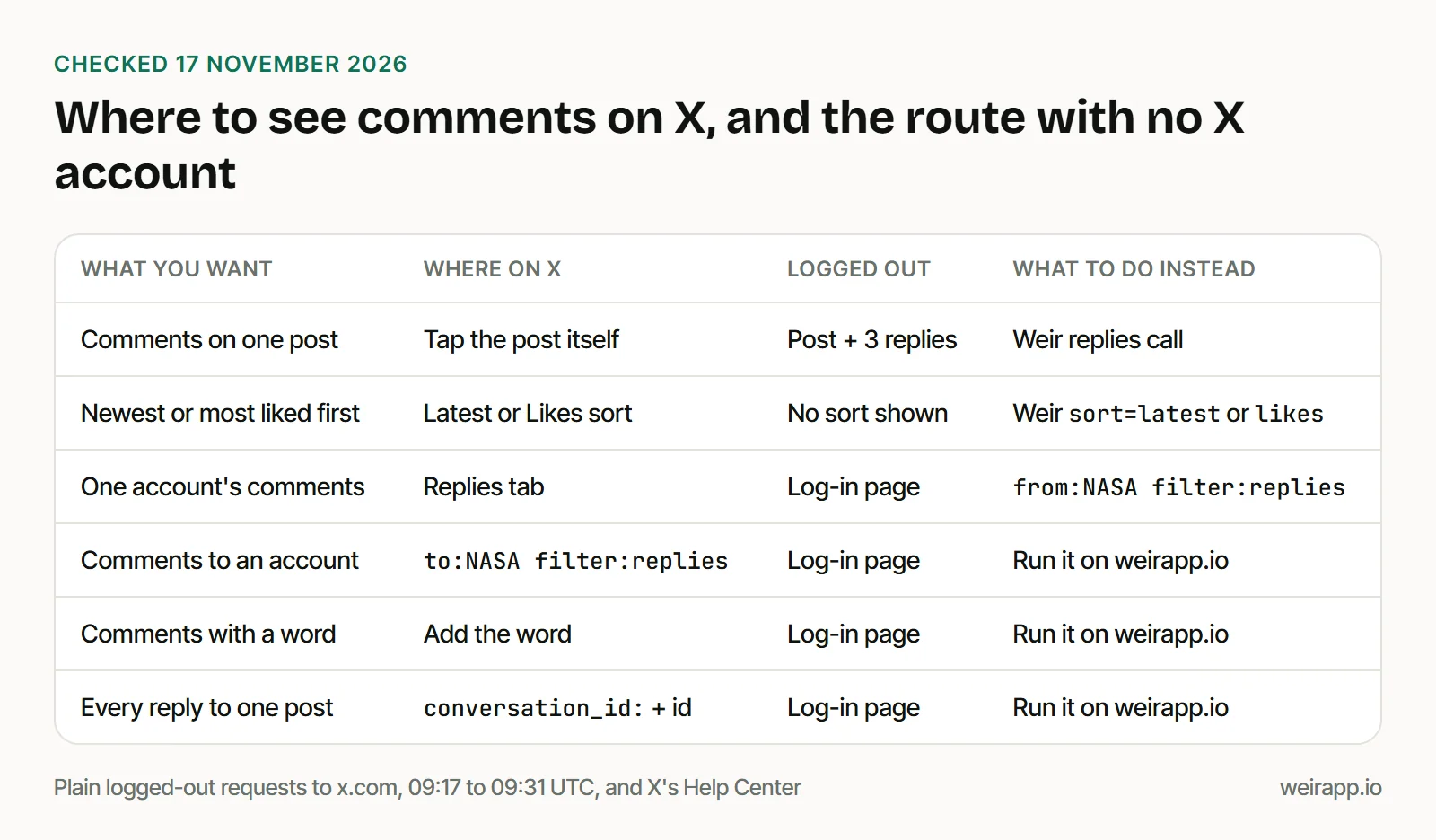
We tested plain requests, not a browser. For what else opens logged out, see how to search Twitter without an account.
How to search comments on X, even without an X account
These four searches work in X's search box when you're logged in. Without an X account, open one filled in on weirapp.io and press Run it here to see the first 20 posts, with a free Weir sign-in.
1. Comments to an account. Replies anyone sent to @NASA, newest first:
to:NASA filter:repliesOpen it filled in. Our 20 replies spanned 8 hours, and 19 sat under NASA's newest post.
2. One account's own comments. On X, that's the Replies tab of a profile, which keeps the newest 3,200. As a search:
from:NASA filter:repliesOpen it filled in. The first page held only 4, spread over 6 days: three answers under NASA's own posts and one reply to another account's post. It still came with a cursor for the next page.
3. Comments with a word. A word reaches further back:
astronaut to:NASA filter:repliesOpen it filled in. It found 20 replies over 13 days. One was NASA's own update in a spacewalk thread, so check who wrote each.
4. Every reply to one post. Use the post's id:
conversation_id:2122404409292337592Open it filled in. Its 20 posts held a reply to a reply that search 1 missed.
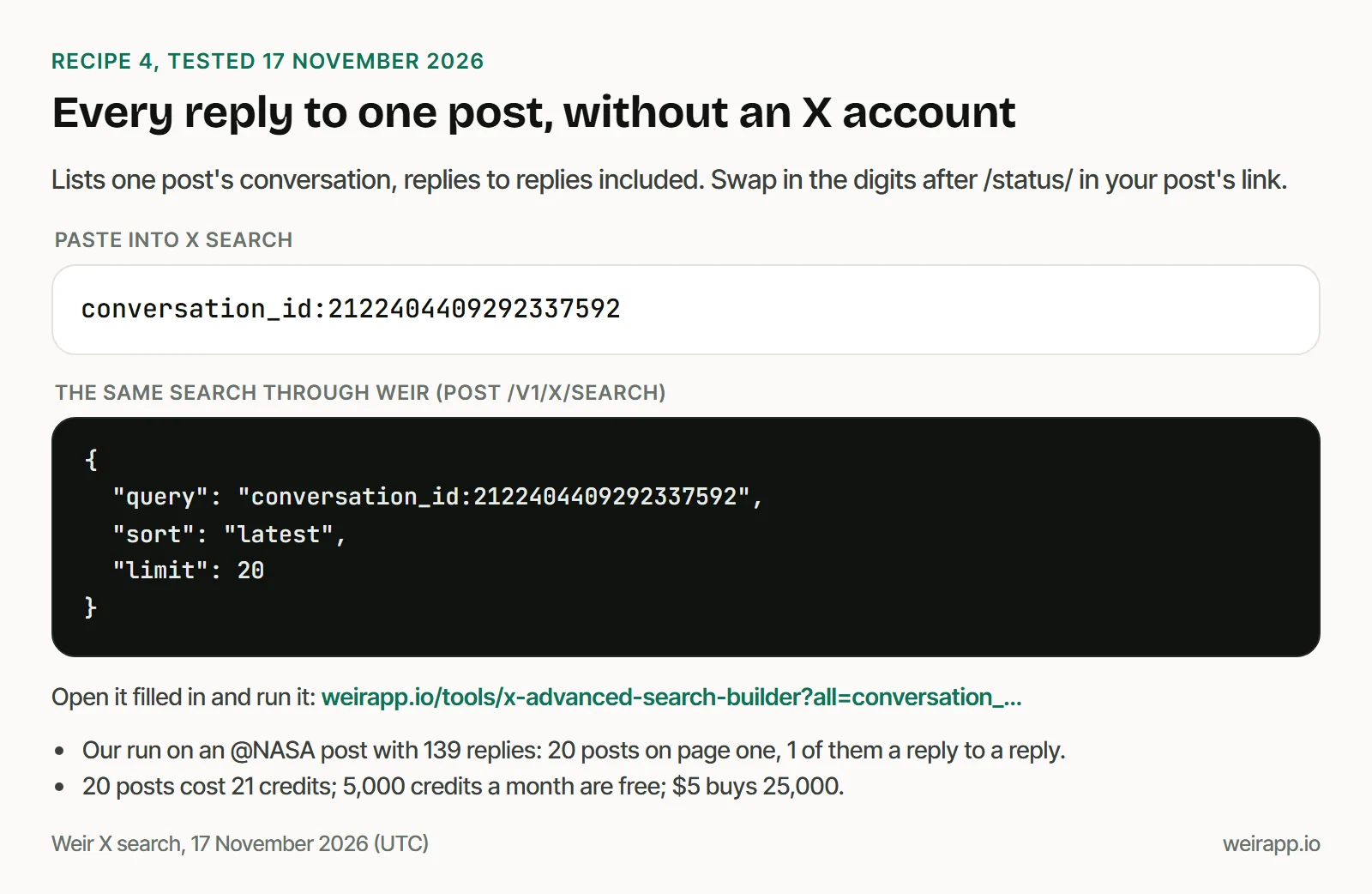
What it costs: 20 posts cost 21 credits; 5,000 credits a month are free; $5 buys 25,000.
Search failing on X itself? See why X search is not working.
Get every reply to one post with Weir
Weir's replies endpoint returns a post's replies, newest first, by likes or by X's relevance. It leaves out ads and costs 1 credit per call plus 1 per reply.
With Weir connected to Claude or ChatGPT, paste:
Get the newest replies to https://x.com/NASA/status/2122404409292337592 and tell me how many came back and what people asked most.We made the same call through Weir's MCP tool on 17 November 2026. It returned 12 replies for 13 credits, spread over 6 hours, and half were about who qualifies.
This Python needs no packages, and it stops at a null cursor or 20 pages:
import json, os, time, urllib.parse, urllib.request
POST_ID = "2122404409292337592"  # from the post's link
URL = f"https://api.weirapp.io/v1/x/posts/{POST_ID}/replies?sort=latest&limit=100"
AUTH = {"Authorization": "Bearer " + os.environ["WEIR_API_KEY"]}
replies, cursor = {}, ""
for page_no in range(1, 21):  # at most 20 pages
    with urllib.request.urlopen(urllib.request.Request(URL + cursor, headers=AUTH), timeout=60) as r:
        page = json.load(r)
    print(f"page {page_no}: {len(page['data'])} replies, {r.headers['x-credits-charged']} credits")
    replies.update((reply["id"], reply) for reply in page["data"])
    if not page["meta"]["nextCursor"]:
        break
    cursor = "&cursor=" + urllib.parse.quote(page["meta"]["nextCursor"])
    time.sleep(4)  # stay under the free tier's rate limit
print(len(replies), "replies in all")
X's first page held 12 replies that day. To save them to a sheet, see how to export tweet replies to Excel.
Why some comments on X don't show
X's help center names these causes:
- X marked them as probable spam. Tap "Show probable spam," which X says holds replies it rates as lower quality.
- The author hid them. Tap the hidden reply icon on the original post, as our guide to hidden replies on X shows.
- A protected account wrote them. X says those replies are visible only to approved followers.
- You muted or blocked them. X hides replies from muted accounts you don't follow, and blocked accounts can't reply to your posts.
- The media is marked sensitive. X covers it with a warning unless you tick "Display media that may contain sensitive content" in your settings.
- Only some people can reply. X lets authors pick Accounts you follow, Only verified accounts or Only accounts you mention, and shows the limit on the post.
- The post is huge. X's engineering notes say it ranks from up to 3,200 recent replies, plus the top 800 on bigger posts.
A reply its author deleted is gone for everyone.
When not to use Weir
- One post's comments are all you need. The X app shows them free.
- Hidden or protected replies matter. Weir doesn't promise either, so use X's hidden reply icon.
- You want to reply, hide or delete. Weir only reads, so use the X app.
- A contract with X is required. Weir isn't licensed by X, so access can change.
FAQ
Why can't I see comments on X?
Open the post itself and log in. Then tap "Show probable spam" and look for the hidden reply icon. Replies from protected or muted accounts stay out of view, and logged out, X showed us only 3.
How do I see comments on X without an account?
In our test, the post's link showed it with 3 replies. For the rest, run a reply search on weirapp.io with a free Weir sign-in, or call Weir's replies endpoint.
How do I see someone's comments on Twitter?
Open their profile and tap Replies, which X keeps to the newest 3,200 posts and replies. Or search from:username filter:replies. Only replies they wrote appear, not replies sent to them.
How do I see comments on X without replying?
Tap the post's text or its time. X's help says the reply icon opens a compose box, so skip that icon when you only want to read.
Sources
Checked 17 November 2026. X's Help Center blocks our reader, so these are Wayback copies, dated:
- About replies and mentions (10 November 2026): https://help.x.com/en/using-x/mentions-and-replies
- About conversations on X (18 October 2026): https://help.x.com/en/using-x/x-conversations
- Conversations recommendations (12 June 2026): https://help.x.com/en/resources/recommender-systems/conversations-recommendations
- Help with missing posts (6 October 2026): https://help.x.com/en/using-x/missing-posts
- Types of posts (13 October 2026): https://help.x.com/en/using-x/types-of-posts
- How to mute accounts (13 November 2026): https://help.x.com/en/using-x/x-mute
- Blocking on X (9 October 2026): https://help.x.com/en/using-x/blocking-and-unblocking-accounts
- Report sensitive media (15 November 2026): https://help.x.com/en/safety-and-security/sensitive-media
- How to create live videos on X (11 October 2026): https://help.x.com/en/using-x/x-live
Other sources:
- Our logged-out requests to x.com with plain curl, 09:17 to 09:31 UTC
- Weir getXReplies reference: https://docs.weirapp.io/reference/x/getXReplies
- Weir rate limits and billing: https://docs.weirapp.io/errors and https://docs.weirapp.io/billing
- Our Weir calls: four X searches (68 credits), two replies calls (26 credits)