Twitter Search Not Working? How to Fix It on X (2026)
Fix X and Twitter search not working: a quick checklist, a test for each cause, what X's status pages cover, and a backup search for when x.com fails.
When Twitter search is not working, check your log-in, your search filters, a rate limit, and whether the site itself is down.
This guide fixes X (Twitter) search that shows an error, a blank page or the log-in screen. We run Weir, the API behind the backup search at the end.
Start with a search that always has results. Paste it into X's search box and tap Latest:
from:NASANASA's newest posts mean search works, so check your query and filters.
- Run a known searchfrom:NASA on Latest shows if search works.
- Check your log-inLogged-out searches go to X's log-in page.
- Reset your filtersFrom anyone, Anywhere, safe search off.
- Reload, restart, updateThen switch between the app and x.com.
- Check if X is downStatus pages, then the complaint search.
X or Twitter search not working? Match your symptom
Find your symptom in the first column.
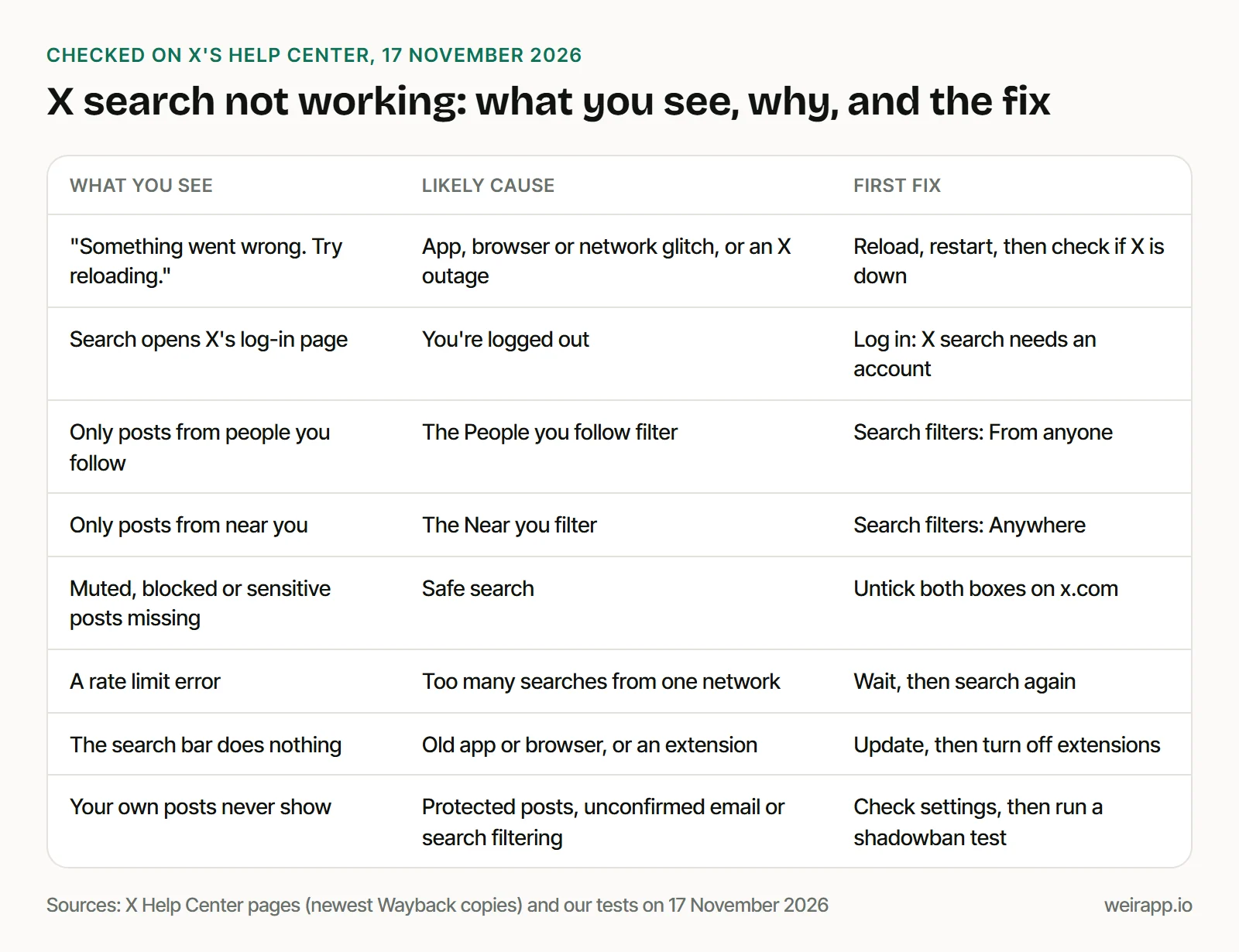
Each section below confirms one cause, quoting X.
Is X search down right now, or just for you?
We found no status page for the X app or x.com on 17 November 2026.
X's Help Center links "Status" to docs.x.com/status, which forwards to developer.x.com/status. That page covers X's API for developers, not the search box.
Its live feed read "operational" when we checked. X's limits page says X posts on "the X status site" when it lowers limits, but that link, status.twitterstat.us, doesn't exist today.
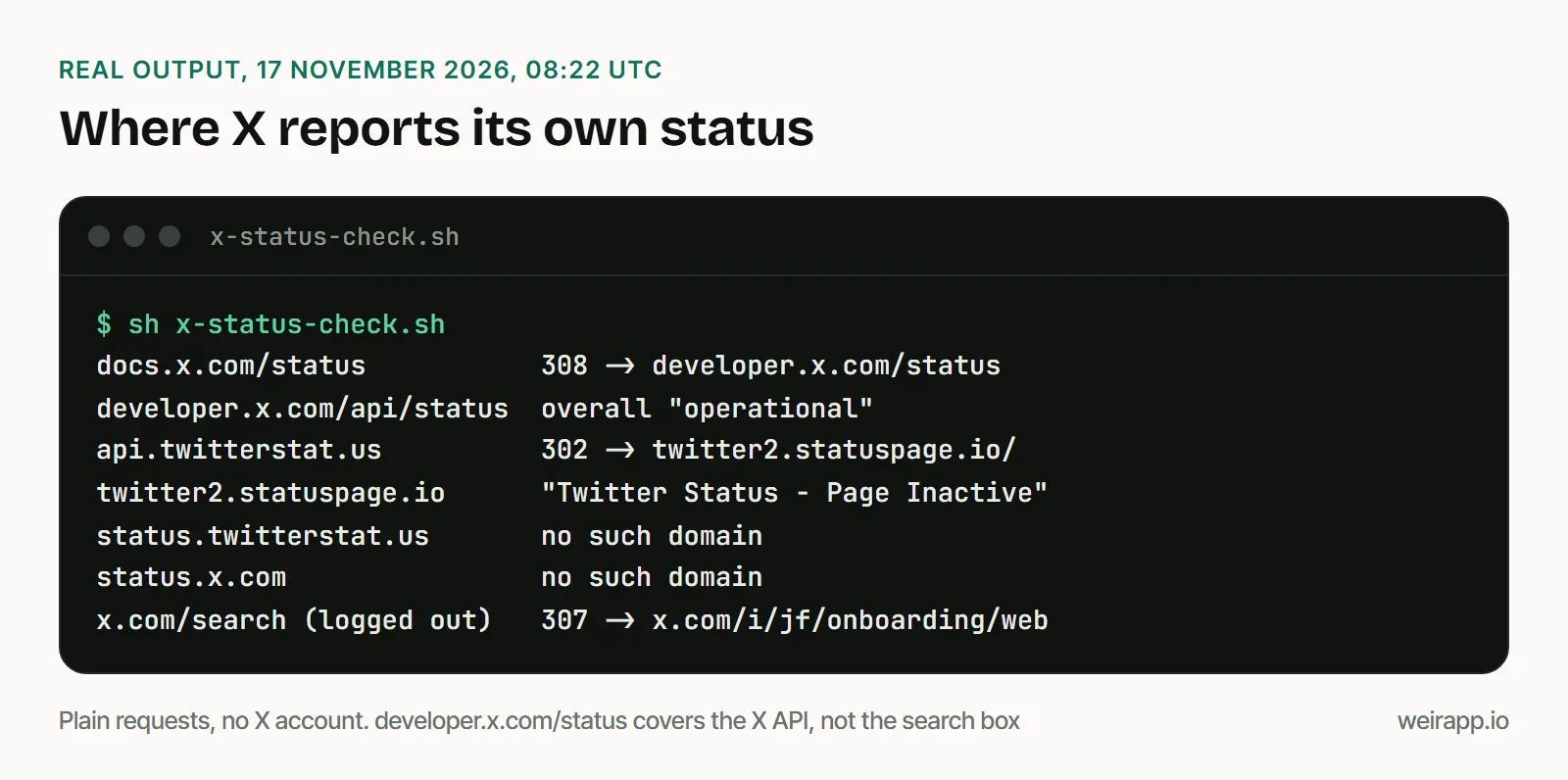
Run three checks of your own:
- Downdetector. It charts problems users reported in the last 24 hours. It's a third party, not X.
- Complaints on X. Recipe 1 below lists the newest posts saying X search is broken. A burst within minutes points to X.
- Weir's view of X. Our status page shows if X answered Weir in the last 15 minutes. X read Operational there at 08:20 UTC on 17 November.
Why does X say "Something went wrong. Try reloading"?
The message names no cause, and no X help page we found explains it.
Reload once. If it returns, or the search bar does nothing, X's help pages give this order:
- On the web: X supports browser versions from the past year. An older browser, or an extension that changes your user agent, can break x.com.
- On iPhone: restart, check your connection and turn off any VPN. Then sign out and back in, which clears unsent drafts. With login verification on, store a backup code first.
- On Android: the same, plus clearing the app's data. X says that keeps your account.
- Last resort: reinstall the app.
If x.com works but the app doesn't, the app is at fault.
Why is Twitter search only showing people I follow?
A search filter is set to People you follow. X's help lists two filters: From anyone or People you follow, and Anywhere or Near you.
- On x.com: open Search filters at the upper right of your results, then pick From anyone and Anywhere.
- In the apps: tap the filter icon in the search bar. The iPhone app calls them All people and Everywhere.
- On Top: results are "personalized based on your X activity and the people you follow," X says, so tap Latest.
Safe search hides more: Hide sensitive content, and Remove blocked and muted accounts. Untick both under Search settings, in the more menu on x.com.
X says the change "may take several minutes" and applies to its apps too.
Why does X search send me to the log-in page?
You're logged out, and X search needs an account.
On 17 November 2026, X sent our logged-out requests for search and advanced search to its log-in flow. X's help says advanced search is "available when you're logged in to X.com."
No account? Our guide to searching Twitter without an account covers what still opens.
Why does X rate limit my searches?
X caps how often one network address can search, "to control abuse," its FAQ says.
Offices, events and conferences can share one address, so a crowd can reach the cap together. Wait, then search again. Our rate limit guide covers X's other limits.
Your posts don't show in X search: is it a shadowban?
Maybe, but check the plain causes first. X's help names three:
- Protected posts show in search only to approved followers.
- An unconfirmed email can keep your posts out, so finish your account setup.
- Duplicates, hashtag abuse or automated replies can get an account removed from search. X filters it "for quality posts and accounts."
X adds that a filtered account's posts still reach its followers. To test your own reach, run our Twitter shadowban test. If search runs but someone else's post is missing, see why X search is not showing all results.
Search X when x.com search fails
When the fault is on your side, run it on weirapp.io instead. Each recipe opens in our X advanced search builder, where "Run it here" shows the first 20 posts. It needs a free Weir sign-in, not an X account.
1. Is X search broken for everyone? The newest posts saying so:
-filter:nativeretweets ("twitter search is broken" OR "x search is broken" OR "twitter search not working" OR "x search not working" OR "twitter search is down" OR "x search is down") lang:enOpen it filled in. On 17 November 2026, 18 of its 20 newest posts were real complaints, spread over two months. The newest was almost two days old, so there was no sign of an outage.
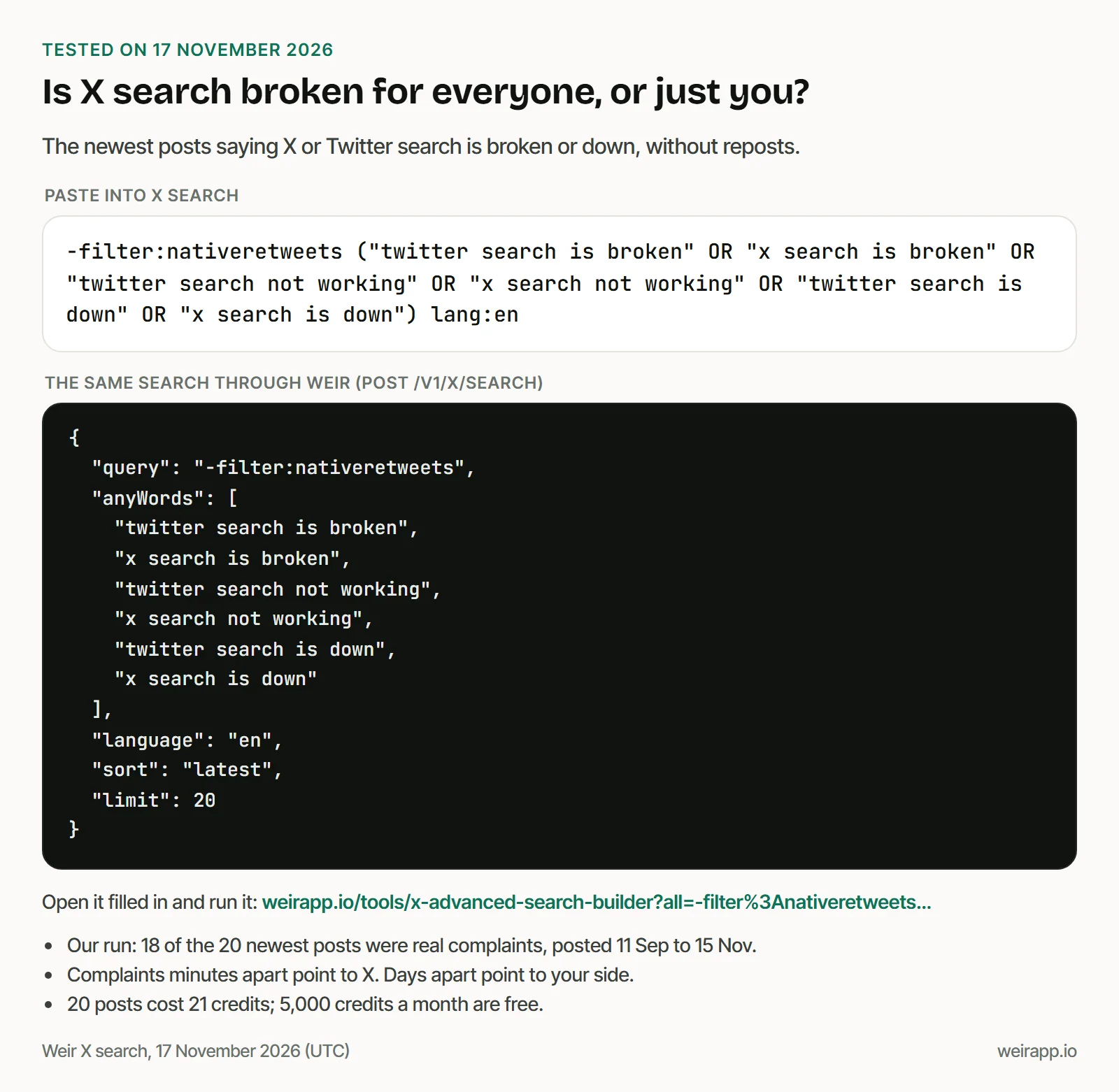
None quoted an error message. Six couldn't find posts they knew were there, and three got unrelated results.
2. Your topic, newest first, with a likes floor to cut the noise:
-filter:nativeretweets "GTA 6" lang:en min_faves:100 -filter:repliesOpen it filled in. We got 20 posts from the last two and a half hours. Each had at least 111 likes.
3. One account's posts in one week:
-filter:nativeretweets from:NASA -filter:replies since:2026-11-09 until:2026-11-15Open it filled in. The first page held 6 original NASA posts. The top one, Saturn's moons Tethys and Dione, had 8,112 likes. Without the repost filter, 9 of 15 results were reposts.
What it costs: 20 posts cost 21 credits; 5,000 credits a month are free; $5 buys 25,000.
When not to use Weir
- X search is down for everyone. Weir asks X's own search, so it fails too. Failed calls cost nothing, but you still wait.
- A filter is the cause. Switching it back is free.
- You need protected posts or your own feed. Weir reads public posts only.
- You need a contract with X. Weir isn't licensed by X, so access can change.
FAQ
Why is my Twitter search not working?
Check your log-in, your filters, a rate limit and an outage, in that order. If from:NASA shows posts on Latest, search itself works.
Is Twitter search down today?
We found no X status page for the app. Check Downdetector, then run recipe 1: complaints minutes apart point to an outage.
Why does Twitter advanced search say "Something went wrong"?
X doesn't say why, and advanced search only works when you're logged in. Log in on x.com, reload, and retry with extensions off. Our builder takes the same fields.
Why is Twitter search only showing people I follow?
A search filter is set to People you follow. Pick From anyone in Search filters on x.com, or under the filter icon in the app.
Why are Twitter search results not appearing?
Reload, check your connection and turn off any VPN. We've seen X's search answer "nothing" for searches that have results, so try once more.
Sources
Checked 17 November 2026. X's Help Center pages block our reader, so for these we read Wayback copies, dated:
- Using search (20 October 2026): https://help.x.com/en/using-x/x-search
- Search FAQs (31 October 2026): https://help.x.com/en/using-x/top-search-results-faqs
- Help with search (10 September 2025): https://help.x.com/en/using-x/x-search-not-working
- Search rules (8 October 2026): https://help.x.com/en/rules-and-policies/x-search-policies
- Advanced search (15 November 2026): https://help.x.com/en/using-x/x-advanced-search
- Advanced muting (31 October 2026): https://help.x.com/en/using-x/advanced-x-mute-options
- Quality filter (11 November 2026): https://help.x.com/en/managing-your-account/understanding-the-notifications-timeline
- iPhone app (13 November 2026): https://help.x.com/en/using-x/x-ios-app-not-working
- Android app (5 November 2026): https://help.x.com/en/using-x/x-android-app-not-working
- Supported browsers (15 November 2026): https://help.x.com/en/using-x/x-supported-browsers
- X limits (10 November 2026): https://help.x.com/en/rules-and-policies/x-limits
Other sources:
- X Developer Platform status page and live feed, 08:22 UTC: https://developer.x.com/status
- Twitter's old status page, now inactive: https://api.twitterstat.us/
- Downdetector, X (Twitter) (Wayback, 31 October 2026): https://downdetector.com/status/twitter/
- Weir status page, 08:20 UTC: https://weirapp.io/status
- Weir docs: https://docs.weirapp.io/errors and https://docs.weirapp.io/changelog
- Our five Weir searches (86 credits), logged-out requests to x.com and status checks, 17 November 2026