How to Search Your Twitter Likes and Bookmarks (2026)
X has no search box for likes, but bookmarks have one. To search your Twitter likes, use the like.js file in your archive and a tested 15-line script.
Weir Team
Published · Updated · 7 min read
To search your Twitter likes, download your Twitter archive and search its like.js file, because the app has no search box for likes.
Bookmarks are easier: X (Twitter) gave them a search box in July 2024. You get what X offers today, where your likes went, and a script we tested.
Have your archive already? Unzip it and run this in its folder, with your own word:
grep -i -B1 "sourdough" data/like.jsYou need your X login and a computer.
- Request your archiveSettings and privacy, Account, Your X data.
- Search like.jsA text editor, grep or PowerShell.
- Add dates and linksOur 15-line Python script.
- Search bookmarksThe search box in X's Bookmarks.
Can you search your Twitter likes on X?
No, not inside X. In its 15 November 2026 copy, X's help page on likes sends you to the Likes tab on your profile, with no search. On iPhone, look under History.
X's advanced search can't filter by what you liked, and X Premium adds no likes search.
Developers can pull their own likes from X's API, but it has no search filter either. As of November 2026, your own app pays $0.001 a post for them.
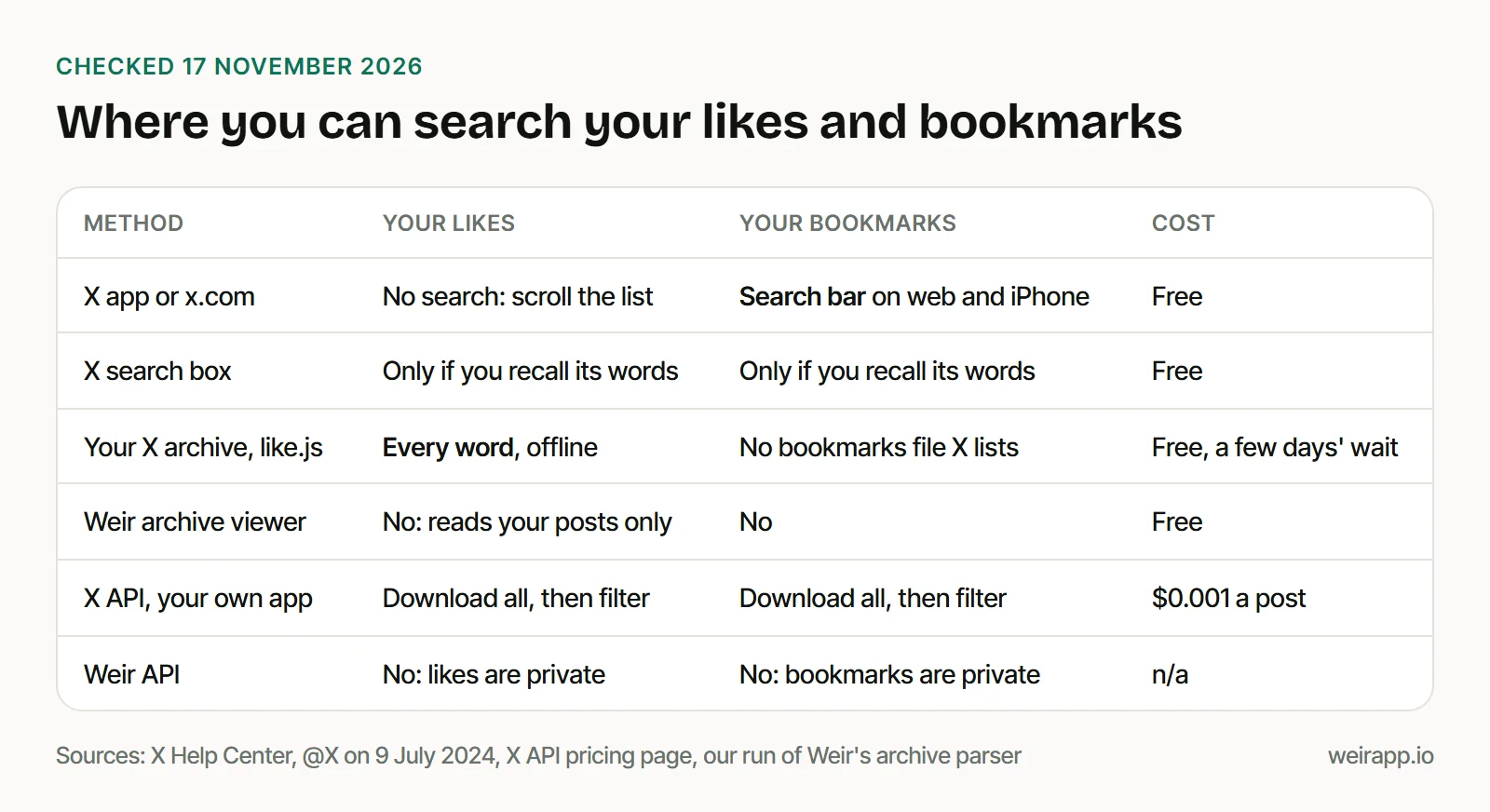
So for likes, your archive is the free way to search every word. For bookmarks, start with X's own search box.
Step 1: Request your X archive today
Start now: X's Help Center says the archive "may take a few days" to prepare.
- Open Settings and privacy, then Account, then Your X data.
- Confirm it's you with the code X sends.
- Tap Request data. X emails you when the ZIP is ready.
Download it while signed in to X, in the same browser. Our guide to opening your Twitter archive explains the other files.
Step 2: Search like.js for the words you remember
Your likes live in data/like.js. X's README, in a published 2022 archive, lists three fields for each like: the post's ID, its text and a link.
Here is one like from our test archive, in X's layout:
  {
    "like" : {
      "tweetId" : "2028918329963448474",
      "fullText" : "Our sourdough discard crackers recipe, written down at last.",
      "expandedUrl" : "https://twitter.com/i/web/status/2028918329963448474"
Then search it:
- Any text editor: open like.js and press Ctrl+F, or Cmd+F on a Mac.
- Mac or Linux: the
grepline above prints each match below its ID line. - Windows PowerShell: run
Select-String -Path data\like.js -Pattern sourdough -Context 1,0. - No commands: drop the ZIP on our free Twitter archive viewer, pick "Your likes", then search or save a CSV.
Put an ID after x.com/i/web/status/ to open the post. The file has no dates or author names, which Step 3 partly fixes.
Step 3: Get dates and links with a 15-line script
This script reads like.js straight from the ZIP, using only Python's standard library:
import json, re, sys, zipfile
from datetime import datetime, timezone

archive, word, likes = sys.argv[1], sys.argv[2].lower(), []
with zipfile.ZipFile(archive) as z:
    for name in z.namelist():
        if re.search(r"data/like[^/]*\.js$", name):  # like.js, and any like-part files
            text = z.read(name).decode("utf-8-sig")
            likes += [item["like"] for item in json.loads(text[text.index("["):])]
hits = [like for like in likes if word in like.get("fullText", "").lower()]
print(f"{len(hits)} of {len(likes)} likes contain {word!r}")
for like in hits:
    ms = (int(like["tweetId"]) >> 22) + 1288834974657  # the id holds the post's time
    print(datetime.fromtimestamp(ms / 1000, timezone.utc).date(), like["fullText"][:60])
    print("   https://x.com/i/web/status/" + like["tweetId"])
Save it as search_likes.py and run python search_likes.py your-archive.zip sourdough. We ran it on 17 November 2026, on a small test archive we made in X's format:
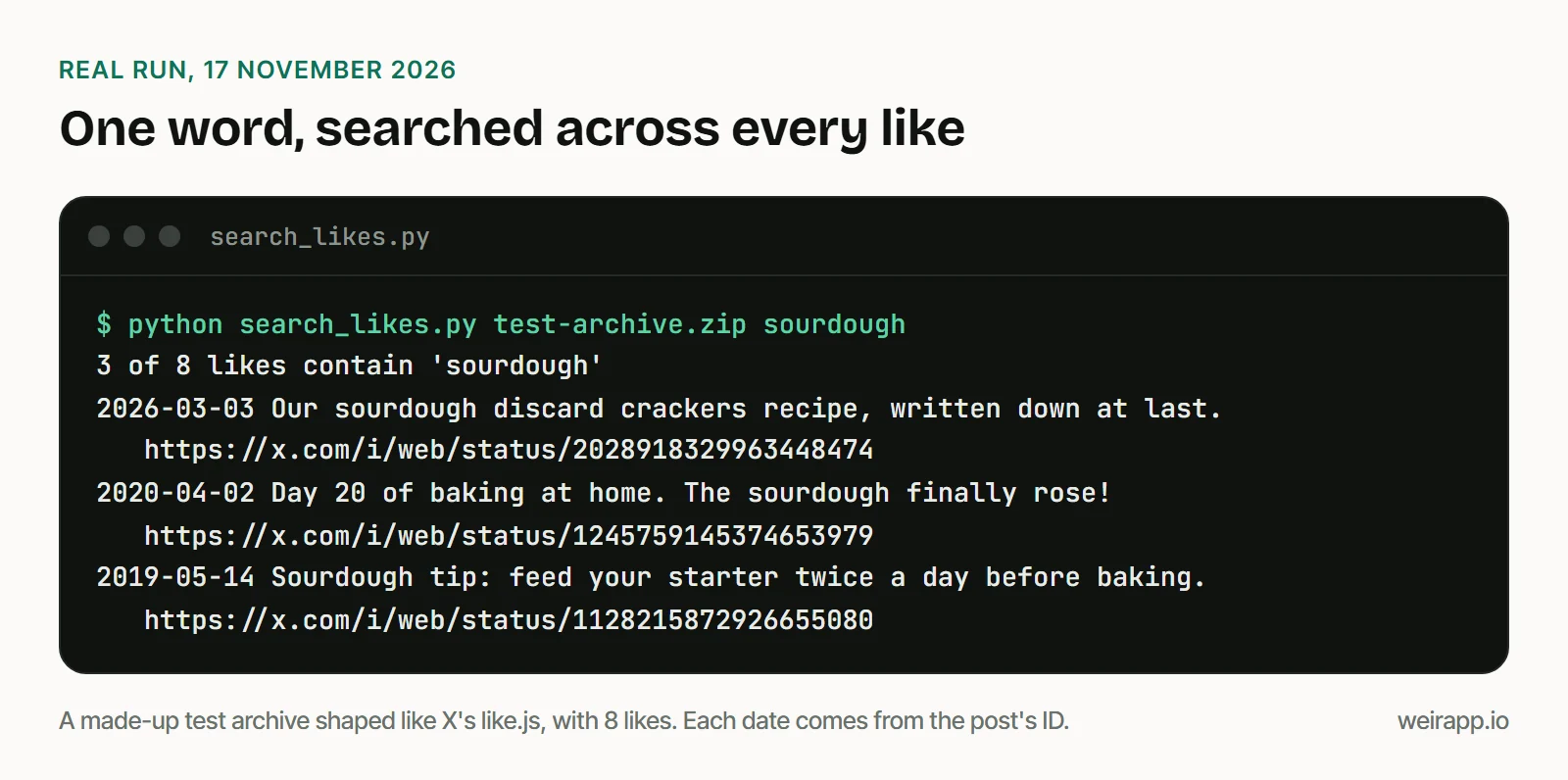
Each date is when the post was written, not when you liked it. X's docs say every post ID carries that time.
How to search your Twitter bookmarks
Open Bookmarks and use its search box. X's own account announced it on 9 July 2024: "search for bookmarks now live on iOS & web."
That post named no Android app. On iPhone, Bookmarks now sits in History, beside Likes.
X's Premium help page lists bookmark folders as a paid feature, but not bookmark search. Don't count on the archive for bookmarks, though:
- X doesn't list them. Its archive help page, copied 3 November 2026, names posts, DMs, followers, Lists "and more."
- A published 2022 archive had none. Its README lists like.js but no bookmarks file.
- Check yours anyway for a data file with "bookmark" in its name.
For a full export, our guide to exporting Twitter bookmarks uses X's API, at $0.001 a post for your own app.
Can't wait for the archive? Search X for the post itself
If you remember a few words, search for the post itself. This finds every match, not only the posts you liked.
You remember the account and the month. Search one word from that account:
copilot from:github since:2026-10-01 until:2026-10-31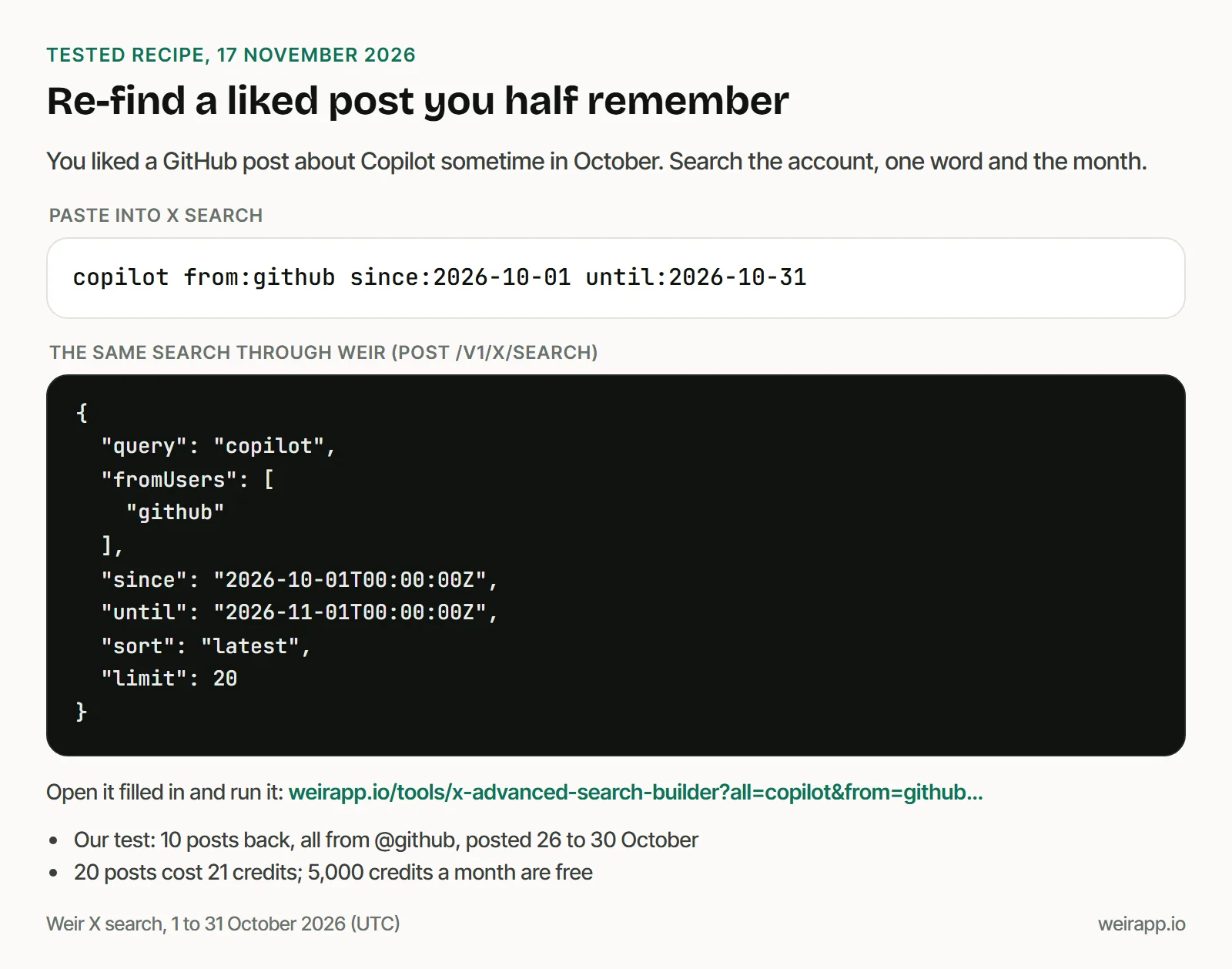
We ran it through Weir on 17 November 2026. All 10 posts on our first page came from @github. They were dated 26 to 30 October.
You remember a popular photo. Add the exact phrase, a photo filter and a likes floor:
"northern lights" min_faves:1000 filter:images since:2026-11-01 until:2026-11-16Its first page held just 3 posts, all with photos.
No X account? Our tweet finder runs this kind of search after a free Weir sign-in. A page of 20 posts costs 21 credits; 5,000 credits a month are free, and $5 buys 25,000.
Why your Twitter likes are not showing
Most "my likes are gone" moments come down to one of these:
- Other people's Likes tabs are gone. X made likes private on 12 June 2024. See who can see your likes.
- On iPhone, open History. X made it the home of Bookmarks, Long Videos, Articles and Likes on 12 May 2026.
- Check your profile on the web. X's help page still points to its Likes tab, in a 15 November copy.
- One like is missing. X says likes of a protected account's posts show only if you follow that account.
- A like has no text in like.js. X's README says the text appears only "if the account has access to it."
- The script prints 2010-11-04. That post is older than X's current IDs, so its date is wrong.
When not to use Weir
We run Weir, a read-only API for public X data:
- You want your likes or bookmarks. Both are private, and Weir never sees your X account.
- One post you clearly remember? X's search box is free.
- Unliking posts or clearing bookmarks? Weir only reads.
Weir fits repeat searches of public posts by words, accounts and dates. It isn't licensed by X, so access can change.
FAQ
How do I search my Twitter likes?
Request your X archive, then search its like.js file in a text editor or with our script. X's help pages list no search for likes. Bookmarks are different: they got a search box on the web and iPhone in 2024.
Why did my likes tab disappear on X?
On iPhone, likes moved into History in May 2026. Other people's Likes tabs went away on 12 June 2024, when likes turned private. On the web, X's help page still points to the Likes tab on your profile.
How do I search my Twitter bookmarks?
Open Bookmarks and type in its search box, which X launched for iOS and the web on 9 July 2024. Bookmark folders need X Premium, but X doesn't list search as a paid feature.
How can I see my old likes on Twitter?
Scroll your Likes list, or search the like.js file in your archive. Our script also prints the day each liked post was written. X doesn't say how far back the Likes list goes.
Does the Twitter archive include bookmarks?
Not that X lists. Its archive help page doesn't name them, and a 2022 archive README we read had no bookmarks file. Check your own data folder, or export them with X's API.
Sources
Checked 17 November 2026. X's help pages are Wayback copies, dated in brackets:
- X Help Center, liking a post (15 November 2026): https://help.x.com/en/using-x/liking-posts-and-moments
- X Help Center, bookmarks (20 October 2026): https://help.x.com/en/using-x/bookmarks
- X Help Center, X Premium (14 November 2026): https://help.x.com/en/using-x/x-premium
- X Help Center, advanced search (15 November 2026): https://help.x.com/en/using-x/x-advanced-search
- X Help Center, your X archive (3 November 2026): https://help.x.com/en/managing-your-account/how-to-download-your-x-archive
- @X on bookmark search (9 July 2024), read through Weir: https://x.com/X/status/1810681227965567375
- X's History tab announcement (12 May 2026), read through Weir: https://x.com/nikitabier/status/2054349560114454862
- X Engineering on private likes (12 June 2024), read through Weir: https://x.com/Engineering/status/1800959499932496139
- X's archive README.txt and like.js, in BitFolk's published archive (December 2022): https://bitfolk.com/twitter-archive/data/README.txt
- X API docs, liked posts: https://docs.x.com/x-api/users/get-liked-posts
- X API pricing, Owned Reads: https://docs.x.com/x-api/getting-started/pricing
- X API docs, post IDs: https://docs.x.com/fundamentals/x-ids
- Our test-archive runs and six Weir calls (24 credits), 17 November 2026