How to Screenshot a Tweet: Long Posts, Threads, Phones
Screenshot a tweet on iPhone, Android, Mac or Windows, capture long posts and whole threads, fit Instagram's shapes, or make a clean PNG without buttons.
Weir Team
Published · Updated · 7 min read
To screenshot a tweet, open the post on its own page, press your device's screenshot keys, then crop the image down to the post.
It works for any public post on X (Twitter). Below are the keys from Apple, Google, Microsoft and Mozilla, checked on 26 November 2026, plus long posts, threads and Instagram. We run Weir, the API behind the free generator below.
iPhone    side button + volume up (iPhone SE: Home + side)
Android   Power + Volume down
Mac       Shift + Command + 4, then drag over the post
Windows Windows logo key + Shift + S, then dragFor an image with no buttons or replies, paste the post's link into our free tweet screenshot generator.
- Open the postX shows its exact time there.
- Capture itPress your device's keys.
- Crop and hideCut buttons and private names.
- Credit itAdd the author and a link.
Step 1: How to screenshot a tweet on iPhone or Android
Open the post on its own page first. There, X shows "the exact time and date the post was posted," per its Help Center.
- iPhone: quickly press and release the side button and volume up together, per Apple. On iPhone SE, use the Home button and the side button.
- Android: press Power and Volume down together, per Google. If nothing happens, hold Power and tap Screenshot.
Then crop it in your photo app to just the post.
Step 2: Screenshot a tweet on a Mac or PC without the reply box
On a computer, you can capture just the post's box, with no sidebar or reply box.
- Mac: press Shift + Command + 4, then drag over the post, per Apple. It saves to your desktop.
- Windows: press the Windows logo key + Shift + S, pick Rectangle and drag, per Microsoft.
- Firefox: press Ctrl + Shift + S (Command on a Mac). Move the mouse until the post's box lights up, click it, then press Download.
- Chrome: right-click the post, choose Inspect and click the line that wraps the post. Press Ctrl + Shift + P (Command on a Mac), type "screenshot" and pick Capture node screenshot.
Step 3: Go dark, crop and hide what you shouldn't share
Small changes make the image cleaner and safer to share.
- Dark mode: on x.com, open More, then Display, and pick a dark background such as Lights Out, per X's Help Center.
- Numbers: crop off the row of counts when the likes aren't the point.
- Other people: blur or crop out a private person's name, @handle and photo.
- The link: put the post's link under your image, so anyone can check it.
How to screenshot a long tweet or a Twitter thread
X Premium lets subscribers post "up to 25,000 characters," per X's Help Center. For a post longer than your screen, use a scrolling capture:
- Android 12 and up: tap Capture more after the screenshot. Google says it works "on most screens that allow you to scroll."
- iPhone: Apple's Full Page option captures a whole page, with Safari as its example. Open the post at x.com in Safari, take a screenshot, tap the thumbnail, then Full Page.
- Computer: use Firefox's Save full page or Chrome's Capture full size screenshot.
We haven't tried these on X itself, so check the result before you share it.
The generator needs no scrolling. Weir returned all 924 characters of a NASA post from 24 November 2026, and the generator draws every line into one tall image.
For a thread, unroll it first. We read NASA's spacewalk thread of 5 November 2026 with one Weir call:
Paste any of its posts into our free Twitter thread reader to see the author's posts on one page. Then use Firefox's Save full page, or print it to PDF.
One generator image per post would cost about 18 credits instead. Our guide to unrolling a Twitter thread has more routes.
How to turn a tweet into an image without the buttons
Our free tweet screenshot generator draws a post from its real data, so the frame holds only the post.
- Copy the post's link. In the X app, tap the share icon, then Share Post via, then Copy link to Post. On a computer, copy the address bar.
- Paste it into the tweet screenshot generator and press Make the image. The first run asks you to sign in to a free Weir account.
- Pick Light or Dark, then press Download PNG.
The PNG is 1,200 pixels wide. It holds the name, @handle, text, UTC date and time, likes and reposts, plus the profile photo when X allows it. Dark mode has a pure black background.
On 26 November 2026, we ran the generator's own call on NASA's 23 November post:
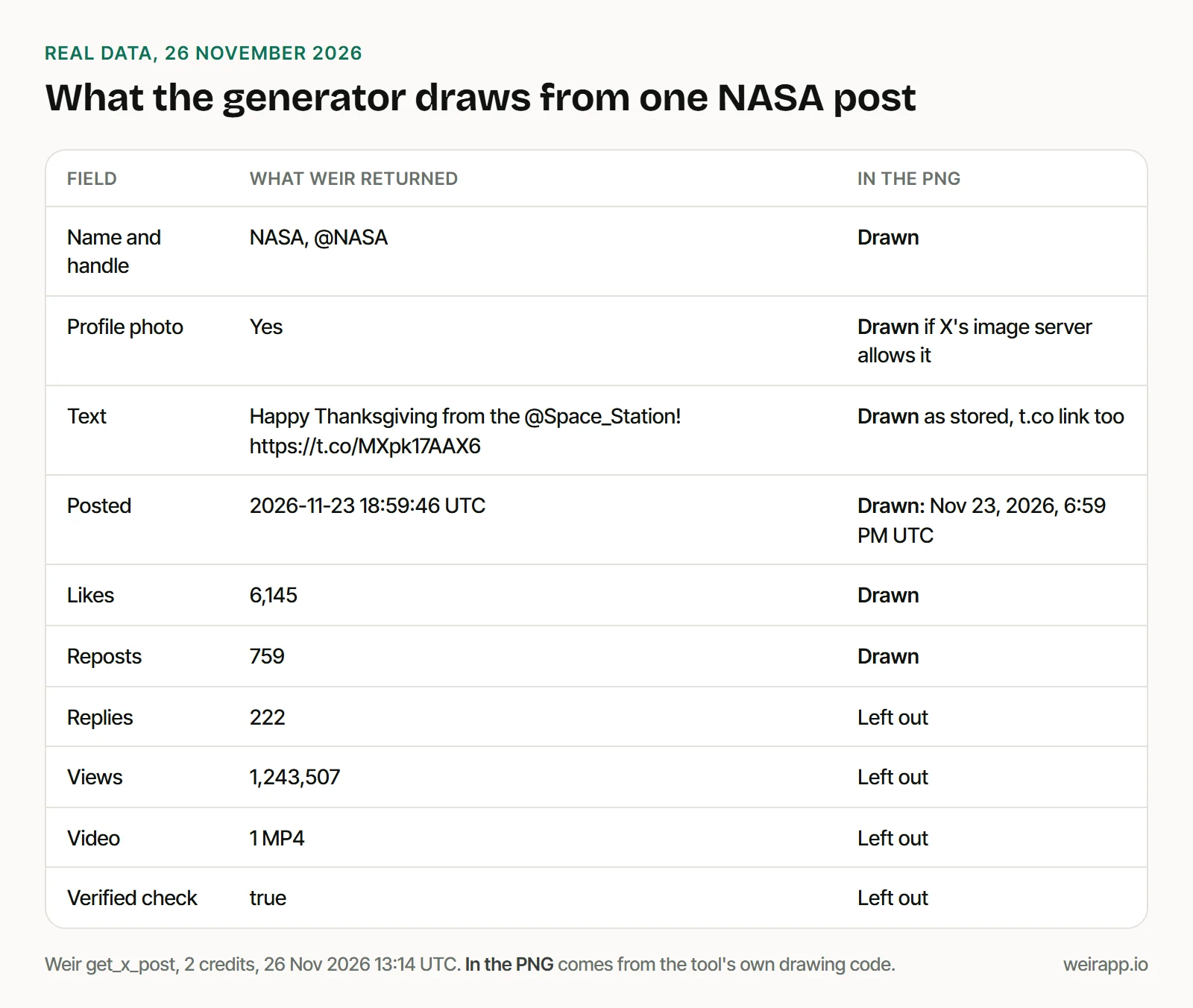
Links show as X's short t.co links, because the image draws the text as X stores it. The video, replies, views and verified check are left out.
Cost: about 2 credits an image. The 5,000 free credits each month cover about 2,500 images, and $5 buys 25,000.
With Weir connected to Claude or ChatGPT, ask for a credit line and alt text too:
Use Weir's get_x_post on https://x.com/NASA/status/2124940993489162256. Give me a credit line with the exact UTC time and link, today's counts, and alt text for a screenshot of it.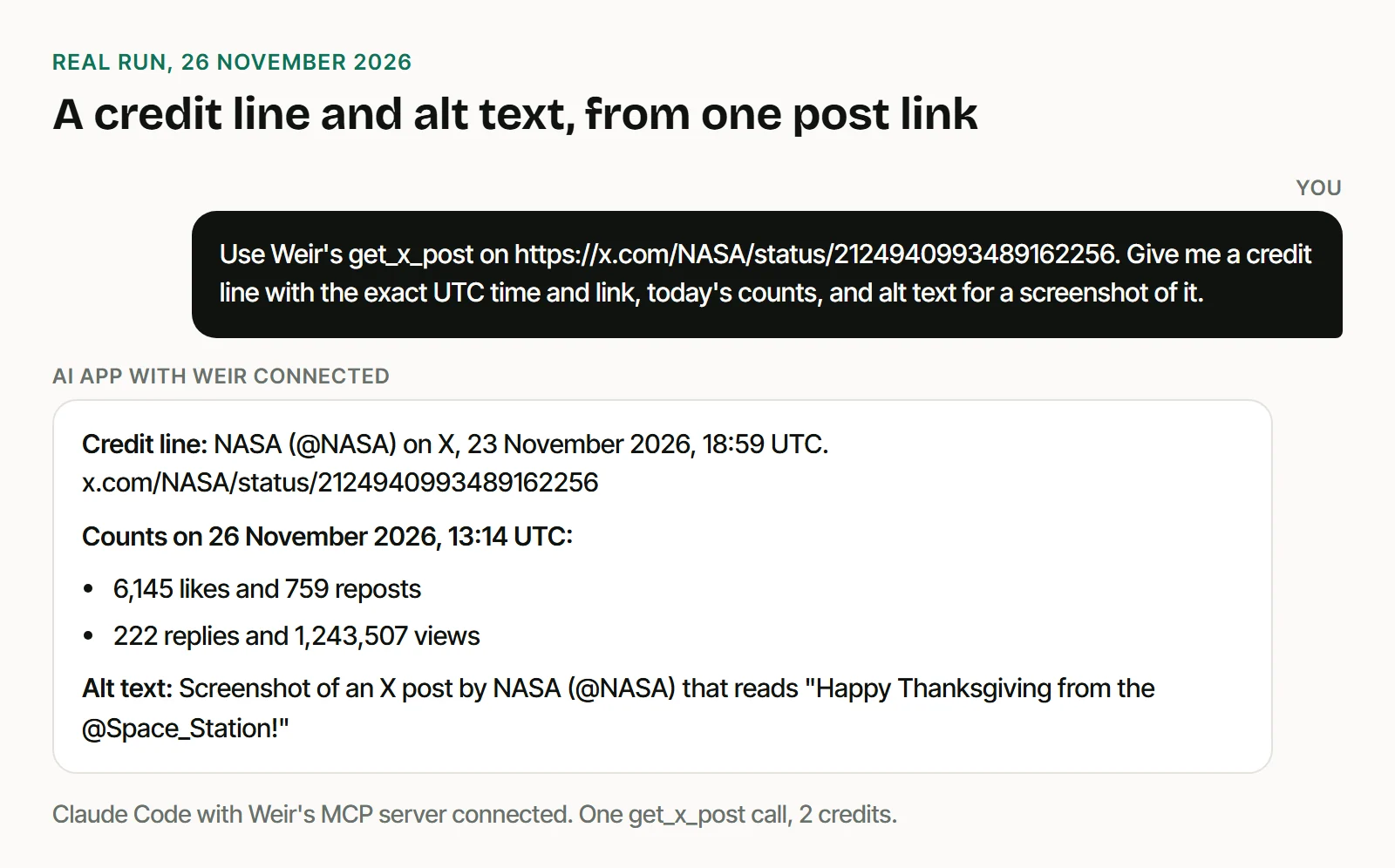
How to screenshot tweets for Instagram
Instagram's feed keeps a photo's shape only from wide 1.91:1 to tall 3:4, per its Help Center, and crops anything else. It also shrinks anything wider than 1,080 pixels.
- Phone screenshots are taller than 3:4, so crop them to the post.
- Generator images grow 56 pixels per line of text. Five lines or fewer come out wider than 1.91:1, so pad them to 4:5, such as 1,080 by 1,350.
- Stories are 9:16, per Meta's specs for Stories ads, so center your image on a tall canvas.
Credit the author in your caption.
What each way keeps, and when a screenshot isn't proof
Each way of saving a post keeps different facts:
| Way | Time | Counts | Link | Photos and video |
|---|---|---|---|---|
| Screenshot or capture | As X shows it | As X shows them | No | As a still |
| Our screenshot PNG | Date and time, UTC | Likes, reposts | No | Left out |
| Our static embed (HTML) | Date, UTC | Likes, reposts | Yes | Left out |
| Our evidence record | UTC, plus capture time | Likes, reposts, replies, views | Yes | As links |
A screenshot proves little alone, because anyone can edit one.
For a record you may need later, save a tweet as evidence. It adds the link, UTC times, a SHA-256 hash and two archive links. For a web page, a static embed keeps the text selectable.
If your screenshot comes out wrong
- No full date? Open the post on its own page.
- Text cut off? It's a long post, so use a scrolling capture or the generator.
- Generator can't read it? The post was deleted or its account is protected. A failed call costs nothing.
- Instagram cut the edges? Pad the image to 4:5 or 9:16 first.
When not to use Weir
- You need one quick screenshot. Your device's keys are free.
- The photo or video is the point. The generator draws text only, so download the image instead.
- You want X's own look. The generator draws its own plain card.
- The post is gone or private. Weir reads public posts only, so try the Wayback Machine.
Weir is not affiliated with X, so access can change.
FAQ
Does X notify someone when you screenshot their tweet?
No. X's Help Center says the Notifications timeline shows likes, reposts, replies, mentions and new followers. Screenshots aren't on that list, and our generator posts nothing on X.
How do you screenshot a Twitter thread?
Unroll it onto one page with a thread reader, then capture that page with Firefox's Save full page or print it to PDF. Or run our generator once per post, at about 2 credits each.
How do you screenshot a tweet without the reply box?
On a computer, click the post's box in Firefox's screenshot tool, or use Chrome's Capture node screenshot. On a phone, crop the reply box out, or paste the link into our generator, which draws only the post.
Is a screenshot of a tweet proof?
Not on its own, because screenshots are easy to edit. Keep the post's link and a dated record too. Our evidence tool saves the UTC time, counts and a SHA-256 hash, with links to two web archives.
Sources
Checked 26 November 2026 (UTC). Wayback marks an Internet Archive copy, dated in brackets.
- Apple: https://support.apple.com/guide/iphone/take-a-screenshot-iphc872c0115/ios and https://support.apple.com/en-us/102646 (14 September 2026)
- Google: https://support.google.com/android/answer/9075928
- Microsoft: https://support.microsoft.com/en-us/windows/use-snipping-tool-to-capture-screenshots-00246869-1843-655f-f220-97299b865f6b
- Mozilla (Wayback, 12 August 2026): https://support.mozilla.org/en-US/kb/take-screenshots-firefox
- Chrome DevTools: https://developer.chrome.com/docs/devtools/command-menu, https://developer.chrome.com/docs/devtools/device-mode and https://chromium.googlesource.com/devtools/devtools-frontend/+/HEAD/front_end/panels/emulation/emulation-meta.ts
- X Help Center (Wayback): https://help.x.com/en/using-x/post-and-moment-url (15 November 2026), https://help.x.com/en/resources/new-user-faq (16 November), https://help.x.com/en/using-x/x-premium (17 November), https://help.x.com/en/managing-your-account/understanding-the-notifications-timeline (11 November)
- Instagram (Wayback, 16 November 2026): https://help.instagram.com/1631821640426723
- Meta, Stories ad specs (Wayback, 23 September 2026): https://www.facebook.com/business/ads-guide/update/image/instagram-story
- Weir docs: https://docs.weirapp.io/reference/x/getXPost, https://docs.weirapp.io/reference/x/getXThread and https://docs.weirapp.io/billing
- Our four Weir calls, 39 credits: https://x.com/NASA/status/2124940993489162256, https://x.com/NASA/status/2125318351341994436 and https://x.com/NASA/status/2118312556548784475