Find Someone on Twitter by Name, Email or Phone (2026)
How to find someone on Twitter in 2026: what X's search and contact sync allow, why email and phone lookups fail, and how to spot look-alike accounts.
Weir Team
Published · Updated · 7 min read
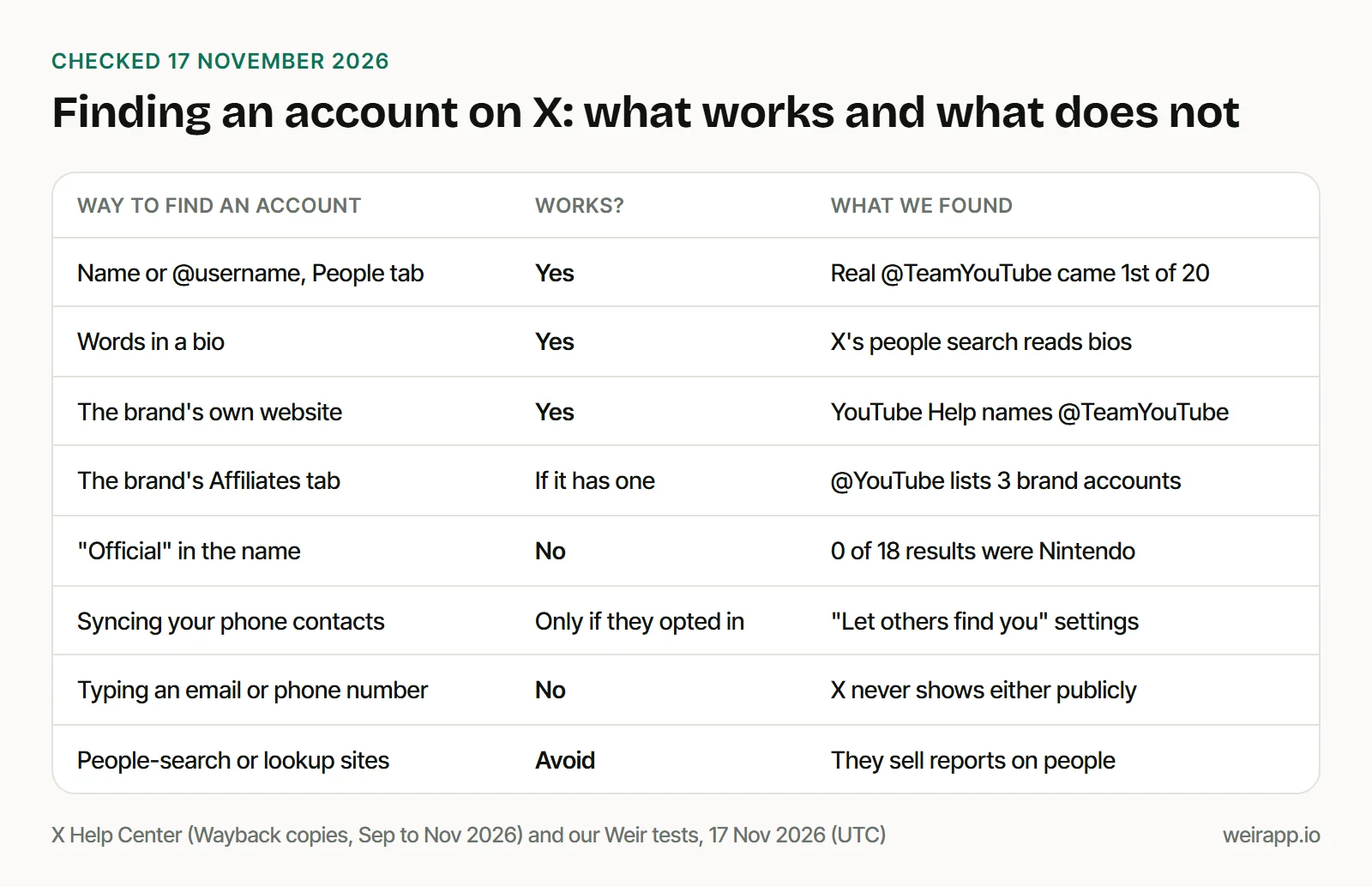
To find someone on Twitter, type their name or @username into the search box and open the People tab.
X (Twitter) has no search by email or phone number. This guide shows what X allows in 2026, checked against its help center today, and how to spot a fake. We run Weir, the API in the examples.
Know a brand's name but not its handle? Paste this into X's search box to see which account people tag:
filter:mentions "Metropolitan Museum of Art" -filter:repliesOr open it filled in and run it without an X account.
- Search the nameThen open the People tab.
- Try bio wordsOr posts that tag the brand.
- Ask the brandIts website and its Affiliates tab.
- Check the accountAbout this account and badges.
- Sync contactsFinds only people who allow it.
Step 1: How to search Twitter by name
X's help center says to type "the person's name or username into the search box." In the app, tap Explore first. Then open People, next to Top and Latest.
Names come first, and copies come with them. We test with brands only, so on 17 November 2026 we searched people for "TeamYouTube", YouTube's support account:
The real one ranked first, with a checkmark and 2.2 million followers. The copy had no checkmark, 113 followers and no posts. We don't name the other 19.
Step 2: Find a Twitter account without the username
No handle? X's developer docs say its user search finds accounts "by name, username, or content in their bio."
- Bio words. Try a role, a product or a city in our free Twitter bio search. It marks bio matches and saves a CSV.
- Two words at most. In our Twitter bio search guide, a third word turned 3 results into 0.
- Posts that tag it. People tag a brand when they name it, as the search at the top shows.
We ran that search for The Met on 17 November 2026. Of 10 posts naming the museum, 8 tagged @metmuseum. No other account showed up twice.
Step 3: Let the brand point you to its real account
The brand itself is the surest source. Look in three places:
- Its website. YouTube's help page calls @TeamYouTube "YouTube's support and education team" and lists 15 other official handles.
- Its Affiliates tab. X's Premium Business page says Full Access subscribers get a profile tab "that lists all affiliated accounts." Affiliates wear a small badge of the parent's picture.
- Its own posts. If the main account sends people to a handle, that handle is real.
For the third place, search the main account's posts for the handle, or open it filled in:
from:YouTube @TeamYouTube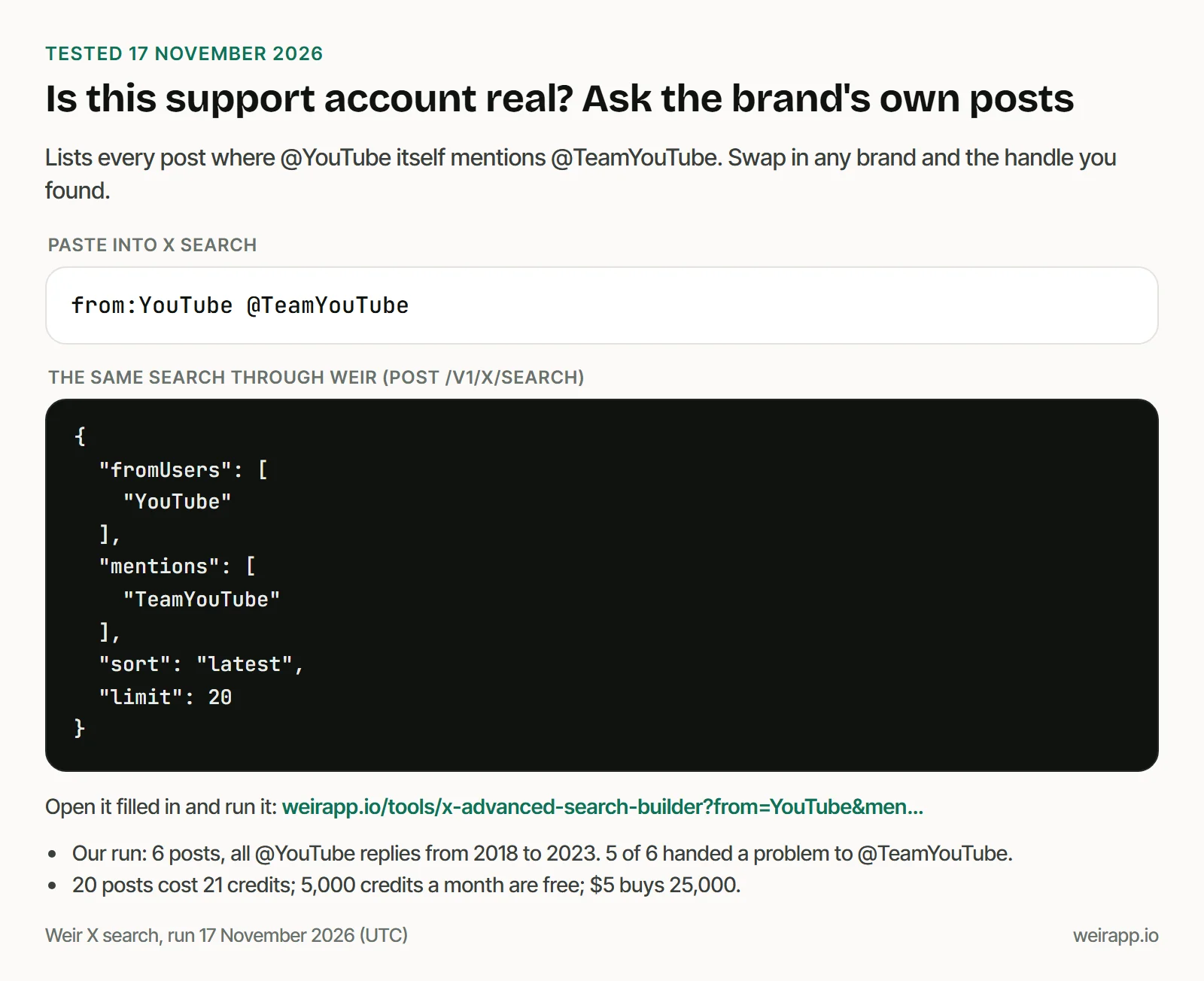
It found 6 replies from @YouTube, the newest from 2023. Five handed a problem to @TeamYouTube, such as "Please reach out to @TeamYouTube for help!"
Step 4: Check the account is real before you DM it
Tap the Joined date on a profile to open "About this account." X's help center says its country is "inferred only by your aggregated IP addresses." We read @TeamYouTube's through Weir for 3 credits:
{
  "username": "TeamYouTube",
  "createdAt": "2015-02-19T18:37:53.000Z",
  "profileImageShape": "Square",
  "aboutProfile": {
    "accountBasedIn": "United States",
    "locationAccurate": true,
    "source": "Web",
    "usernameChanges": { "count": 0 }
  }
}
Read it with the other signs:
- A gold check and a square picture mark a business, per X's Premium Business page.
- An affiliate badge links to the parent brand.
- "Official" in a name proves nothing. None of our "Nintendo official" results was Nintendo's.
Our free X account location checker reads this screen for 10 accounts at once. With Claude or ChatGPT and Weir connected, one prompt runs every check:
Find YouTube's official support account on X and check that it's real. Use About this account, and see whether @YouTube's own posts point to it. Count look-alike accounts, but don't name them.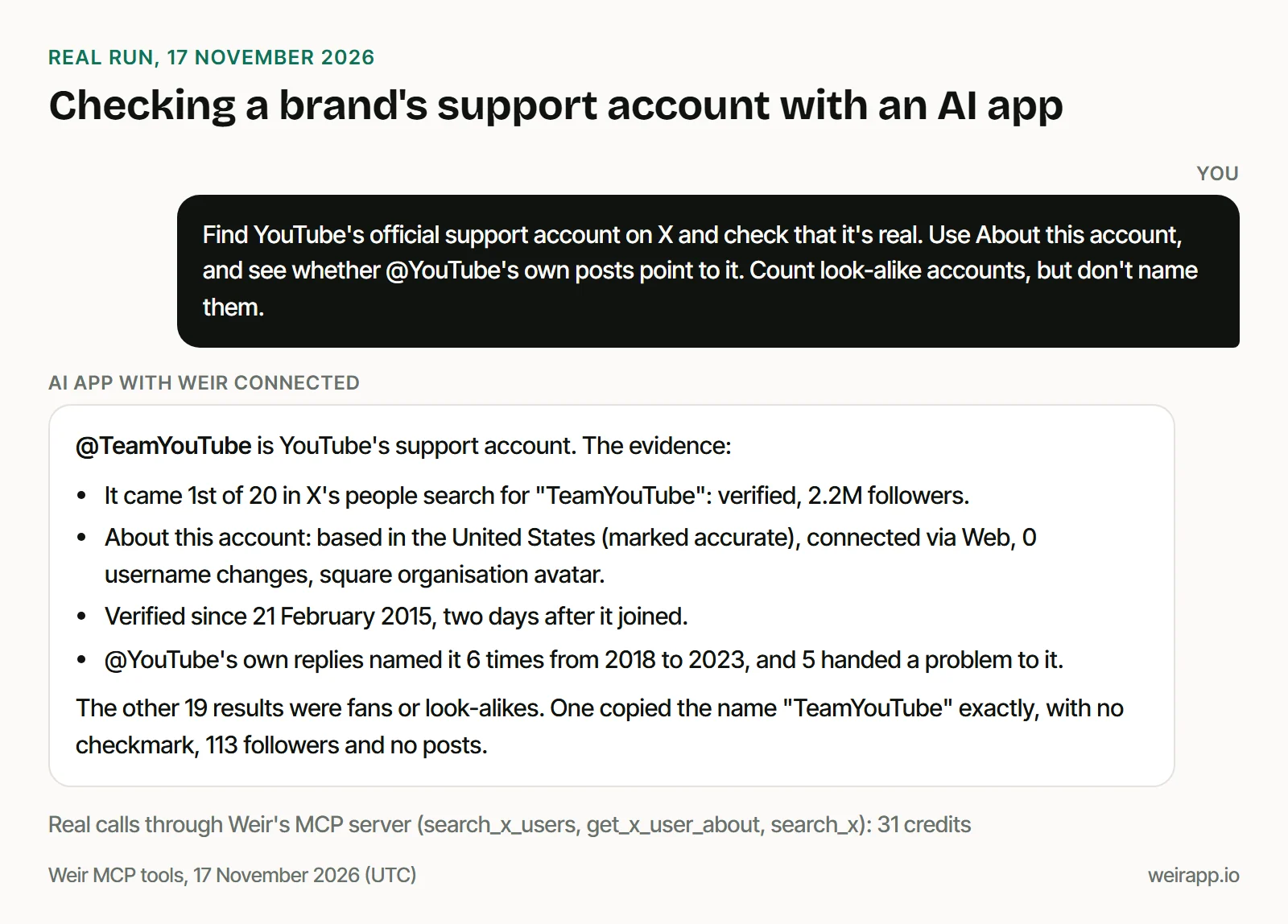
What it costs: a 40-account bio search costs about 42 credits and an About check costs 3; 5,000 credits a month are free; $5 buys 25,000.
Can you find someone on Twitter by phone number or email?
Not by typing it in: X's help center describes no search by email or phone number. Contact syncing is the only route. It finds only people who turned on the matching setting under Privacy and safety:
- In the app: "Let others find you by your email" and "Let others find you by your phone."
- On x.com: "Let people who have your email address find you on X," and the same for a phone number.
X adds that your email and phone number "are not publicly displayed on X, even if you have enabled the setting." The same settings decide whether X suggests your account to people who have your details in their contacts.
In August 2022, Twitter called this kind of lookup a vulnerability. A bug had told anyone which account an email or phone number belonged to. It was fixed, but someone had already used it and offered the data for sale.
How to find friends on Twitter from your contacts
X's help center gives these steps for the app:
- Tap your profile icon, then Settings and privacy.
- Tap Privacy and safety, then Discoverability and contacts.
- Tap Sync address book contacts.
- X shows the contacts already on X who allow others to find them.
Syncing uploads your address book "on an ongoing basis." Remove all contacts deletes the upload and turns syncing off on every device.
The web importer is gone from X's help page. In 2018, the page described a "Find friends" button that read your email contacts. Today x.com only lets you view and remove them.
Syncing also uploads your friends' details, so ask whether they'd mind.
If you still can't find the account
- Its posts are protected. The account can still appear in People, but its posts "will only be searchable on X by you and your followers."
- Your filters are narrow. Switch to All people and Everywhere.
- The handle changed. See our guide to Twitter username history.
- You only have a numeric ID. Our Twitter user ID lookup guide turns it into today's handle.
When not to use Weir
- You want to find a private person. Weir isn't a people finder, and X's own search is free.
- An email or phone number is the goal. Weir returns neither, and X doesn't publish them.
- One brand account needs checking. Tapping its Joined date on X costs nothing.
- Your project needs X's own terms. Weir reads public data only and isn't licensed by X, so access can change.
FAQ
Can you find someone on Twitter by phone number?
Only through contact syncing. Save the number in your phone, then turn on Sync address book contacts in the X app. The account appears only if its owner turned on "Let others find you by your phone."
Can you find people by email on Twitter?
Only if the email is in contacts you sync, and only if that person allows it. X says emails are not shown publicly, so treat any site that promises an email lookup with suspicion.
How do I find someone's Twitter without knowing their username?
Search their name or two bio words, then open the People tab. For a brand, check its website and Affiliates tab, or search posts that name it and see which account people tag.
Sources
Checked 17 November 2026; X's help pages as Wayback copies, dated in brackets:
- X Help, email and phone discoverability (5 October 2026): https://help.x.com/en/safety-and-security/email-and-phone-discoverability-settings
- X Help, upload and manage contacts (11 September 2026): https://help.x.com/en/using-x/upload-your-contacts-to-search-for-friends
- Twitter Help, the same page in 2018 (11 August 2018): https://help.twitter.com/en/using-twitter/upload-your-contacts-to-search-for-friends
- X Help, account suggestions (15 November 2026): https://help.x.com/en/using-x/account-suggestions
- X Help, find people (26 February 2026): https://help.x.com/en/using-x/x-search-people
- X Help, country settings and About this Account (8 May 2026): https://help.x.com/en/managing-your-account/how-to-change-country-settings
- X Help, protected posts (19 September 2026): https://help.x.com/en/safety-and-security/public-and-protected-posts
- X Help, search filters (20 October 2026): https://help.x.com/en/using-x/x-search
- X Help, Premium Business (4 November 2026): https://help.x.com/en/using-x/premium-business
- Twitter Privacy Center, lookup incident (5 August 2022; copy of 27 October 2026): https://privacy.x.com/en/blog/2022/an-issue-affecting-some-anonymous-accounts
- X API docs, user search: https://docs.x.com/x-api/users/search/introduction
- YouTube Help, @TeamYouTube: https://support.google.com/youtube/answer/13646088
- FTC, people search sites (July 2022): https://consumer.ftc.gov/articles/what-know-about-people-search-sites-sell-your-information
- Weir API reference and billing: https://docs.weirapp.io/reference/x/searchXUsers, https://docs.weirapp.io/reference/x/getXUserAbout and https://docs.weirapp.io/billing
- Our Weir calls, 17 November 2026: 9 calls, 80 credits