Who Doesn't Follow Me Back on Twitter? Free, No Login (2026)
See who doesn't follow you back on Twitter without giving an app your X login: what X shows, a free checker with a CSV, and a tested Python script.
Weir Team
Published · Updated · 7 min read
To see who doesn't follow you back on Twitter, compare your Following list with your followers: anyone missing from your followers doesn't follow back.
X (Twitter) has no list for this, as of 17 November 2026. Our free not-following-back checker compares the two for any public account, with no X login, and saves a CSV. We run Weir, the service behind it.
Use Claude or ChatGPT with Weir connected? Paste this, with your username:
Use Weir to find which accounts @yourname follows that don't follow it back. Call get_x_user_following and get_x_user_followers, and pass meta.nextCursor back until it is null each time. Compare the two lists by account id. Tell me how many don't follow back, then list them with username and follower count.- Open the checker/tools/twitter-not-following-back, with a free Weir sign-in.
- Type a usernameYours or a brand's. It must be public.
- Read the listAccounts it follows that don't follow it back.
- Save the CSVReview it before you unfollow anyone by hand.
Does X show who doesn't follow you back?
No. X's Help Center describes no such list, as of 17 November 2026. Its Following FAQs say following "isn't mutual": "you don't have to approve it or follow them back."
Here is what X itself gives you:
- Two lists to scroll. Your Following list and your Followers list, with nothing that compares them.
- A tag to check by hand. Guides point to a "Follows you" tag on profiles. X's Help Center doesn't describe it, so check a profile yourself.
- Your archive. It holds "a list of your followers, a list of accounts that you are following," as ids. Compare
data/follower.jswithdata/following.js. - A flag only for apps. X's API has a
followed_bystatus, but only for "the authenticating user."
That's one reason apps ask you to sign in with X. Here are all the ways side by side:
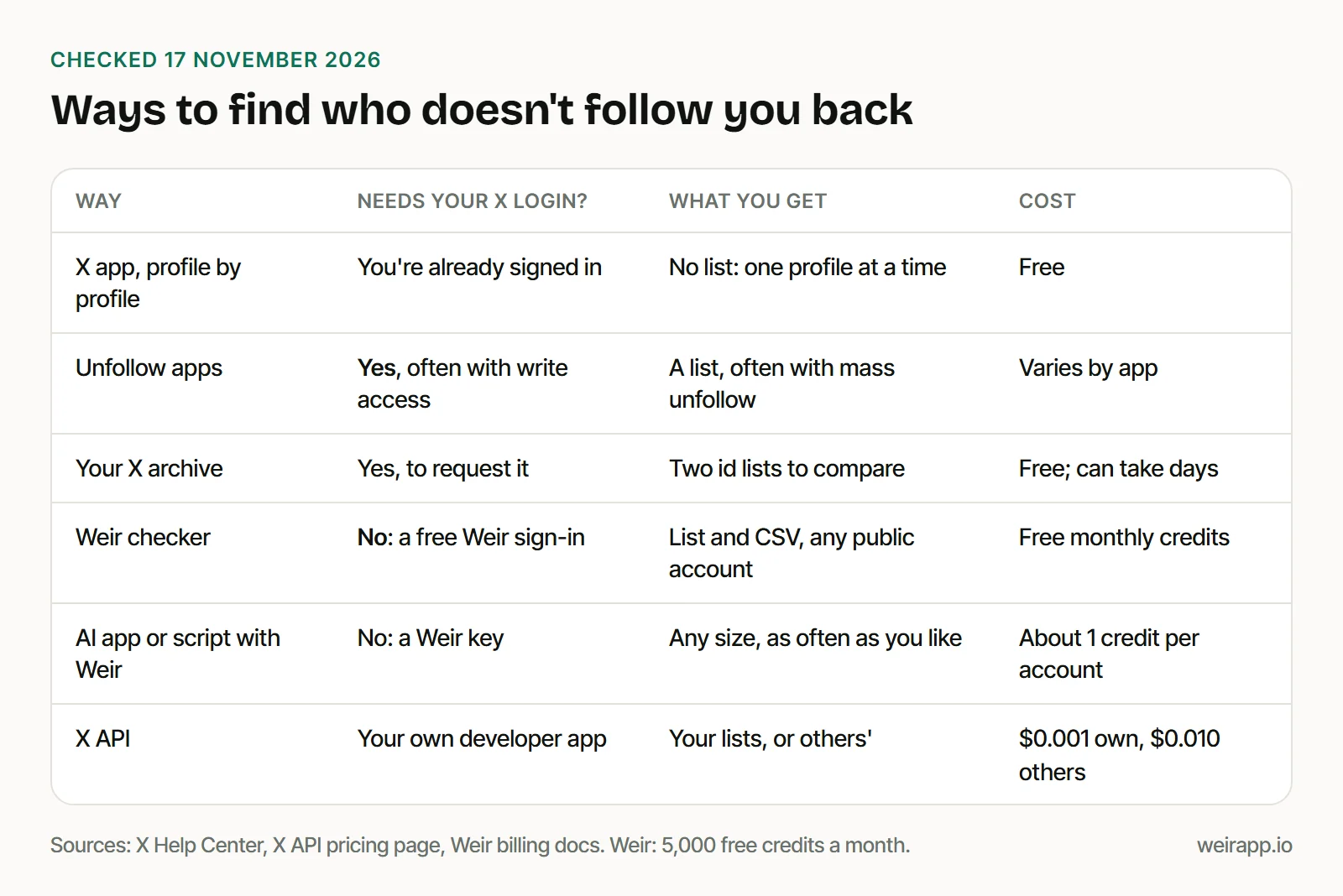
Check who doesn't follow you back on Twitter without your X login
Our checker skips X's flag. It reads two public lists for a username, then shows every account it follows that isn't among its followers. A second tab shows the reverse. Sort either list by follower count, or save it as a CSV.
- No X login. You sign in to Weir with Google, GitHub or email, never with X.
- No app permission. Nothing connects to your X account, so nothing can post or unfollow for you.
- Public accounts only. Yours, or a brand you manage. Protected lists can't be read.
- Up to about 400 follows and 500 followers. It reads the newest first and tells you when a list was cut short.
- Free credits. About 1 credit per account read, from your 5,000 free credits a month.
What we found on a public library's account
We ran the same comparison on @westbranchpl, the West Branch Library in Iowa, with the script below. On 17 November 2026 it took 6 calls and 270 credits.
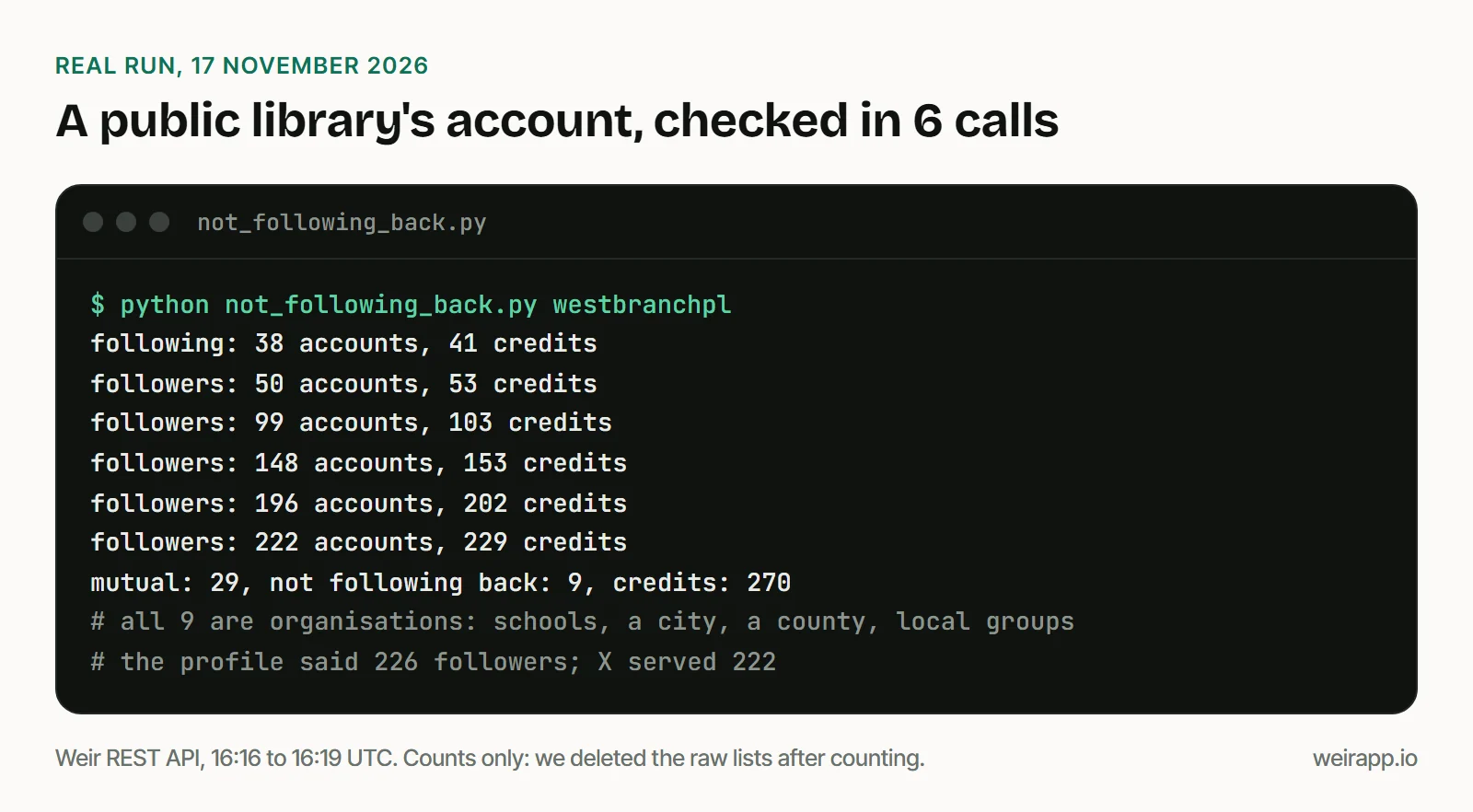
Three things stood out:
- All 9 were organisations. Schools, a city, a county and local groups, not people.
- Most were old follows. Six of the 9 sat in the last ten rows, and X lists follows mostly newest first.
- The count was 4 short. The profile said 226 followers, but X served 222.
So read your list before you act. A brand or news account that doesn't follow back is normal.
The 29 on both lists are the library's mutuals. To compare two accounts' audiences, see Twitter mutual followers.
Check a big account with an AI prompt or Python
Past the checker's limits, or for a weekly check, use the prompt at the top or this script. It needs Python 3 and a free Weir key in WEIR_API_KEY.
The first part reads one whole list, page by page, until meta.nextCursor is null:
import csv, json, os, sys, time, urllib.request

def walk(user, kind):  # kind: "following" or "followers"
    rows, cursor, spent = {}, "", 0
    for _ in range(100):  # page cap
        req = urllib.request.Request(f"https://api.weirapp.io/v1/x/users/{user}/{kind}?{cursor}",
                                     headers={"Authorization": "Bearer " + os.environ["WEIR_API_KEY"]})
        with urllib.request.urlopen(req, timeout=60) as r:  # 402: out of credits, 404: protected
            page, spent = json.load(r), spent + int(r.headers["x-credits-charged"])
        rows.update((a["id"], a) for a in page["data"])
        print(f"{kind}: {len(rows)} accounts, {spent} credits")
        if not page["meta"]["nextCursor"]: return rows, spent
        cursor = "cursor=" + page["meta"]["nextCursor"]; time.sleep(7)  # free tier: 10 calls a minute
    sys.exit(f"{kind}: page cap hit, so the list is partial")
The second part compares the lists by id and writes the CSV:
user = sys.argv[1]
(following, c1), (followers, c2) = walk(user, "following"), walk(user, "followers")
nope = [a for i, a in following.items() if i not in followers]
print(f"mutual: {len(following) - len(nope)}, not following back: {len(nope)}, credits: {c1 + c2}")
with open(f"{user}-not-following-back.csv", "w", newline="", encoding="utf-8-sig") as f:
    w = csv.DictWriter(f, ["id", "username", "name", "followersCount"], extrasaction="ignore")
    w.writeheader(); w.writerows(nope)
Save both as not_following_back.py and run python not_following_back.py yourname. It printed the library lines shown above. We paused 31 seconds between calls, as our test account is shared.
For bios and join dates too, see how to export Twitter followers to CSV.
What does a not-following-back check cost?
Each list costs 1 credit per account and 1 per call, plus 2 to look up the account. So 300 following and 400 followers come to about 715 credits.
- Weir: about 715 credits. 5,000 credits a month are free, and $5 buys 25,000.
- X's API charges $0.010 per account, or $0.001 for your own lists through your own developer app.
- TwitterAPI.io lists these reads from $0.01 per 1,000 accounts, far below our rate.
Why not give an unfollow app your X login?
Most top results for this search point to apps that connect to your X account. Circleboom's guide, for one, says to "authorize Circleboom with your Twitter account."
X's Help Center spells out what that access can mean:
- Read access lets an app "see who you follow, mute, and block."
- Read and write adds "follow and unfollow accounts for you," and posting.
- Your password lets someone "gain complete control of your account."
A non-follower list needs none of that. To remove apps you connected before, open Settings and privacy, then Apps and sessions.
If the list looks wrong
- A
404: the account is protected, suspended or gone. It costs nothing. - A follower shows up anyway: the checker may have read your followers only in part, and it says so. Run the script for full lists.
- A
429: the free pool is busy. Wait theRetry-Afterseconds, then retry. - A
402: you're out of credits. Free credits return on the 1st of each month (UTC).
When not to use Weir
- You check a few accounts. Open their profiles on X for free.
- Your account is protected. Compare the two files in your X archive.
- You check huge accounts daily. TwitterAPI.io's follower reads cost far less.
- You need X's own terms. Weir isn't licensed by X, so access can change.
X's Terms of Service say you "cannot scrape the Services without X's express written permission." This isn't legal advice.
FAQ
How do I see who doesn't follow me back on X?
X has no list for it. Compare your Following list with your followers: anyone missing from your followers doesn't follow back. Our free checker does it for any public account.
Is there a free Twitter follow back checker?
Yes. Ours runs on Weir's 5,000 free monthly credits, enough for about six checks of 300 following and 400 followers. Your X archive is free too, but X says it may take a few days, and it lists ids, not names.
Is it safe to unfollow everyone who doesn't follow me back?
Not in bulk. X's automation rules forbid bulk or aggressive unfollowing, and apps that do it need write access to your account. Unfollow by hand, and keep the news, brands and people you still read.
Is a non-follower the same as an unfollower?
No. A non-follower never followed you back. An unfollower followed you, then left, and you need two saved lists to spot one. Our guide to who unfollowed me on Twitter shows how.
Sources
Checked 17 November 2026. X's help pages are Wayback copies, dated in brackets:
- X Help Center, Following FAQs (17 October 2026): https://help.x.com/en/using-x/following-faqs
- X Help Center, third-party apps (13 November 2026): https://help.x.com/en/managing-your-account/connect-or-revoke-access-to-third-party-apps
- X Help Center, automation rules (1 November 2026): https://help.x.com/en/rules-and-policies/x-automation
- X Help Center, your X archive (3 November 2026): https://help.x.com/en/managing-your-account/how-to-download-your-x-archive
- X API data dictionary and pricing: https://docs.x.com/x-api/fundamentals/data-dictionary and https://docs.x.com/x-api/getting-started/pricing
- X Terms of Service, effective 9 October 2026 (14 November 2026): https://x.com/en/tos
- An X archive README, 25 December 2022, published by BitFolk: https://bitfolk.com/twitter-archive/data/README.txt
- Circleboom's guide: https://circleboom.com/blog/how-do-you-know-whos-not-following-you-back-on-twitter/
- TwitterAPI.io pricing: https://twitterapi.io/pricing
- Weir docs: https://docs.weirapp.io/reference/x/getXUserFollowing, https://docs.weirapp.io/billing and https://docs.weirapp.io/mcp
- Our run on @westbranchpl, Weir REST API, 17 November 2026, 16:16 to 16:19 UTC, 270 credits