Export Twitter Following List to CSV or Excel (2026)
Export a Twitter following list: your own from your X archive, any public account with 15 lines of Python. Plus what X shows, its order, and real costs.
To export a Twitter following list, download your Twitter archive for your own list, or run a short script for any public account.
X (Twitter) has no export button on the Following tab, as of 17 November 2026.
If you need that list in Excel or a CSV file, you get both exports here, plus our real run on @NASA's list. We run Weir, the API the script calls.
Use Claude or ChatGPT with Weir connected? Paste this:
Use Weir to list every account @OpenAI follows. Call get_x_user_following and pass meta.nextCursor back until it is null. Show each account's name, username and follower count, then tell me how many are verified.- Pick your routeYour own list, or a public account's.
- Run the scriptPass a username. It follows the cursor to the end.
- Open the CSVExcel and Google Sheets read it as it is.
How to see who someone follows on Twitter
Open the account's profile and click Following, under the bio. X's Following FAQs describe the same list on your own profile: "Tap or click on Following on your profile or home page to see who you've followed."
The tab has two gaps, as of 17 November 2026:
- No export. X's Help Center describes no download for it, only your own archive.
- No dates. Nothing says when a follow happened.
Is the Twitter following list in order?
Mostly newest first. X's docs for its older friends/ids endpoint say results come "with the most recent following first," but warn the order "is subject to unannounced change." Weir's API reference says the same.
Our @NASA export shows how little the order tells you. Row 1 was one of the oldest accounts on the list. Every account created since 2020 sat further down, in rows 21 to 48.
Can you hide who you follow on Twitter?
Not on its own, as of 17 November 2026:
- No setting hides only your Following list. X's Following FAQs name one control: protect your posts.
- Protected means approved. New followers must ask, and "Only followers you approve can see your protected posts."
- Weir stops there too. Its API reference says a protected account's connections are visible only to accounts it approved, so the endpoint answers
404.
Export your own Twitter following list from your X archive
Your archive is free, and it's the one export X itself offers. X's help page says it holds "a list of accounts that you are following."
Go to Settings and privacy, Account, Your X data, then tap Request data. X says it "may take a few days" to prepare.
Unzip it and open data/following.js. Here is its shape, with @NASA's id as the example:
window.YTD.following.part0 = [ {
  "following" : {
    "accountId" : "11348282",
    "userLink" : "https://twitter.com/intent/user?user_id=11348282"
  }
} ]
That's all you get: an id and a link per account, with no names. The README in an archive X built in December 2022 lists only those two fields.
Our free archive viewer reads posts only, so it can't open this file.
For names, run the script below on your own username, if your account is public. If it's protected, Weir's profile lookup turns up to 100 ids per call into names, at 2 credits each.
Export any public account's following list to CSV with Python
Weir's endpoint is GET /v1/x/users/{user}/following. Our Twitter followers API page lists every field each account carries.
X picks the page size, about 70. This script sends meta.nextCursor back until it's null, then writes the CSV:
import csv, json, os, sys, time, urllib.request

FIELDS = ["id", "username", "name", "verified", "protected", "followersCount", "createdAt", "description"]
user, cursor, rows, spent = sys.argv[1], "", {}, 0
for _ in range(80):  # page cap: about 5,600 accounts
    req = urllib.request.Request(f"https://api.weirapp.io/v1/x/users/{user}/following?{cursor}",
                                 headers={"Authorization": "Bearer " + os.environ["WEIR_API_KEY"]})
    with urllib.request.urlopen(req, timeout=60) as r:  # 402: out of credits, 404: protected or missing
        page, spent = json.load(r), spent + int(r.headers["x-credits-charged"])
    rows.update((a["id"], a) for a in page["data"])  # each account once
    print(f"{len(rows)} accounts, {spent} credits")
    if not page["meta"]["nextCursor"]: break
    cursor = "cursor=" + page["meta"]["nextCursor"]; time.sleep(7)  # free tier: 10 calls a minute
with open(f"{user}-following.csv", "w", newline="", encoding="utf-8-sig") as f:
    w = csv.DictWriter(f, FIELDS, extrasaction="ignore"); w.writeheader(); w.writerows(rows.values())
Save it as following_to_csv.py, set WEIR_API_KEY to your free key, and run python following_to_csv.py NASA. Three details matter:
- Two stops. A
nullcursor ends it, and the page cap limits your bill. - A 7-second pause. The free tier allows 30 requests a minute, and this endpoint counts as 3.
- Excel-ready text. The
utf-8-sigsetting keeps emoji and accents intact in Excel.
What we got from @NASA's following list
We ran the script on @NASA on 17 November 2026, at 08:44 UTC:
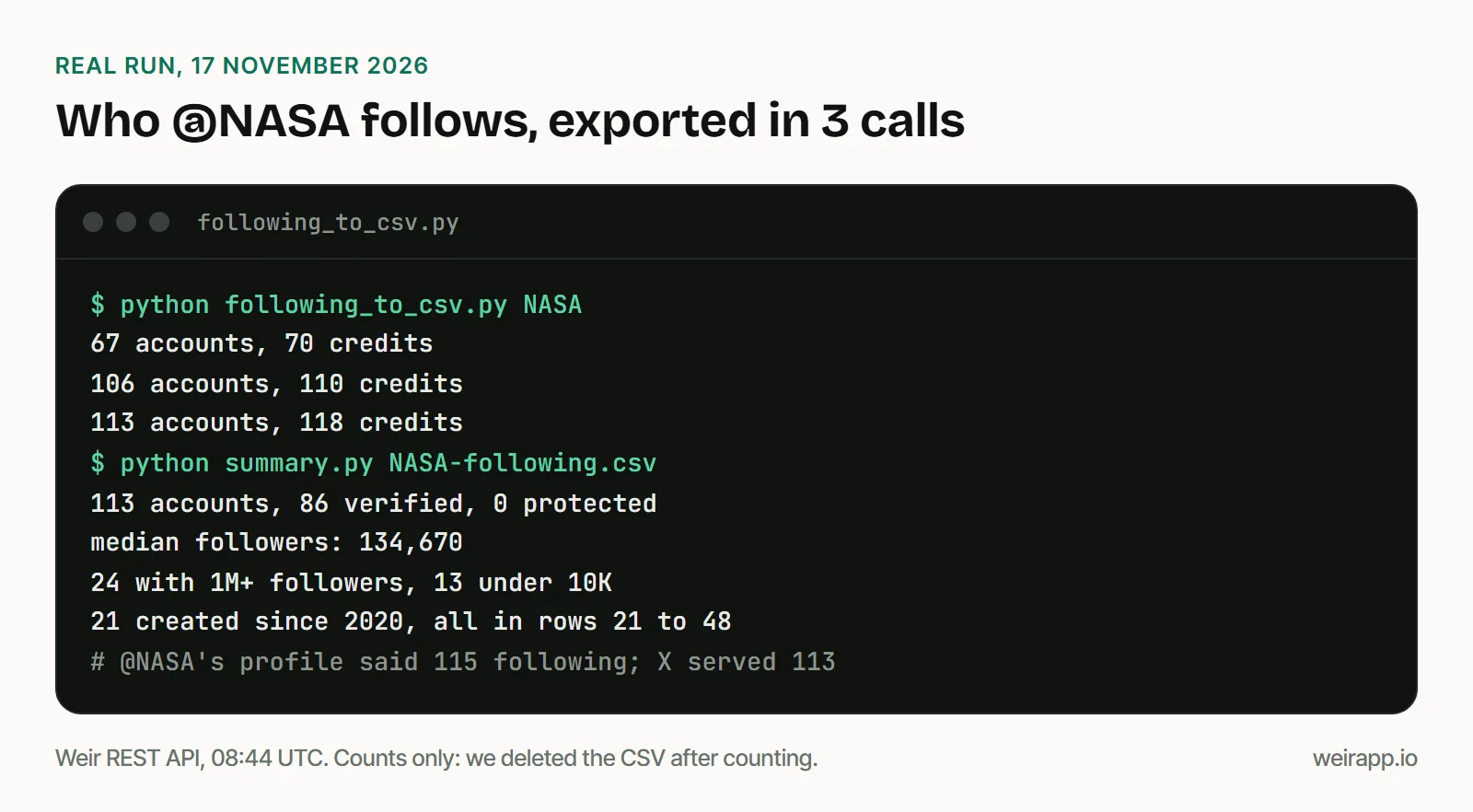
We counted the file, then deleted it. A following list names real people, so keep yours private and never use it for cold messages.
Three things surprised us:
- X chose small pages. Ours held 67, 39 and 7 accounts.
- The count was off. NASA's profile said 115 following, but X served 113.
- It's mostly NASA. 41 of the 113 accounts carry "NASA" in their handle or name.
Want the accounts two brands both follow? Compare their ids, as our mutual followers guide does with followers.
Ask your AI app instead of writing code
With Weir connected, the prompt at the top does the same job: your AI app calls get_x_user_following page by page. We tried it on @OpenAI, which follows 4 accounts:
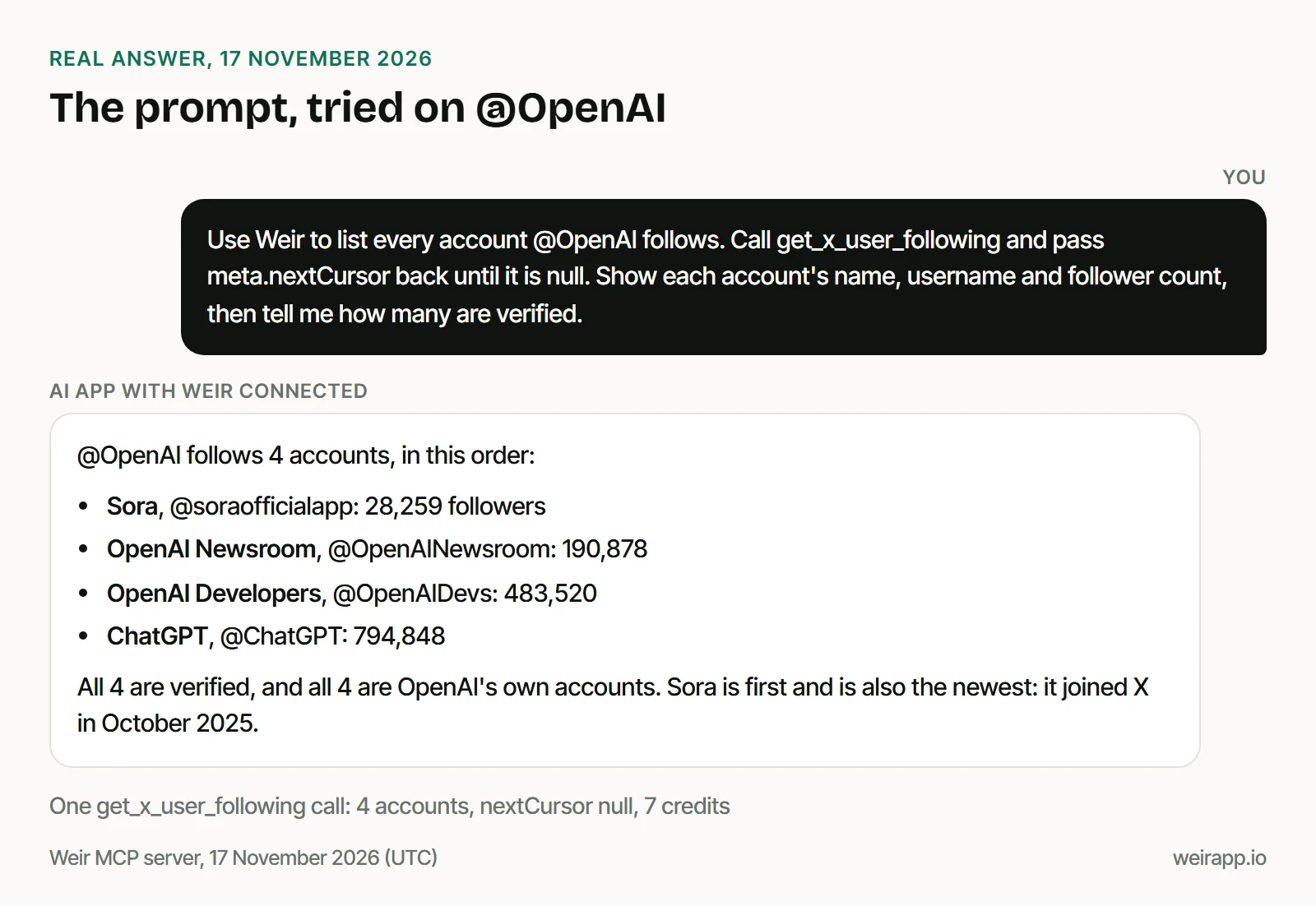
It took one call and 7 credits. For lists in the hundreds, use the script: it writes a file instead of filling your chat.
Which way should you export a following list?
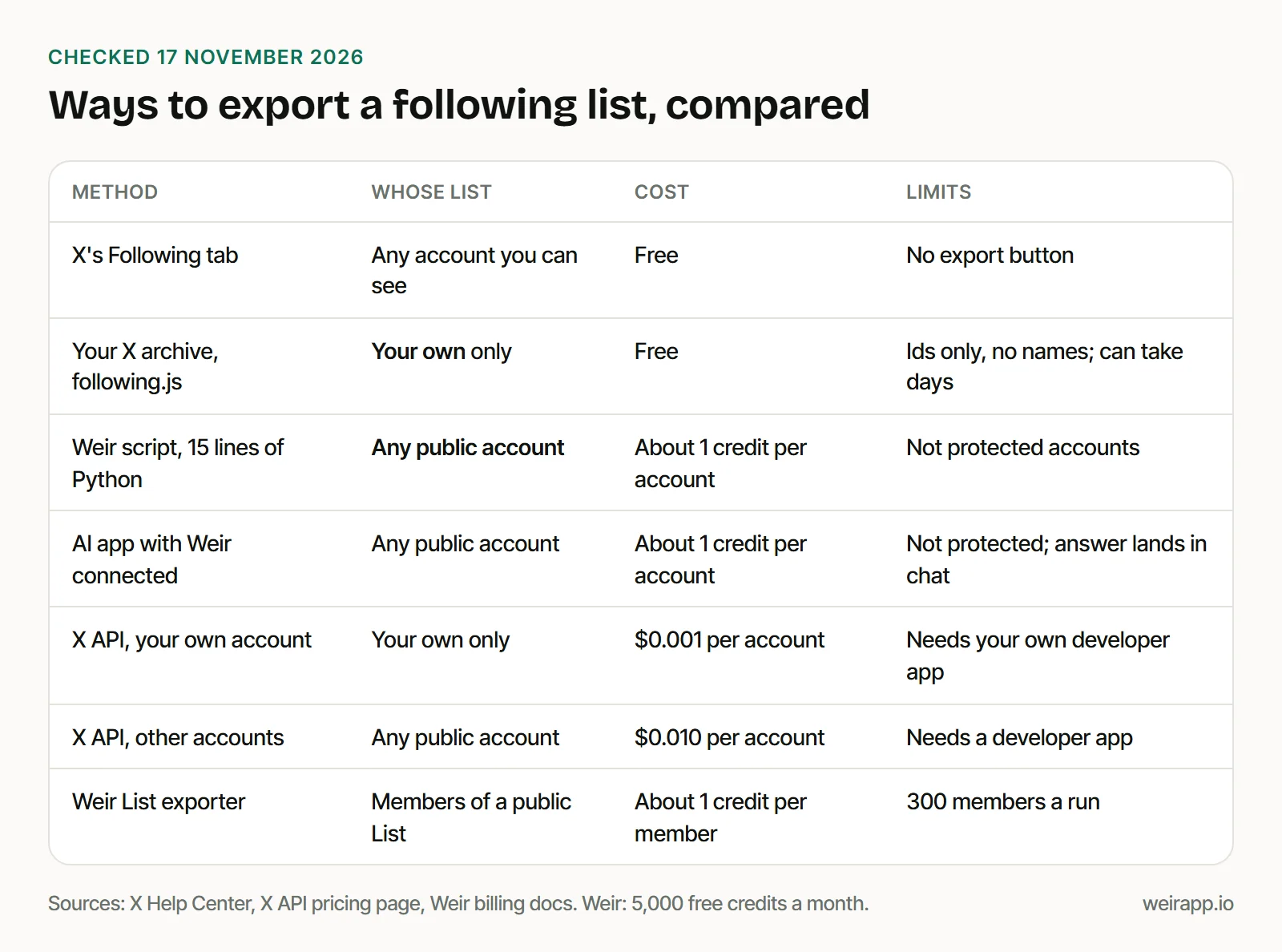
Pick by whose list it is:
- Your own, once: the archive. It's free, but you get ids only.
- Your own, often: X's API reads it at $0.001 an account, with your own developer app.
- Any public account: the script or the prompt, at about 1 credit an account.
- Accounts in an X List: our free List exporter saves up to 300 members a run.
What does it cost to export a following list?
Weir charges 1 credit per account and 1 per page, plus 2 on the first page to look up the account. So 1,000 accounts cost about 1,017 credits:
@NASA's 113 accounts cost 118 credits; 5,000 credits a month are free; $5 buys 25,000.
If the export fails or looks wrong
- A
404error: the account is protected, suspended or gone. It costs nothing. - A
429error: too fast, or the free pool is busy. Wait theRetry-Afterseconds and run it again. - A
402error: you're out of credits. Free credits return on the 1st of each month (UTC). - Ids like 1.98E+18 in Excel: import the id column as text.
When not to use Weir
- You need your own list once. Your archive is free.
- You export big lists often. TwitterAPI.io lists followings from $0.01 per 1,000 as of November 2026. That's 10 to 20 times less than Weir.
- You need follow dates. Neither Weir nor your archive has them.
- You need X's own terms. Weir isn't licensed by X, so access can change.
X's Terms of Service say you "cannot scrape the Services without X's express written permission." This isn't legal advice.
FAQ
How do I download my Twitter following list to Excel?
Request your X archive and open data/following.js, which lists everyone you follow by id. For names and follower counts, run the script above on your own username. Excel opens its CSV directly.
Can you see who someone recently followed on Twitter?
Roughly. The Following tab lists accounts mostly newest first, so the top rows hint at recent follows. X shows no dates, so export the list twice, weeks apart, and compare.
Can I export the following list of a private account?
No. Weir reads public data only and answers 404 for a protected account, at no charge. For your own protected account, your X archive still lists everyone you follow.
Sources
Checked 17 November 2026. X's help pages are Wayback copies, dated in brackets:
- X Help Center, Following FAQs (17 October 2026): https://help.x.com/en/using-x/following-faqs
- X Help Center, download your X archive (3 November 2026): https://help.x.com/en/managing-your-account/how-to-download-your-x-archive
- X developer docs, GET friends/ids, v1.1 (16 January 2026): https://developer.x.com/en/docs/x-api/v1/accounts-and-users/follow-search-get-users/api-reference/get-friends-ids
- X API pricing and Owned Reads: https://docs.x.com/x-api/getting-started/pricing
- X Terms of Service, effective 9 October 2026 (14 November 2026): https://x.com/en/tos
- An X archive README, generated 25 December 2022, published by BitFolk: https://bitfolk.com/twitter-archive/data/README.txt
- TwitterAPI.io pricing: https://twitterapi.io/pricing
- Weir following and profile lookup references: https://docs.weirapp.io/reference/x/getXUserFollowing and https://docs.weirapp.io/reference/x/getXUsers
- Weir billing, tiers and pagination: https://docs.weirapp.io/billing and https://docs.weirapp.io/pagination
- Our runs: @NASA through Weir's REST API and @OpenAI through Weir's MCP server, 17 November 2026