Twitter Advanced Search on Mobile: iPhone & Android (2026)
How to use Twitter advanced search on mobile: operators to type in the X app on iPhone or Android, x.com's form in a browser, and three tested searches.
Weir Team
Published · Updated · 7 min read
On mobile, Twitter advanced search works by typing operators like from: and since: into the app's search box.
X (Twitter) gives its iPhone and Android apps tabs and two filters, but its help pages show no advanced search form there. You get a tested cheat sheet, the web form, and three searches to run on any phone. We run Weir, the API behind our builder.
Paste this into the X app's search box, then tap Latest:
from:SpaceX since:2026-11-01 until:2026-11-15 -filter:replies -filter:nativeretweets- Open searchTap Explore, then the search box.
- Type your operatorsWords plus from:, since: or min_faves:.
- Tap LatestTop is personalized, X says.
- Set People and LocationThe filter icon in the search bar.
- Save itThe overflow icon, then Save.
Can you use Twitter advanced search on mobile?
Yes, but X's help pages show no advanced search form inside its apps.
X's Help Center, in its 20 October 2026 copy, lists tabs such as Latest, People and Videos, plus two search filters behind a filter icon. On iPhone they read All people or People you follow, and Everywhere or Near you. Android says From anyone and Anywhere.
The form itself lives on x.com. "Advanced search is available when you're logged in to X.com," X's advanced search page said on 15 November 2026.
One 2026 guide says newer app versions have a short form with a date filter. X doesn't mention one, and we couldn't check an app ourselves. Operators work either way, because the form only writes them for you: X's own help examples link to searches like since:2013-12-30 until:2014-01-02.
The three routes, side by side:
| Way | What you get | Account you need |
|---|---|---|
| X app search box | Operators, plus People and Location | X |
| x.com/search-advanced | X's full form, in your browser | X |
| Our search builder | A form, date picker and 20 posts | Free Weir sign-in |
Pick the app for quick searches, and the builder when you'd rather not type operators.
Way 1: Type operators into the X search bar
Operators are short commands you type next to your words, and they do everything the form does.
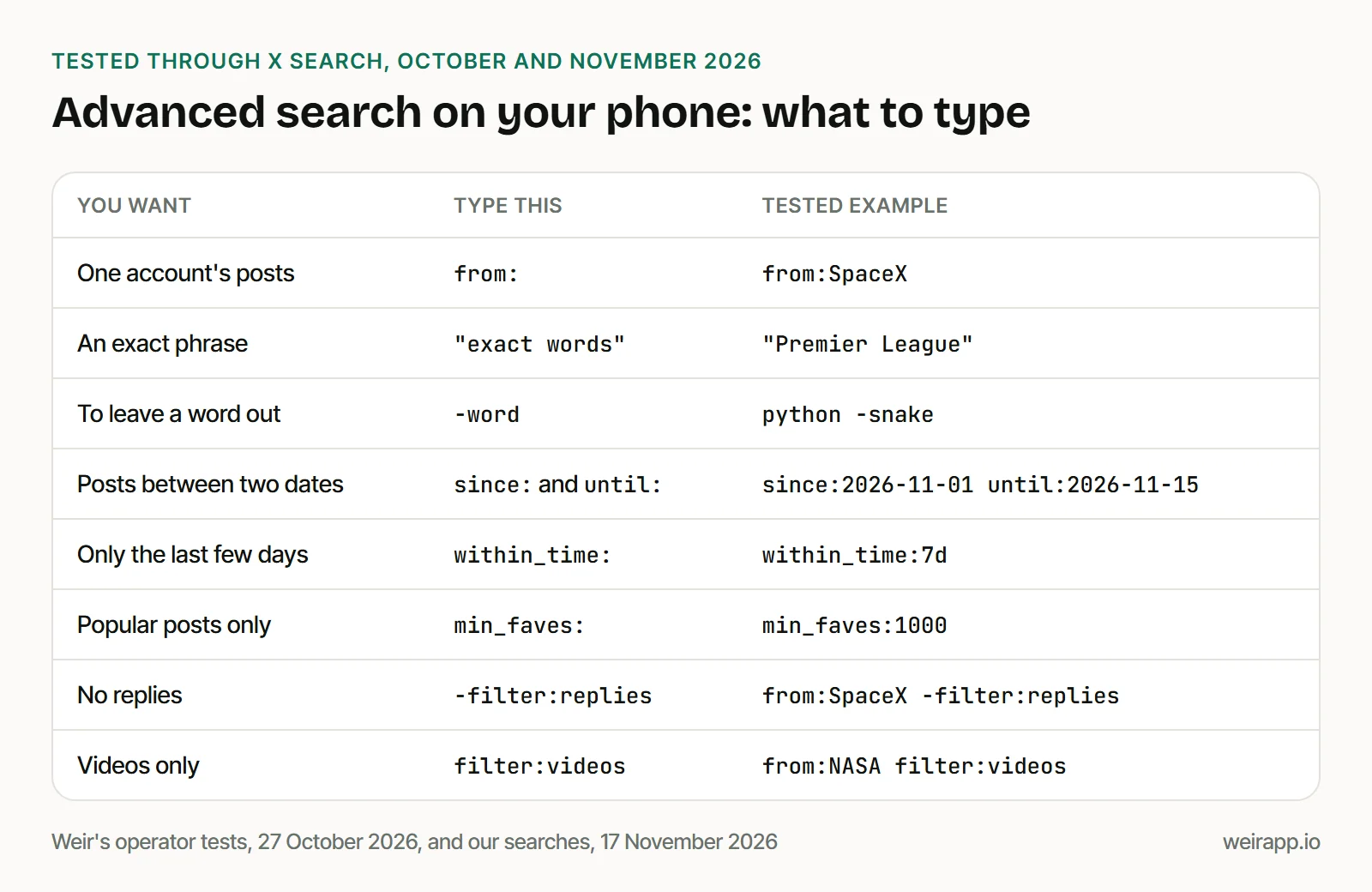
Each one returned matching posts in our operator status test of 27 October 2026. Three habits help on a phone:
- Leave no space after the colon. Type
from:SpaceX, notfrom: SpaceX. - Type
ORin capitals. A lowercase "or" is searched as a plain word. - Curly quotes are fine. Apple says iPhone's Smart Punctuation curls quotes in other apps too. On 17 November 2026, we searched
“league premier”, Premier League flipped. All 10 posts had that flipped order, so X kept the phrase.
Every operator, and the X API's dialect, is in our guide to Twitter advanced search operators.
How to filter Twitter search by date on mobile
Type the dates as operators, since X documents no date filter in its apps.
since:2026-11-01keeps posts from that day on.until:2026-11-15includes the 15th itself.within_time:7dkeeps the last seven days, with no dates to type. Usehfor hours.
Add a word or from: too, since a date alone isn't a search.
Way 2: Open x.com/search-advanced in Safari or Chrome
X's help puts the full form on x.com, so open it in your phone's browser and log in.
- Open x.com/search-advanced in Safari or Chrome.
- Log in to your X account.
- Fill in only the fields you need, such as an account and dates.
- Tap Search.
We could only test this logged out. On 17 November 2026, x.com/search-advanced answered our plain request with a redirect to X's log-in page. Old twitter.com and mobile.twitter.com links ended up there too.
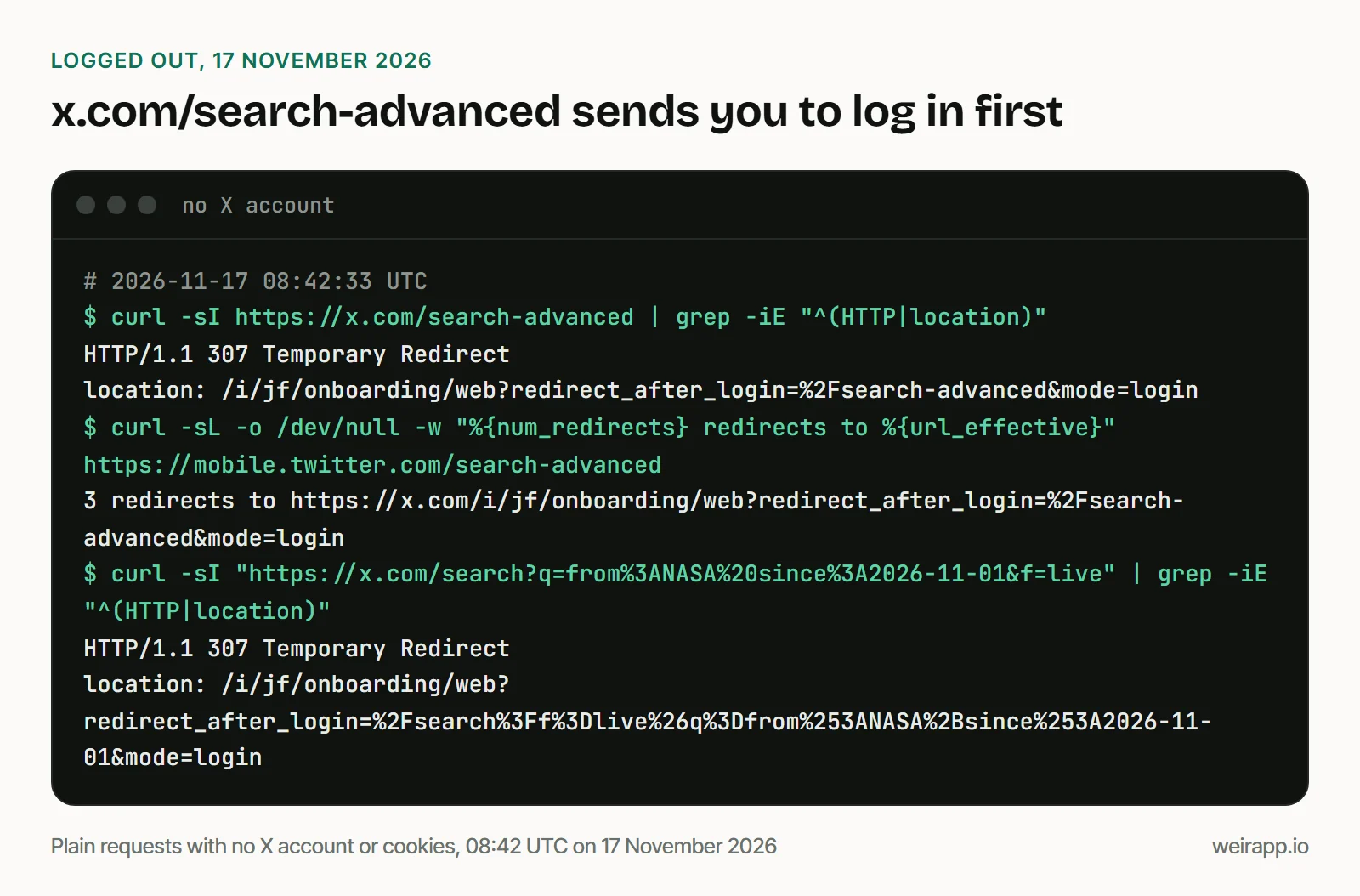
So the form needs an X account. We couldn't check how it looks after log-in.
Way 3: Build and run the search with our free builder
Our X advanced search builder runs in a phone's browser and needs no X account.
Its fields stack into one column on a phone, and the date boxes open your phone's date picker. "Run it here" shows the first 20 posts after a free Weir sign-in, by email or Google with no card. You can save them as a CSV or open the search on x.com.
We ran three recipes on 17 November 2026.
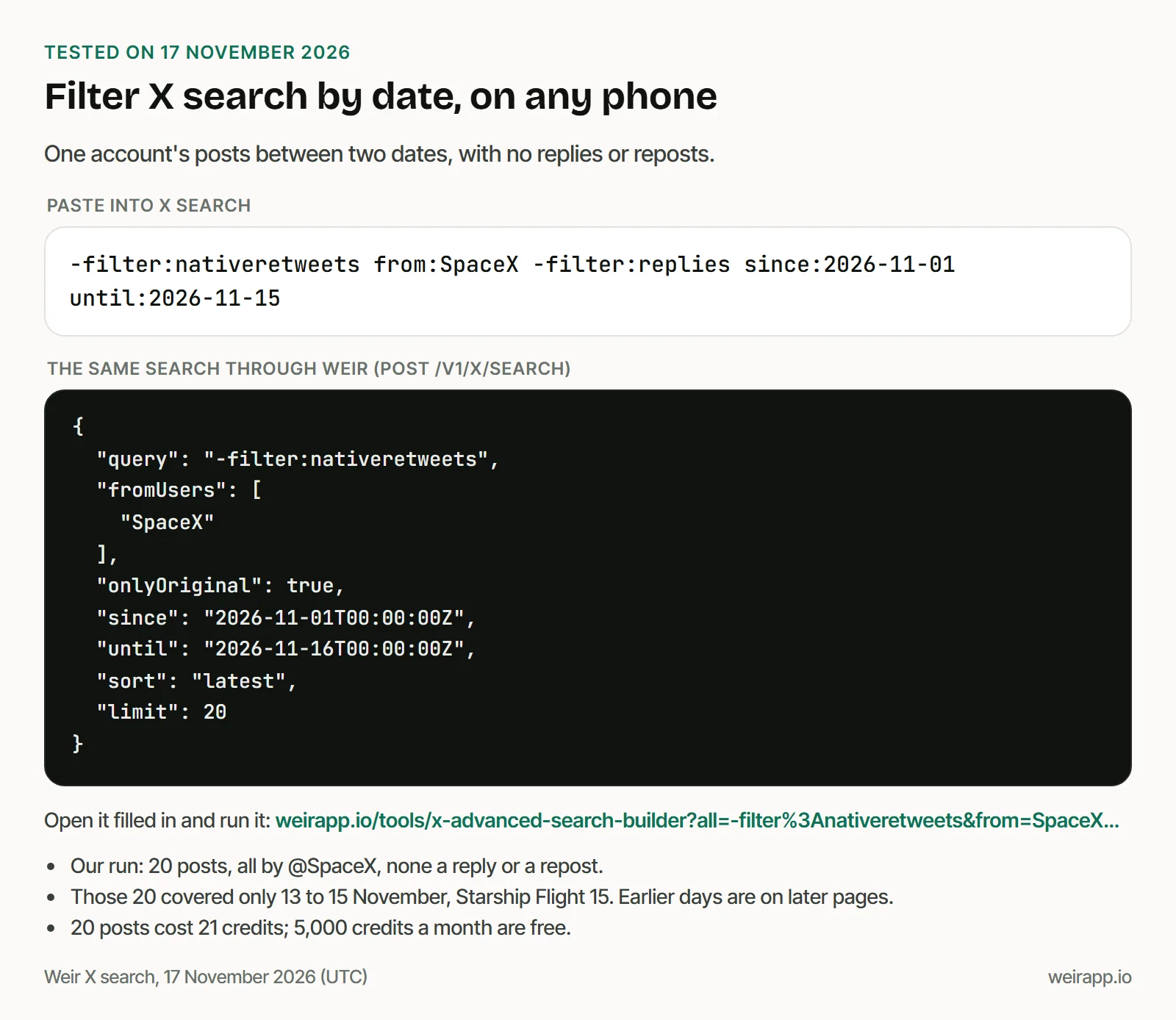
1. One account between two dates:
-filter:nativeretweets from:SpaceX -filter:replies since:2026-11-01 until:2026-11-15Open it filled in. All 20 posts were @SpaceX's own, with no replies or reposts. They only reached back to 13 November, because posts about Starship's Flight 15 filled the page.
2. The most liked posts on a topic this week:
within_time:7d -filter:nativeretweets "Premier League" lang:en min_faves:1000 -filter:repliesOpen it filled in. All 20 posts had over 1,000 likes and came from the past seven days. Of those, 14 came from brands, including @premierleague and @SpursOfficial; 6 were personal accounts.
3. Only videos from one account:
-filter:nativeretweets from:NASA filter:videos -filter:repliesOpen it filled in. All 20 NASA posts carried a video, back to 15 September 2026.
What it costs: 20 posts cost 21 credits; 5,000 credits a month are free; $5 buys 25,000. More ready searches, by goal, are in our X search recipes.
How to save a search on your phone
X's help says saved searches work in the app, not on x.com.
Its steps: run the search, tap the overflow icon at the top of the results, then tap Save. Next time you tap the search box, it's listed under Saved. Tap the X beside it to remove it.
X's saved-search page, last copied on 2 July 2026, says they're "currently not available on x.com." Its search page still lists a desktop Save option.
We read the 20 newest English posts on X that mention saved searches. Seven people said theirs had vanished, five between May and July 2026, most after an app update. We can't confirm what changed.
So keep a backup you control:
- Bookmark a recipe link. Each "Open it filled in" link reopens with its search ready.
- Keep the search as text in a note.
- Let a Weir monitor run it daily. It posts new matches to Slack, Discord or Telegram; the free tier gets one.
If advanced search doesn't work on your phone
- Nothing comes back. Remove one operator at a time, since X changes search without notice.
- You only see people you follow. Tap the filter icon and pick All people, or From anyone on Android.
- Muted or sensitive posts are missing. That's safe search. Android has it under the overflow icon; on iPhone, X says to change it on x.com.
- Your browser shows X's log-in page. The form needs an account, so log in or use the builder.
- Your keyboard types a full-width colon. Switch to a half-width one: in our 5 November 2026 test, X read
filter:videosas plain words.
Other fixes are in our guide to Twitter search not working.
When not to use Weir
- You search now and then. X's own search box is free and takes every operator here.
- You need protected posts, your likes or your feed. Weir reads public posts only, and can't reply or like.
- You need a deal with X. Weir isn't licensed by X, so access can change.
FAQ
Can you use Twitter advanced search on mobile?
Yes. Type operators like from: and since: into the X app's search box, or open x.com/search-advanced in your phone's browser and log in. X's help shows no advanced form inside its apps, only tabs plus People and Location filters.
How do I use X advanced search on iPhone?
Tap Explore, type your words and operators, such as from:SpaceX since:2026-11-01, then tap Search and Latest. For X's full form, open x.com/search-advanced in Safari and log in.
Is there advanced search in the Twitter app for Android?
Not as a form, in X's help pages. Android's filter icon offers From anyone or People you follow, and Anywhere or Near you. Type operators for the rest, or open x.com/search-advanced in Chrome.
How do I filter Twitter search by date on mobile?
Type since: and until: with dates as YYYY-MM-DD, as in from:NASA since:2026-11-01 until:2026-11-15. until: includes its own day. For recent posts, within_time:7d keeps the last seven days.
Sources
Checked 17 November 2026; X's help pages as Wayback copies, dated:
- X Help, how to use X search (20 October 2026): https://help.x.com/en/using-x/x-search
- X Help, how to use advanced search (15 November 2026): https://help.x.com/en/using-x/x-advanced-search
- X Help, how to save searches (2 July 2026, the latest copy): https://help.x.com/en/using-x/saving-searches
- X Help, search result FAQs (31 October 2026): https://help.x.com/en/using-x/top-search-results-faqs
- Apple Support, Pages for iPhone, quotation marks and Smart Punctuation: https://support.apple.com/guide/pages-iphone/format-dashes-and-quotation-marks-tanad45f9cce/ios
- Fedica, guide describing an app form (2026): https://fedica.com/blog/advanced-twitter-search-mobile/
- Our logged-out requests to x.com, twitter.com and mobile.twitter.com, 08:42 UTC
- Weir's operator tests, 27 October 2026: https://weirapp.io/x-search-operators
- Weir docs, searchX and monitors: https://docs.weirapp.io/reference/x/searchX and https://docs.weirapp.io/monitors
- Our seven Weir searches, 107 credits, 17 November 2026