How to Find Articles on X: 3 Searches We Tested (2026)
Find X Articles, the long posts on X: where they sit in the app, three searches we tested on 17 November 2026, and how to rank the best ones yourself.
Weir Team
Published · Updated · 6 min read
To find articles on X, search url:x.com/i/article, which matches posts that share an X Article, then add likes, an author or a date.
This guide is for you if you want to read X's long posts, or if you write them and want to study what wins. We ran every search below on 17 November 2026. We run Weir.
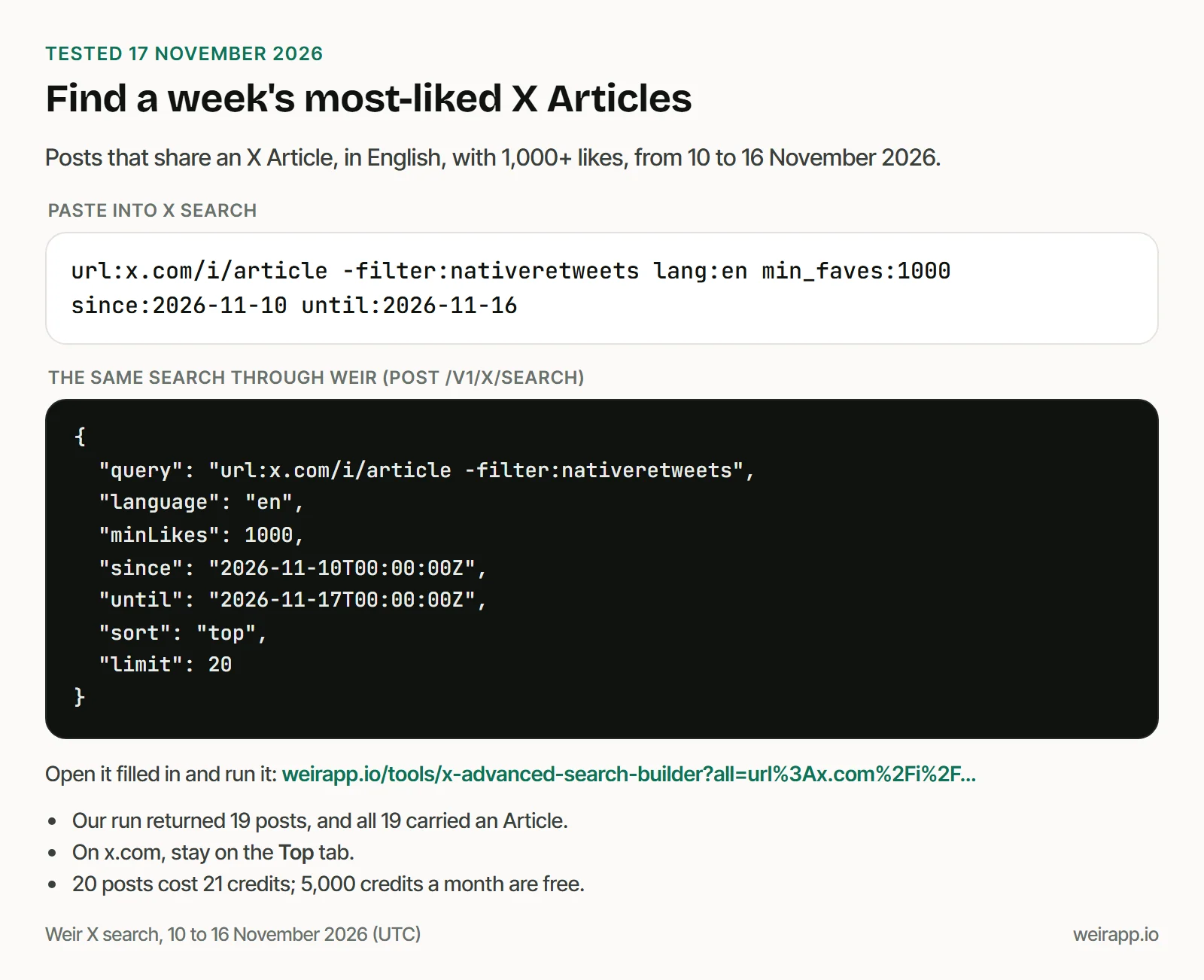
Paste this into X's search box and stay on Top:
url:x.com/i/article -filter:nativeretweets lang:en min_faves:1000 since:2026-11-10 until:2026-11-16- Pick a searchPopular, one author, or one day.
- Open it filled inRun it on X, or in our builder.
- Rank what comes backBy likes, views or bookmarks.
- Keep the bestSave each as a PDF or Markdown.
Where do Articles live on X?
Articles sit on their authors' profiles and in your saved posts, but X documents no search tab or feed just for them.
We don't log in to X, so this comes from X's help pages and App Store listing, not its menus:
- The author's profile. A new Article goes "live on your profile on the Articles tab," X's help page says.
- The side menu, for writers. Paying subscribers write from "the Articles tab in the side navigation." The page describes no reading feed there.
- Your Bookmarks. X's help page says saved posts open from the "Bookmarks" tab in your menu.
- History on iPhone. X's App Store listing calls it "one unified place for your bookmarks, likes, videos, and articles."
- Not in search tabs. X's search help lists Top, Latest, People, Photos, Videos, News and Broadcasts.
So to find Articles from people you don't follow yet, you search.
3 tested searches to find articles on X
Each search starts with url:x.com/i/article, the operator our X Articles API guide first tested. We ran all three through Weir on 17 November 2026.
1. This week's most-liked Articles
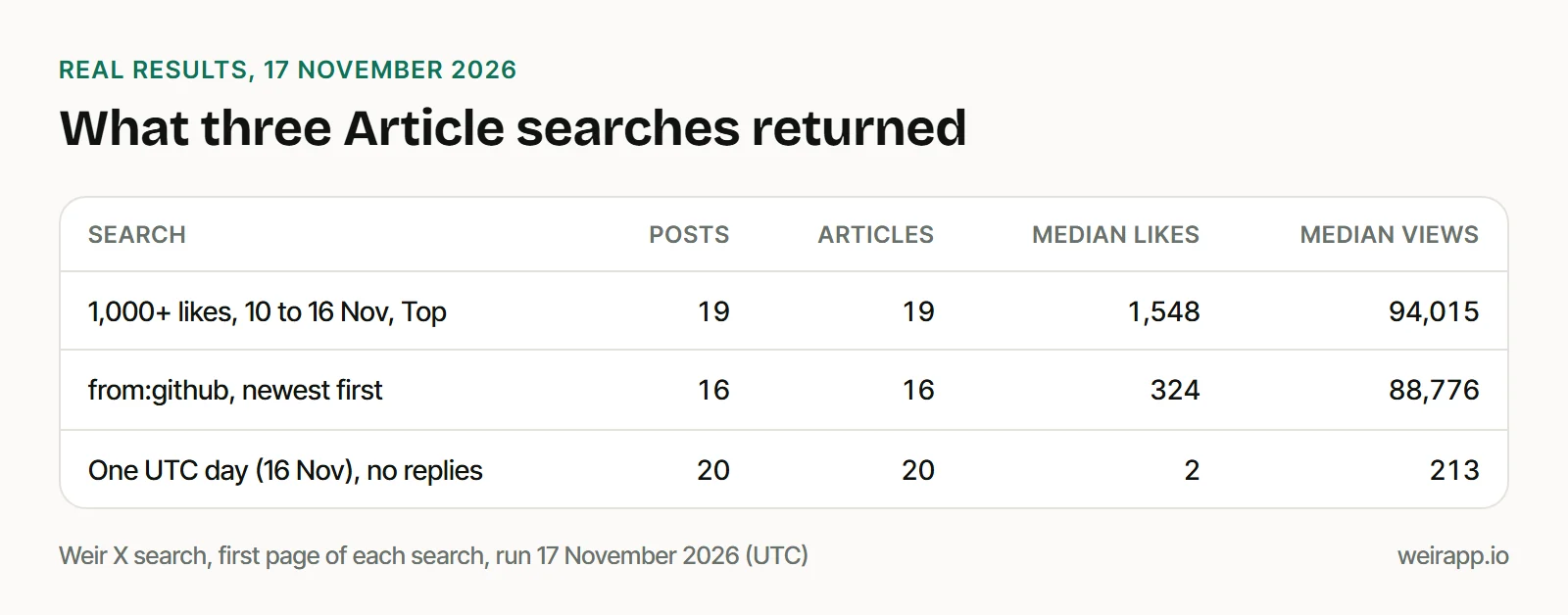
It's the search at the top of this page. Its first page held 19 posts with 1,000+ likes, and every one was an Article. Open it filled in
2. Every Article from one author
Swap in any username. GitHub's account returned 16 Articles from 28 July to 16 November 2026, about one a week.
url:x.com/i/article -filter:nativeretweets from:github3. Articles from one day
Through Weir and our builder's Run it here, since: and until: count whole UTC days, and until: includes its own day. On x.com, the day may follow your own time zone.
url:x.com/i/article -filter:nativeretweets lang:en -filter:replies since:2026-11-16 until:2026-11-16Our first page held 20 Articles, all posted in the last 30 minutes of the day.
Add topic words, too. X matched words from an Article's title that its post never uses. url:x.com/i/article "everything you need to know" found Chrome for Developers' "Modern Web Guidance: Everything You Need to Know."
In our builder, Run it here shows the first 20 posts with a free Weir sign-in, no X account needed. Our guide to X advanced search operators lists more filters, and our X search recipes hold ready searches by goal.
What the searches returned on 17 November 2026
The operator was precise: every one of the 55 posts our three searches returned carried an Article.
What stood out:
- Most Articles get little reach. Of the 20 from 16 November, 11 had 2 likes or fewer.
- AI led the day. It was the topic of 11 of those 20 Articles.
- The popular week leaned to news. Seven of its 19 Articles were news or politics.
- One account can fill a page. A single news account posted 5 of the 19.
How to find the best X Articles: rank them yourself
"Best" depends on what you count, and in our popular week each count picked a different Article:
X's Top tab sorts by none of these. It put a 1,200-like Article first and the most-liked one ninth.
What the counts told us:
- Guides get saved. All three tech and AI Articles had more bookmarks than likes.
- News gets shared, not saved. The seven news Articles drew 2 to 18 bookmarks per 100 likes, but the most reposts.
- Roundups lag. GitHub's four monthly Ship Logs drew fewer than 45 bookmarks each. Its most-saved Article, a Copilot workflow guide, drew 3,017.
So sort by bookmarks to find Articles worth reading, and by reposts to see what spread.
With Weir connected to Claude or ChatGPT, paste this to rank a week for you:
Search X for url:x.com/i/article -filter:nativeretweets lang:en min_faves:1000 from the last 7 days. Rank the Articles by bookmarks, then by views, with each title, link and count.We ran the same search over Weir's MCP server, and Chrome for Developers' guide topped the bookmarks. Over the API, sort on bookmarkCount, viewCount or likeCount.
Save or read the Articles you find
Found a keeper? Our free X Article to PDF tool shows it as a clean page and saves it as a PDF, Markdown or text. Our guide to saving an X Article as a PDF covers X's own options and Kindle.
A search page of 20 posts costs 21 credits; 5,000 credits a month are free; $5 buys 25,000. One Article in the tool costs 2.
When not to use Weir
- You follow the authors already. Their profiles' Articles tabs and your Bookmarks are free.
- You want X's own picks for you. Weir reads public posts, not your For You timeline.
- You need subscriber-only Articles. Weir reads public data only.
- You want every Article ever posted. A page holds about 20 posts, so a big window takes many pages.
Weir is not affiliated with X, so access can change.
FAQ
How do I search articles on X?
Type url:x.com/i/article into X's search box, then add words, from:username or min_faves:1000. In our tests on 17 November 2026, every result carried an Article. X also matched words from an Article's title that its post never used.
How do I find saved articles on X?
Open Bookmarks from X's menu. X's help page says your saved posts live there, and an Article you saved is a post too. On iPhone, X's History tab also gathers "bookmarks, likes, videos, and articles."
How do I find trending articles on X?
Search url:x.com/i/article min_faves:1000 with since: set to a week ago, and stay on Top. For 10 to 16 November, our first page held 19 Articles. Raise the number for fewer, bigger hits.
What are the best X Articles?
There is no official list. Rank a search's results yourself by bookmarks, views or likes, since each picked a different winner in our test. Bookmarks point to guides people keep; reposts point to news people share.
Does X still have Top Articles?
That Premium feature listed the web links most shared in your network, not X Articles. The latest Wayback copy of its help page dates from October 2025, and X's Premium help page of 14 November 2026 doesn't mention it.
Sources
Checked 17 November 2026. help.x.com answered us with a 403, so X's help pages are Wayback copies, dated:
- X Help Center, Articles (15 November 2026), Bookmarks (20 October 2026) and search (20 October 2026): https://help.x.com/en/using-x/articles, https://help.x.com/en/using-x/bookmarks and https://help.x.com/en/using-x/x-search
- X Help Center, Top Articles (13 October 2025) and X Premium (14 November 2026): https://help.x.com/en/using-x/top-articles and https://help.x.com/en/using-x/x-premium
- X on the App Store, History tab: https://apps.apple.com/us/app/x/id333903271
- Weir searchX reference: https://docs.weirapp.io/reference/x/searchX
- Our Weir X searches, 17 November 2026: 4 calls, 60 credits