How to Archive a Twitter Account and Keep It Updated (2026)
X's own archive covers only your account. To archive any public Twitter account, save its posts month by month, add new ones, and log deletions.
Weir Team
Published · Updated · 7 min read
To archive a Twitter account, request the official download if it's yours, and save any other public account's posts yourself, month by month.
It's for you if you need a lasting record of an organisation's or a public figure's posts on X (Twitter), as a journalist, researcher or agency. We run Weir, the API in the script, and tested it on @XDevelopers.
One request saves a month of posts:
curl -X POST https://api.weirapp.io/v1/x/search \
  -H "Authorization: Bearer $WEIR_API_KEY" -H "Content-Type: application/json" \
  -d '{"fromUsers": ["XDevelopers"], "query": "-filter:nativeretweets", "limit": 100,
"since": "2026-10-01T00:00:00Z", "until": "2026-11-01T00:00:00Z"}'- Back up by monthOne search window a month.
- Keep it currentRe-run the script, or add a monitor.
- Log deletionsRe-check saved ids; gone ones are free.
Can you archive someone else's Twitter account?
Not with X's tools. X's Help Center calls its archive "a snapshot of your X information," which the owner requests in Settings after a code check.
It "may take a few days" to prepare, and our guide to opening your X archive covers the rest. For anyone else's public account, you have three routes:
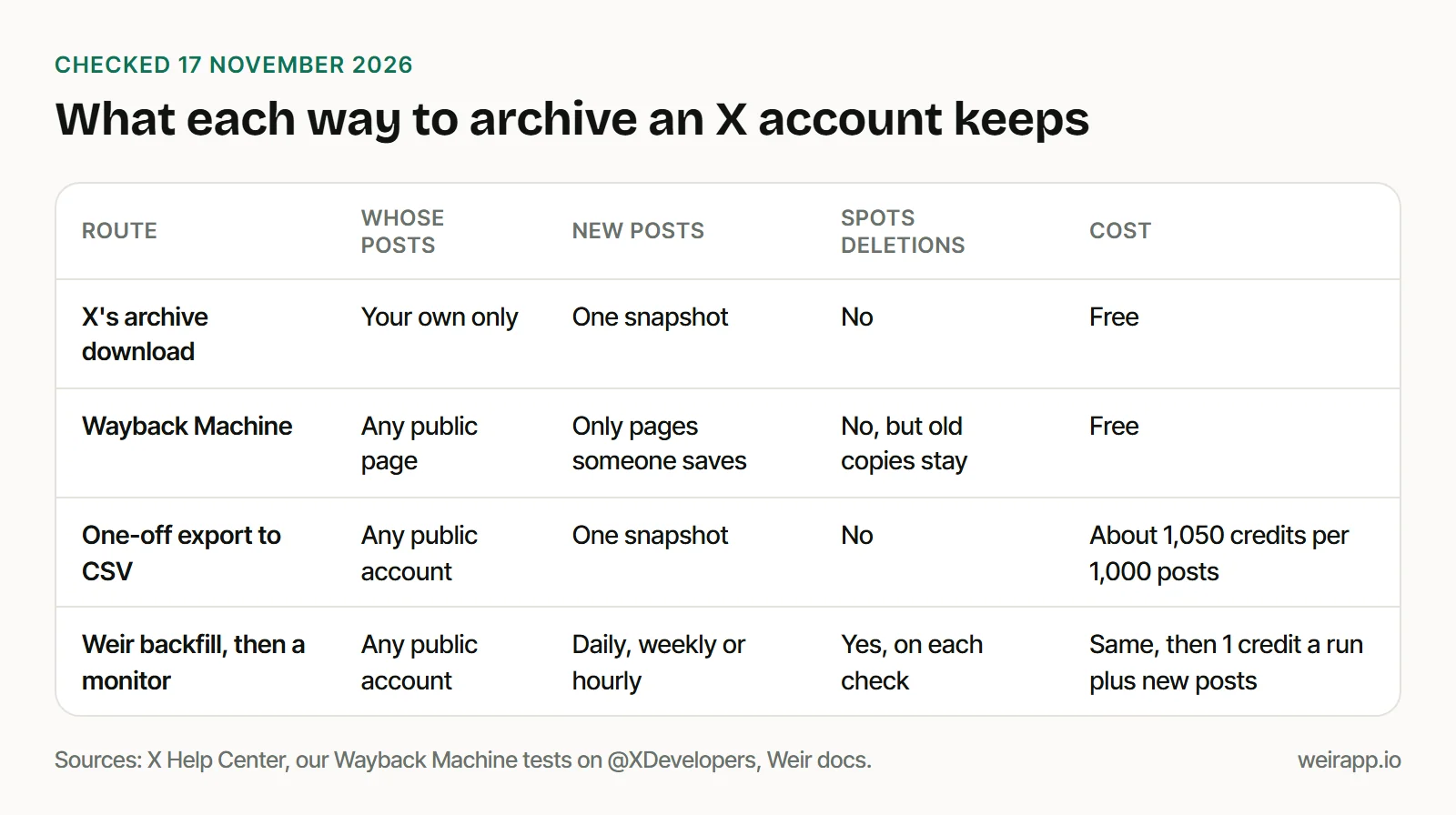
A one-off export, like our script that downloads all tweets from a user, suits one report. A record you cite for months also needs new posts and deletions.
Wayback Machine for Twitter: what it saved of X in 2026
The Wayback Machine keeps free public copies you can cite. Here's what it held for @XDevelopers, X's developer account, on 17 November 2026:
| What we looked for | What the Wayback Machine had |
|---|---|
| The profile page | A December 2025 copy: bio, no posts |
| Its 9 October posts, twitter.com links | All 9, as raw data with 0 or 1 like |
| The same posts at x.com links | None |
| Its one November post | None |
| A new copy with Save Page Now | Refused for x.com and twitter.com too |
Each October copy is stamped with its post's own time and shows near-zero counts: the 27 October post reads 0 likes there, while our run read 995.
Save Page Now, the button for a new copy, promises "a permanent URL." For X links it told us: "We're currently facing some limitations when it comes to archiving this site."
So treat it as a bonus, not your archive. For copies of posts that are gone, see how to see deleted tweets.
Step 1: Back up the account month by month
Save the four blocks below, in order, as archive_x.py. The first makes every call and waits when Weir says it's busy.
import datetime as dt, json, os, sys, time, urllib.error, urllib.request
API = "https://api.weirapp.io/v1"
HEADERS = {"Authorization": "Bearer " + os.environ["WEIR_API_KEY"], "Content-Type": "application/json"}

def call(path, body=None, retry=True):
    time.sleep(float(os.environ.get("WEIR_PAUSE", 4)))  # free tier: 15 searches a minute
    data = json.dumps(body).encode() if body else None
    try:
        with urllib.request.urlopen(urllib.request.Request(API + path, data, HEADERS), timeout=90) as r:
            return json.load(r), int(r.headers["x-credits-charged"])
    except urllib.error.HTTPError as e:
        if retry and e.code in (429, 503, 504):  # busy: wait, then try once more
            time.sleep(int(e.headers.get("Retry-After", "30")))
            return call(path, body, retry=False)
        raise  # a 402 means out of credits: stop
Each month is one search window. Keep the body the same on every page, until included: a cursor is tied to its exact query, and Weir answers 400 to a changed one.
def save_month(user, since, until, seen, store):
    body = {"fromUsers": [user], "query": "-filter:nativeretweets", "limit": 100,
            "since": f"{since}T00:00:00Z", "until": f"{until}T00:00:00Z"}  # same for every page
    before, credits = len(seen), 0
    for _ in range(100):  # page cap
        page, charged = call("/x/search", body)
        fresh = [p for p in page["data"] if p["id"] not in seen]
        with open(store, "a", encoding="utf-8") as f:
            f.writelines(json.dumps(p, ensure_ascii=False) + "\n" for p in fresh)
        seen.update(p["id"] for p in fresh)
        credits += charged
        body["cursor"] = page["meta"]["nextCursor"]
        if not body["cursor"]:
            return len(seen) - before, credits, True
    return len(seen) - before, credits, False
-filter:nativeretweets drops plain reposts. You keep the account's own posts, quotes and replies.
Step 2: Resume where it stopped
The main loop walks from the month you name up to today:
user, arg = sys.argv[1], sys.argv[2]  # "XDevelopers 2026-01" or "XDevelopers check"
store, done_file = f"{user}.jsonl", f"{user}.done"
open(store, "a").close()  # first run: create it
seen = {json.loads(line)["id"] for line in open(store, encoding="utf-8")}
done = open(done_file).read().split() if os.path.exists(done_file) else []
today = dt.datetime.now(dt.timezone.utc).date()
month = None if arg == "check" else dt.date.fromisoformat(arg + "-01")
while month and month <= today:
    nxt = (month + dt.timedelta(days=31)).replace(day=1)
    if f"{month:%Y-%m}" not in done:
        new, credits, complete = save_month(user, month, nxt, seen, store)
        print(f"{month:%Y-%m}: {new} new posts, {credits} credits")
        if complete and nxt <= today:  # finished: skip it next time
            open(done_file, "a").write(f"{month:%Y-%m}\n")
    month = nxt
Finished months go into the .done file and are skipped next time. You re-read only the current month, and no id is saved twice.
What it cost to archive @XDevelopers
We ran it on 17 November 2026 for October and 1 to 17 November:
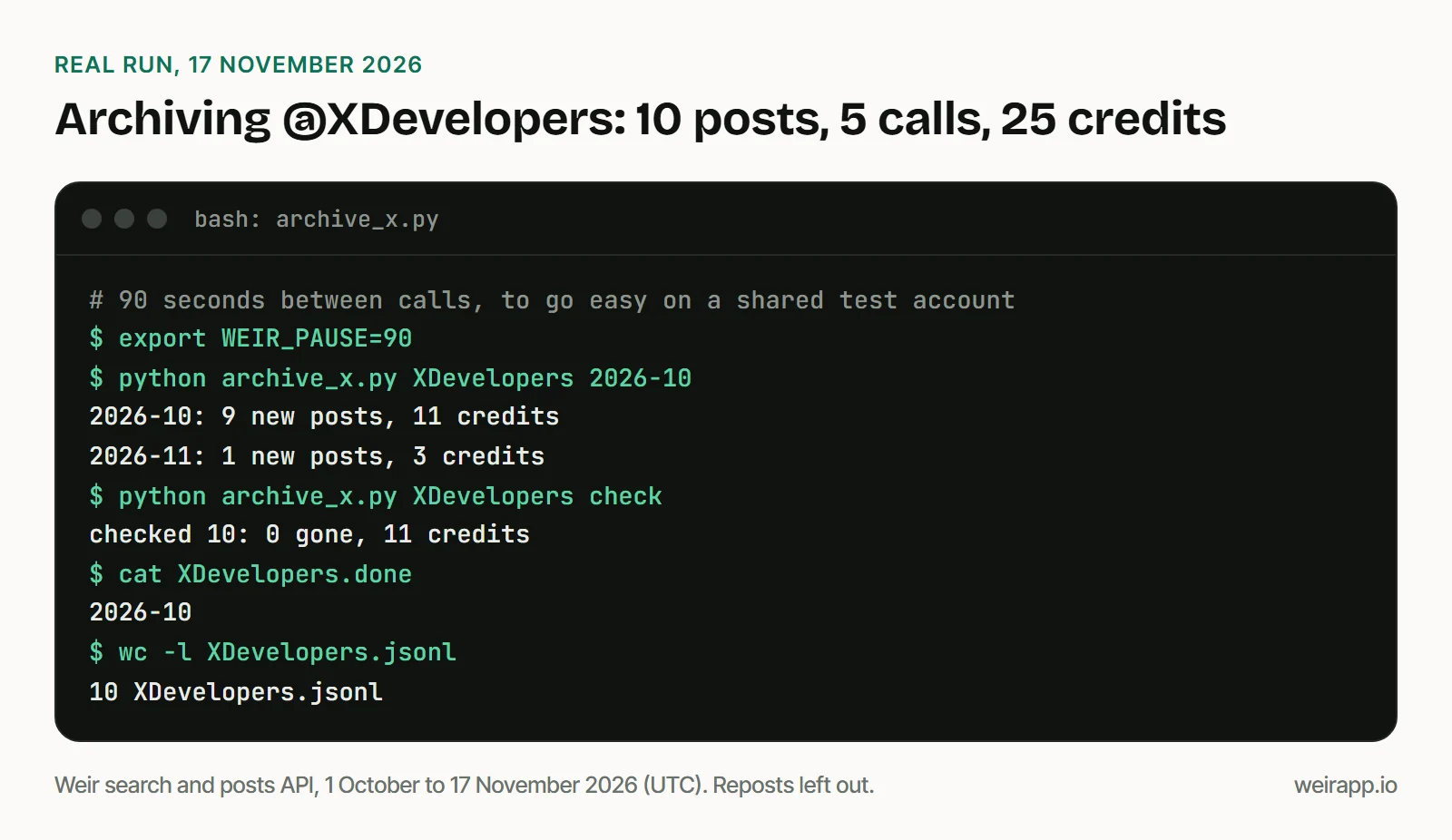
You pay 1 credit a call plus 1 per post. A month that fits one page takes two calls, as the last page comes back empty.
Our 9 October posts matched every own post among the Wayback Machine's 15 October copies. Its other 6 were reposts.
For a busy account, 1,000 posts cost about 1,050 credits; 5,000 credits a month are free; $5 buys 25,000.
Step 3: Keep the Twitter archive updated
There are two ways to add new posts:
- Re-run the script daily or weekly with cron or Task Scheduler. Each run pays again for the current month's posts.
- Add an x_user monitor. It follows the account's numeric id, so a new handle doesn't break it. It sends new posts to your webhook for 1 credit a run plus 1 per post, as our monitor tutorial shows.
The monitor reads the timeline, so you get posts and reposts but no replies. On the free tier you get one monitor, daily or weekly; any purchase from $5 adds hourly runs.
Our free Twitter account monitor sets one up without code. A run reads about 20 posts, so busy accounts need hourly.
Monitors don't send email, but you can route the webhook through Zapier, or fill a sheet with our Google Sheets script.
Step 4: Log deleted posts with a re-check
The last block asks whether your 100 newest saved posts are still public:
if arg == "check":  # re-check the newest 100 saved posts
    ids = sorted(seen, key=int)[-100:]
    page, credits = call("/x/posts?ids=" + ",".join(ids))
    gone = page["meta"]["notFound"]
    with open(f"{user}.gone", "a") as f:
        f.writelines(f"{dt.datetime.now(dt.timezone.utc):%Y-%m-%dT%H:%MZ} {i}\n" for i in gone)
    print(f"checked {len(ids)}: {len(gone)} gone, {credits} credits")
Run python archive_x.py XDevelopers check. Ours checked 10 posts, found none gone and cost 11 credits. You pay nothing for gone ids and 1 credit for each post still up.
notFound means "not public now": deleted, suspended, protected or withheld. If every id vanishes at once, look up the account: Weir answers 404 with details.reason: "suspended" for a suspended one, free.
Is it legal to archive someone's tweets?
It depends on who you are and what you do with the copy. X's Terms of Service, effective 9 October 2026, say "you cannot scrape the Services without X's express written permission." Weir reads public posts only.
- Organisations and brands fit best: a company, an agency, a regulator, a client.
- Public figures and officials fit when the record serves reporting or research.
- Private people never do. Weir's acceptable use policy bans using it to "track, monitor, or build profiles of specific individuals" without a lawful basis.
Mind privacy when you publish from your archive: an organisation's replies can name private people.
When not to use Weir
- It's your own account. X's download is free and holds your DMs and media too.
- You need legal hold. Weir isn't a compliance archive; products for regulated firms sell legal hold and signed exports.
- You need the page as people saw it. Use the Wayback Machine or a screenshot.
- The account is protected. You can't read protected posts by any route here.
FAQ
How do I view archived tweets on the Wayback Machine?
Put web.archive.org/web/*/ in front of the post's link, and try the twitter.com form as well as x.com. In our test, recent copies sat only under twitter.com, with near-zero counts.
Can I archive a suspended Twitter account?
Not once it's suspended: Weir answers 404, and only the owner can download X's archive. Only copies saved earlier survive, so start before you need them.
How do I search a tweet archive?
Each line of the .jsonl file is one post, so you can search it all with grep -i "pay-per-use" XDevelopers.jsonl. Ours found the 2 October post on free API credits. For your own X archive, use our free archive viewer.
Sources
All checked 17 November 2026; X's help page through its Wayback copy of 3 November.
- X archive help: https://help.x.com/en/managing-your-account/how-to-download-your-x-archive
- X Terms of Service: https://x.com/en/tos
- X Developer Policy: https://docs.x.com/developer-terms/policy
- Internet Archive, Save Page Now help: https://help.archive.org/help/save-pages-in-the-wayback-machine/
- Wayback Machine CDX index: https://web.archive.org/cdx/search/cdx?url=twitter.com/XDevelopers/status/&matchType=prefix
- Save Page Now, tried at 22:29 UTC: https://web.archive.org/save
- Compliance archiving guides: https://blog.pagefreezer.com/how-to-archive-twitter-account and https://jatheon.com/?p=4523
- Weir docs: https://docs.weirapp.io/reference/x/searchX, https://docs.weirapp.io/reference/x/getXPosts, https://docs.weirapp.io/monitors and https://docs.weirapp.io/billing
- Weir acceptable use policy: https://weirapp.io/acceptable-use
- Our run on @XDevelopers: 5 calls, 25 credits