How to Report Harassment on Twitter and Keep Evidence
Report harassment on Twitter (X) in 2026: the steps for posts, accounts and DMs, what evidence to save first, and where to turn if X doesn't act.
Weir Team
Published · Updated · 7 min read
To report harassment on Twitter, tap the more icon on the post or profile, choose Report, and say who the abuse targets.
It's for anyone targeted on X (Twitter), or helping someone who is. Steps were checked on 26 November 2026.
To list what one account sent you, paste this into X's search with both usernames, then tap Latest:
from:theirname (to:yourname OR @yourname)Our free Twitter harassment log runs that search for you. It saves up to 100 public posts one account sent to or about you, with links and UTC times, as a CSV. The other account isn't notified. We run Weir, the API behind it.
- Stay safeIn danger? Call the police first.
- Save the evidenceLinks, post IDs, UTC times, screenshots.
- Report to XFrom the post, profile or message.
- Block or muteOnce your evidence is saved.
Step 1: If you're in danger, call the police first
If you believe you're in physical danger, X's help page says to "contact the local law enforcement authorities." In the UK, Report Harmful Content says to dial 999.
If you go to the police, X suggests you bring:
- Print-outs or screenshots of the messages.
- Why you're worried, as specifically as you can.
- Context on who might be involved, and any earlier threats.
After you report a threatening post, X offers a copy for the police. Click Email report on the "We have received your report" screen.
Step 2: Save the evidence before you report or block
Save first, because posts can vanish. The author can delete them, and X can remove them or suspend the account.
Reporting and blocking change your view too. X swaps each post you report for a notice you can click through. Blocking hides the account's posts on its profile.
Keep these for each post:
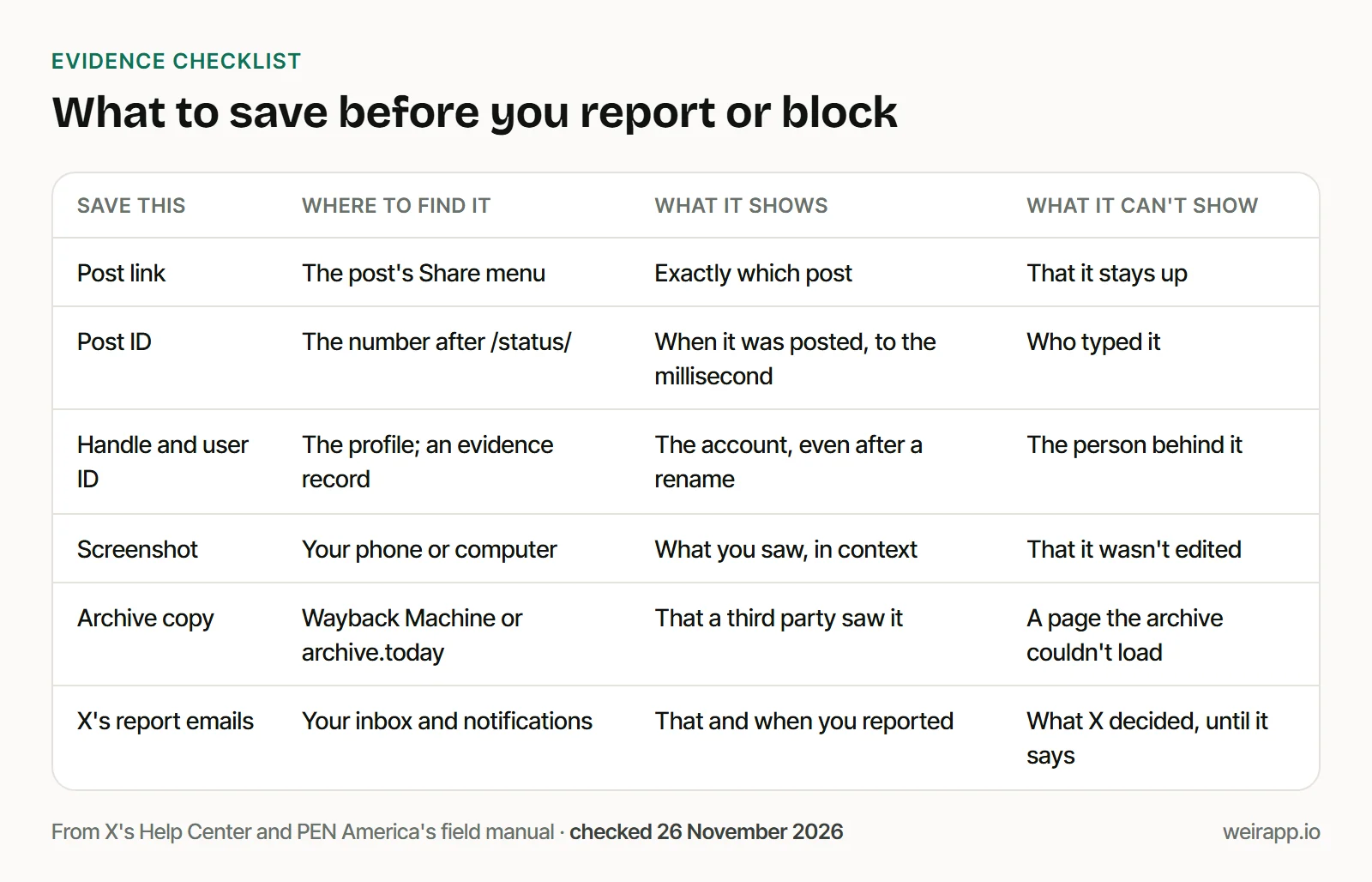
Three free tools do the slow parts:
- The Twitter harassment log lists the newest 100 posts one account aimed at you. You sign in to Weir, not X, so your blocks and mutes don't apply to it.
- Save a tweet as evidence records one post's IDs, UTC time, text and counts, with a PDF and archive links, for about 2 credits.
- Tweet ID to date reads the posting time from a post link, in your browser, with no sign-in.
PEN America's harassment field manual adds two tips. Save everything relevant, "not just the evidence that paints you in a favorable light." And if it hurts to read, ask "a trusted confidant" to help.
A full log uses about 105 credits. The free plan gives you 5,000 credits a month, and $5 buys 25,000 more.
Step 3: How to report harassment on Twitter
You can report harassment on X wherever it happens. "Anyone can report abusive behavior directly from a post, profile, or Direct Message," X says.
- A post: tap its more icon, choose Report, then pick who it's for: "Myself", "Someone else or a specific group of people" or "Everyone on X".
- How to report a Twitter account: open the profile, tap the more icon, choose Report and follow the same steps.
- A message: in the app, tap and hold it, then choose Report message. For the whole chat, tap the info icon, then Report @username.
X then asks what happened, and it "may also ask you to select additional posts from the account." Your log shows which ones to pick.
X quotes reported posts in its follow-up emails. To stop seeing them, uncheck "Updates about this report can show these posts" before you send.
A confirmation "may take up to 24 hours," X says. If a rule was broken, X acts, "ranging from a warning to permanently suspending the account."
How to report a tweet for doxxing
Sharing your private details without consent breaks X's private information policy, which calls it doxxing. That covers a home address, ID documents, private phone numbers, money or health details, and unmasking an anonymous user.
Report the post from its more icon, or pick "Private content is being posted" on X's form. Anyone can report it when details were shared "in a clearly abusive way," X says. Otherwise, X may need to hear from you or your lawyer.
Keep your saved copy private, since it holds your details. Never repost or quote the post.
Someone posing as you is impersonation, a separate report: see finding and reporting impersonator accounts.
Step 4: Block, mute or limit replies once it's saved
Each setting stops something different, per recent copies of X's Help Center:
| Setting | What it does | What it doesn't do |
|---|---|---|
| Block | Stops follows, replies and DMs | Hide your public posts |
| Mute | Hides their posts; they aren't told | Stop their DMs |
| Muted words | Hides posts with that word | Hide them from search |
| Who can reply | Limits who replies to your post | Stop quote posts |
| Protected posts | Shows posts to followers only | Remove existing followers |
A blocked account sees the block if it visits your profile. You can still report an account that has blocked you, X says. You can't report its posts, though, if they're protected and you don't follow it.
We couldn't find a current X help page for Safety Mode. Its old address returned "not found" in every Wayback Machine copy from June to December 2025.
What your evidence proves, and what it doesn't
To show the fields, we saved an ordinary post from X's own @Safety account on 26 November 2026, as a neutral example.
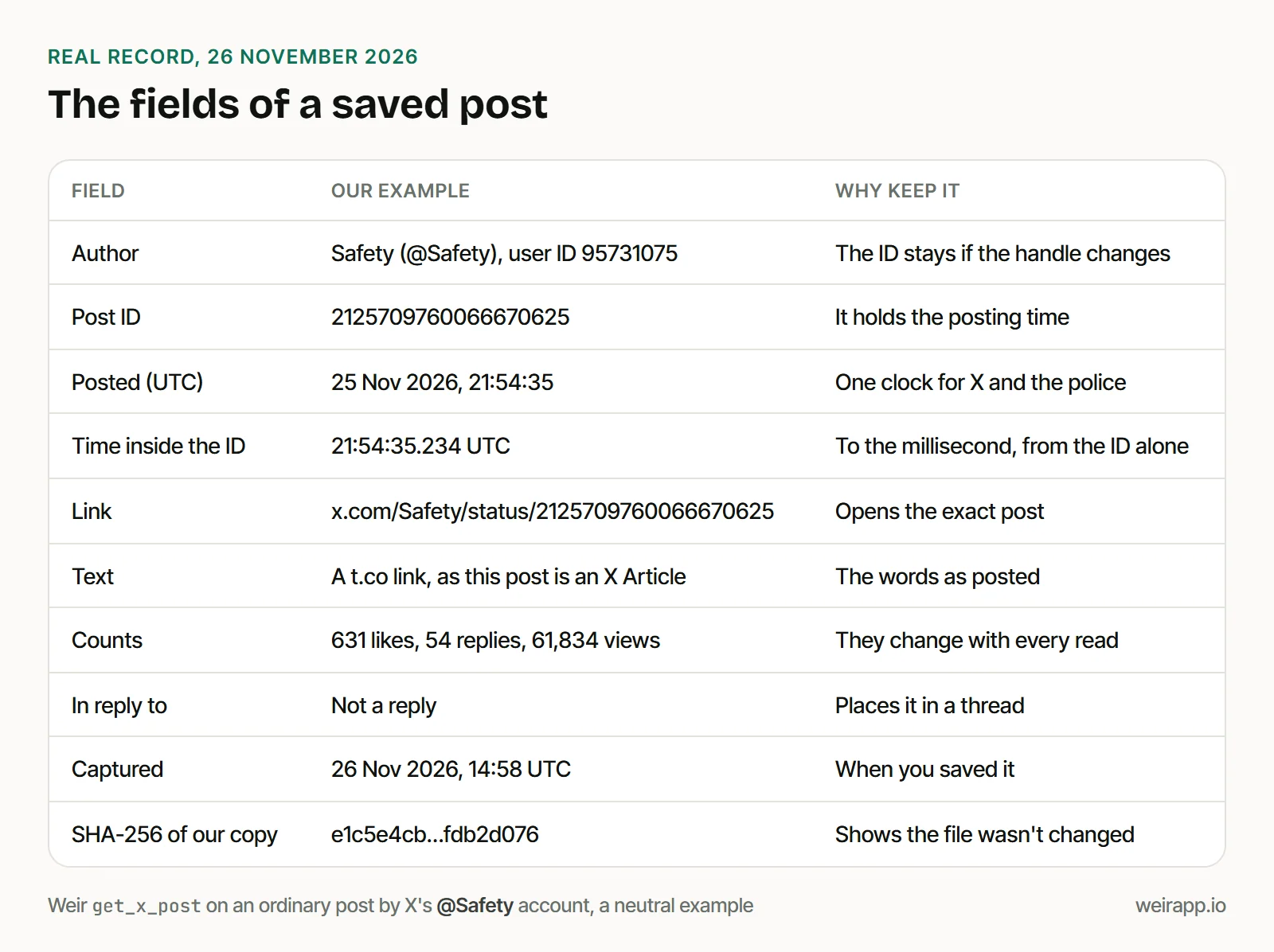
Counts move, so lean on the link and IDs. To prove your file wasn't changed, hash it and note the value, as our guide to archiving a tweet shows.
The log is a search, and searches can miss posts, so a gap proves nothing. If someone calls your screenshot fake, the link, ID and an archive copy answer them. See how to tell if a tweet is fake.
What a court or the police accept depends on where you live. This isn't legal advice, so ask a lawyer or the police what format they want.
If X doesn't act on your report
You have options outside X:
- UK: Report Harmful Content. Run by SWGfL with the UK Safer Internet Centre, it reviews harassment reports about Twitter and other sites. You must have reported to the platform "at least 48 hours ago."
- US, if it's taking a toll: 988. Call or text 988 for the Suicide & Crisis Lifeline, which "is available 24/7/365," free and confidential.
- US, intimate images: CCRI. The Cyber Civil Rights Initiative's helpline, 844-878-2274, helps victims of nonconsensual intimate images and sextortion, day and night. X's form also has a "US Take It Down Act Report" choice.
If it keeps happening, the log's "Get new matches as alerts" link opens a filled-in Weir monitor for the same search. A free account gets one daily monitor, with alerts in a private Discord, Slack or Telegram channel. A $5 pack allows hourly.
When not to use Weir
- You're in danger now. Call the police; the log can wait.
- It's in your DMs. Weir reads public posts only, so screenshot DMs and report them in X.
- The posts are gone or protected. Weir can't read deleted posts or protected accounts.
- You need a certified capture. Weir makes a data record, not a forensic one.
Weir is not affiliated with X, so access can change.
FAQ
What is the Twitter harassment policy?
X's "Abuse and harassment" policy dates from March 2024. It says: "You may not target others with abuse or harassment, or encourage other people to do so." It covers targeted harassment, insults, unwanted sexual content and calls to harass. Penalties range from making a post less visible to suspending the account.
Is there an X report abuse form?
Yes. X says "You can also use our form to report abusive behavior." One choice on the report abuse form is "An account is harassing me or someone else." Another is "An account is threatening violence or physical harm."
Can X tell me who is behind an account?
Not directly. X says it "does not release account information except as required by valid legal process." The police or a lawyer can make that request.
Sources
Checked 26 November 2026 (UTC). help.x.com refused us, so X's pages are dated Wayback copies.
- X rules and reporting: https://help.x.com/en/safety-and-security/report-abusive-behavior (13 Nov), https://help.x.com/en/safety-and-security/cyber-bullying-and-online-abuse (7 Oct), https://help.x.com/en/rules-and-policies/abusive-behavior (21 Oct), https://help.x.com/en/rules-and-policies/personal-information (15 Nov), https://help.x.com/en/forms/safety-and-sensitive-content/abuse (15 Nov)
- X settings: https://help.x.com/en/using-x/blocking-and-unblocking-accounts (16 Nov), https://help.x.com/en/using-x/x-mute (13 Nov), https://help.x.com/en/using-x/advanced-x-mute-options (31 Oct), https://help.x.com/en/using-x/x-conversations (18 Oct), https://help.x.com/en/safety-and-security/public-and-protected-posts (16 Nov)
- Safety Mode captures: https://web.archive.org/cdx/search/cdx?url=help.x.com/en/safety-and-security/safety-mode
- Live: https://reportharmfulcontent.com/report/, https://988lifeline.org/
- Wayback, as both refused us: https://cybercivilrights.org/ccri-crisis-helpline/ (14 Nov), https://onlineharassmentfieldmanual.pen.org/documenting-online-harassment/ (13 Nov)
- Weir: two calls, 6 credits, on https://x.com/Safety/status/2125709760066670625; https://docs.weirapp.io/monitors